Introducció
This manual provides essential information for the proper setup, operation, and maintenance of your Hitachi Touro Desk Dx3 2TB External Hard Drive. Please read these instructions carefully before using the device to ensure optimal performance and longevity.
Contingut del paquet
Verifiqueu que tots els elements siguin presents al paquet:
- Hitachi Touro Desk Dx3 2TB External Hard Drive
- Cable de dades USB 3.0
- AC Power Adapter (EURO plug)
- Guia d'inici ràpid (si s'inclou)
Producte acabatview
The Hitachi Touro Desk Dx3 is a 2TB external desktop hard drive designed for reliable data storage and backup. It features a stylish, stackable design and SuperSpeed USB 3.0 connectivity for fast data transfers, while also being backwards compatible with USB 2.0.

Figura 1: Davant view of the Hitachi Touro Desk Dx3. This image displays the sleek, black, vertically ribbed casing of the external hard drive. A small, rectangular indicator light is visible towards the bottom center of the front panel, signifying power or activity status.
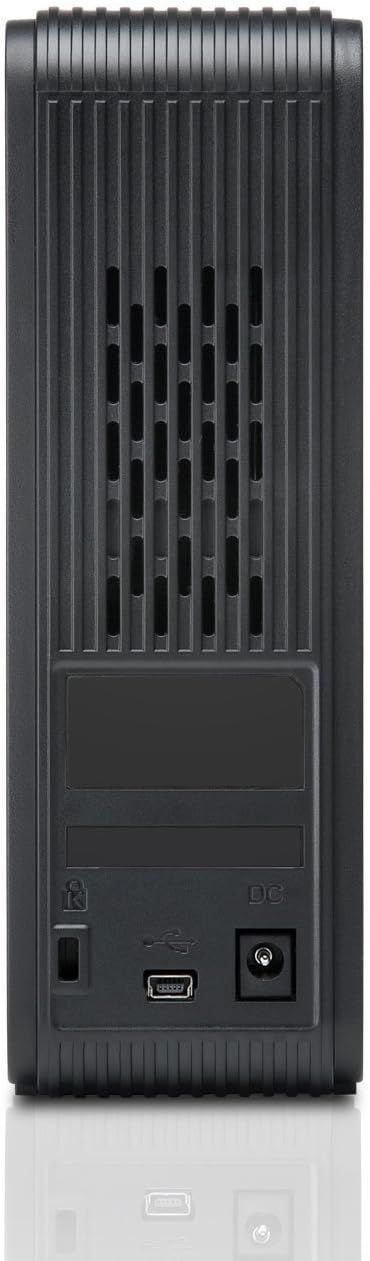
Figura 2: Enrere view of the Hitachi Touro Desk Dx3. This image shows the rear panel of the hard drive, which includes the DC power input port on the right, the USB 3.0 data port in the center, and a security lock slot on the left. Ventilation grilles are visible across the top portion of the back panel.
Configuració
Follow these steps to set up your external hard drive:
- Connecteu l'adaptador de corrent: Plug the AC power adapter into the DC power input port on the back of the Touro Desk Dx3. Then, plug the other end of the power adapter into a wall outlet. The drive will power on automatically.
- Connecteu el cable USB: Connect one end of the supplied USB 3.0 data cable to the USB port on the back of the Touro Desk Dx3. Connect the other end of the USB cable to an available USB port on your computer. For optimal performance, use a USB 3.0 port.
- Reconeixement del sistema operatiu: Your computer's operating system (Windows or macOS) should automatically detect and install the necessary drivers for the hard drive. The drive will appear as a new storage device in 'My Computer' (Windows) or 'Finder' (macOS).
- Initial Formatting (Optional): The drive comes pre-formatted. If you wish to reformat the drive or partition it, refer to your operating system's disk management tools. Note: Reformatting will erase all data on the drive.
En funcionament
Once connected, your Touro Desk Dx3 is ready for use.
- Transferència de dades: Arrossegueu i deixeu anar files or folders to and from the Touro Desk Dx3 icon on your desktop or in your file explorer. The USB 3.0 interface allows for rapid data transfer speeds.
- Còpia de seguretat: Use your operating system's built-in backup utilities or third-party software to create backups of your important files on the external drive.
- Eliminació segura: Always safely eject the hard drive before disconnecting it from your computer. In Windows, right-click the drive icon in the system tray and select 'Eject'. In macOS, drag the drive icon to the Trash or click the Eject button next to the drive in Finder. This prevents data corruption.
Manteniment
Proper maintenance ensures the longevity of your device.
- Neteja: Use a soft, dry, lint-free cloth to clean the exterior of the drive. Do not use liquid cleaners or aerosols.
- Condicions ambientals: Store and operate the drive in a cool, dry environment, away from direct sunlight, extreme temperatures, and high humidity. Avoid placing the drive near strong magnetic fields.
- Manipulació física: Handle the drive with care. Avoid dropping it or subjecting it to strong impacts, as this can damage the internal components.
Resolució de problemes
Si teniu problemes, consulteu les solucions habituals següents:
- Unitat no reconeguda:
- Ensure the power adapter is securely connected to both the drive and a working power outlet.
- Verify the USB cable is firmly connected to both the drive and your computer. Try a different USB port or cable.
- Reinicieu l'ordinador.
- Check Disk Management (Windows) or Disk Utility (macOS) to see if the drive is detected but not assigned a drive letter or mounted.
- Velocitats de transferència lentes:
- Ensure you are connected to a USB 3.0 port on your computer for SuperSpeed performance. USB 2.0 ports will operate at slower speeds.
- Eviteu transferir moltes petites files simultaneously; large files transfer more efficiently.
- Close other applications that might be using system resources or the USB bus.
- Drive Light Not On:
- Check the power adapter connection to the drive and the wall outlet.
- Proveu una presa de corrent diferent.
Especificacions
| Capacitat d'emmagatzematge digital | 2 TB |
| Interfície de disc dur | USB 3.0 |
| Tecnologia de connectivitat | USB |
| Marca | Hitachi |
| Factor de forma del disc dur | 3.5 polzades |
| Dispositius compatibles | Ordinadors d'escriptori |
| Tipus d'instal·lació | Taula |
| Color | Negre |
Informació de la garantia
This product is covered by a limited warranty. For detailed information regarding warranty terms, conditions, and duration, please refer to the warranty card included in your product packaging or visit the official Hitachi support weblloc web. Conserveu el comprovant de compra per a reclamacions de garantia.
Atenció al client
For further assistance, technical support, or to inquire about service, please visit the official Hitachi support weblloc web o poseu-vos en contacte amb el seu departament d'atenció al client. Normalment, podeu trobar la informació de contacte al fabricant weblloc o a la documentació del producte.


