Introducció
This manual provides essential instructions for the safe and effective operation of your Vivitar 20.1 MP Digital Camera, model VXX14. Please read this manual thoroughly before using the camera and retain it for future reference.
The Vivitar VXX14 is designed to capture high-resolution photos and videos. Key features include a 20.1-megapixel sensor, 4x digital zoom, and a 1.8-inch rotating preview screen for versatile shooting angles.
Producte acabatview
Familiarize yourself with the components of your Vivitar VXX14 digital camera.
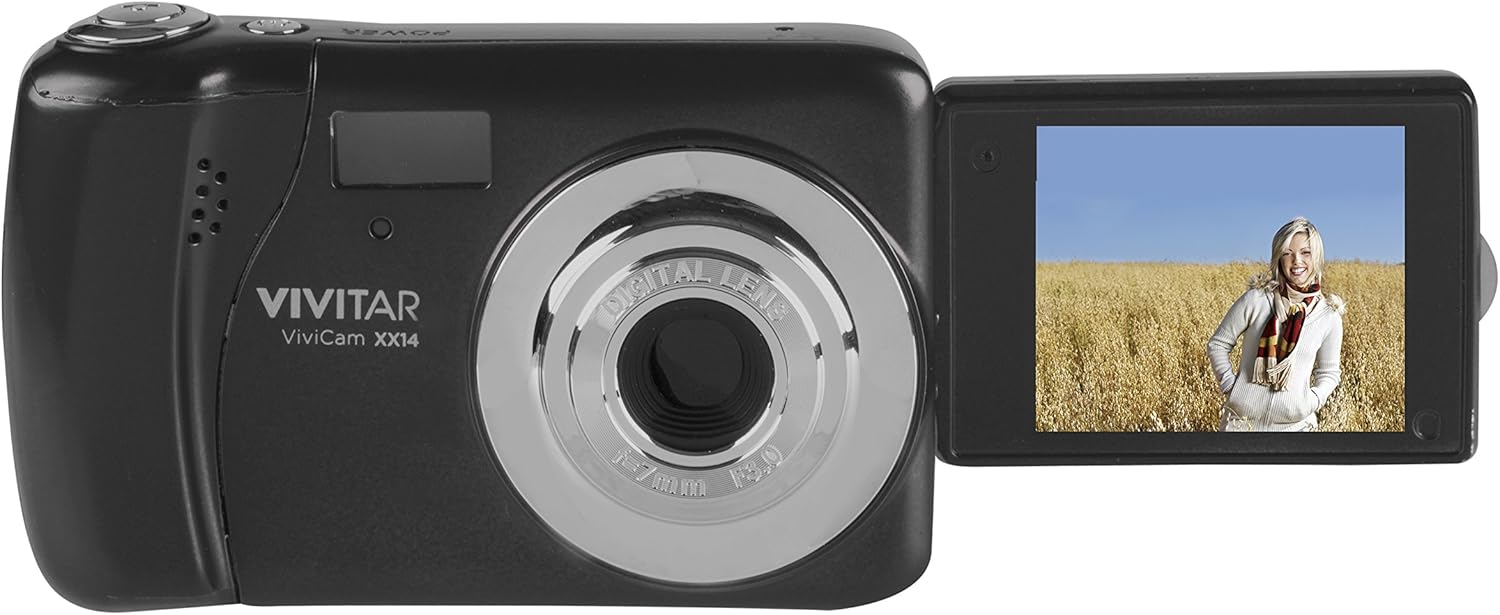
Imatge 1: Vivitar VXX14 Digital Camera, black, with its 1.8-inch LCD screen rotated outwards, displaying a live view. The camera body shows the lens, flash, and Vivitar branding.
Components de la càmera:
- Lent: Captura imatges i vídeo.
- Flash: Proporciona il·luminació en condicions de poca llum.
- Pantalla LCD d'1.8 polzades: Mostra en directe view, menus, and playback. Rotates 180 degrees.
- Botó de l'obturador: Premeu per fer fotos.
- Botó d'encesa: Encén o apaga la càmera.
- Mode Dial/Buttons: Selects shooting modes (e.g., Photo, Video, Playback).
- Directional Pad/Navigation Buttons: Navigates menus and settings.
- Compartiment de la bateria: Holds 3 AAA batteries (not included).
- Ranura per a targeta SD: For inserting an SD/SDHC/SDXC memory card (not included).
- Port USB: Per connectar-se a un ordinador per transferir dades.
Configuració
1. Instal·lació de bateries
The Vivitar VXX14 requires 3 AAA batteries for operation. Batteries are not included with the camera.
- Locate the battery compartment cover on the camera.
- Feu lliscar o aixequeu la tapa per obrir-la.
- Insert 3 fresh AAA batteries, ensuring correct polarity (+/-) as indicated inside the compartment.
- Tanqueu la tapa del compartiment de la bateria de manera segura fins que encaixi al seu lloc.
Nota: Use alkaline or rechargeable AAA batteries. Remove batteries if the camera will not be used for an extended period.
2. Inserció d'una targeta de memòria
A memory card (SD/SDHC/SDXC) is required to store photos and videos. A memory card is not included with the camera.
- Localitza la ranura per a targetes SD al lateral de la càmera.
- Obriu la tapa de la ranura.
- Insert the memory card with the metal contacts facing the correct direction (refer to the diagram near the slot).
- Empènyer suaument la targeta fins que encaixi al seu lloc.
- Tanqueu la tapa de la ranura de la targeta SD.
Nota: Ensure the memory card is not write-protected. Format new memory cards in the camera before first use (refer to the "Operating" section for formatting instructions).
Instruccions de funcionament
1. Encès / apagat
- Per encendre: premeu i manteniu premut el botó Poder botó.
- Per apagar: premeu i manteniu premut el botó Poder botó de nou.
2. Fer fotos
- Turn on the camera. The LCD screen will display the live view.
- Frame your shot using the 1.8-inch LCD screen. You can rotate the screen for selfie mode.
- Premeu el botó Obturador button halfway down to focus.
- Premeu el botó Obturador button fully to capture the image.
Temporitzador automàtic: To activate the self-timer, navigate through the camera's menu settings to find the timer option (e.g., 2s, 10s). Select your desired delay before pressing the shutter button.
3. Gravació de vídeos
- Enceneu la càmera.
- Switch to video mode (if applicable, via a mode button or menu option).
- Premeu el botó Obturador button to start recording. A timer or indicator will appear on the screen.
- Premeu el botó Obturador botó de nou per aturar la gravació.
Videos are recorded in AVI format.
4. Mode de reproducció
- A view captured photos and videos, switch to playback mode.
- Feu servir els botons de direcció per navegar pels vostres continguts multimèdia.
- Premeu el botó D'acord/Enter botó per view a video or zoom into a photo.
5. Configuració del menú
Access the camera's menu to adjust various settings such as:
- Resolució: Adjust photo and video quality.
- Mode de flaix: Auto, Fill-in, Red-eye reduction, Off.
- Balanç de blancs: Auto, Daylight, Cloudy, Fluorescent, Tungsten.
- Compensació de l’exposició: Ajusta la brillantor.
- Formatting SD Card: Erases all data on the memory card. Use with caution.
- Data/Hora: Estableix la data i l'hora actuals.
Refer to the on-screen prompts and the camera's navigation buttons to make selections.
Manteniment
Neteja de la càmera
- Feu servir un drap suau i sec per netejar el cos de la càmera.
- Per a la lent i la pantalla LCD, feu servir un drap i una solució especials per netejar lents. Eviteu materials abrasius.
- Do not use organic solvents or strong chemicals.
Emmagatzematge
- Guardeu la càmera en un lloc fresc i sec, allunyat de la llum solar directa i de temperatures extremes.
- Traieu les piles si no heu d'utilitzar la càmera durant un període prolongat per evitar fuites.
Resolució de problemes
| Problema | Causa possible | Solució |
|---|---|---|
| La càmera no s'encén. |
|
|
| No es poden fer fotos/vídeos. |
|
|
| Les imatges són borroses. |
|
|
| La bateria s'esgota ràpidament. |
|
|
Especificacions
| Nom del model | VXX14 |
| Resolució de fixes efectius | 20.1 MP |
| Zoom digital | 4x |
| Mida de la pantalla | 1.8 inches (LCD) |
| Resolució de vídeo | HD 720p |
| Format de captura de vídeo | AVI |
| Imatge File Format | JPEG, RAW |
| Mitjans d'emmagatzematge | SD/SDHC/SDXC Card (not included) |
| Tipus de bateria | 3 piles AAA (no incloses) |
| Estabilització d'imatge | Digital |
| Característiques especials | 180-degree rotating screen, Self-Timer |
Garantia i Suport
For warranty information or technical support, please refer to the official Vivitar weblloc web o poseu-vos en contacte amb el seu departament d'atenció al client. Conserveu el rebut de compra com a comprovant de compra per a reclamacions de garantia.
Fabricant: Sakar International, Inc.
Marca: Vivitar
Model: VXX14


