Introducció
This manual provides essential information for the safe and effective use of your Sony Cyber-shot DSC-WX50 digital camera. Please read it thoroughly before operating the camera and retain it for future reference. The DSC-WX50 is a compact digital camera featuring a 16.2 MP Exmor R CMOS sensor, 5x optical zoom, and Full HD 1080/60i video recording capabilities.
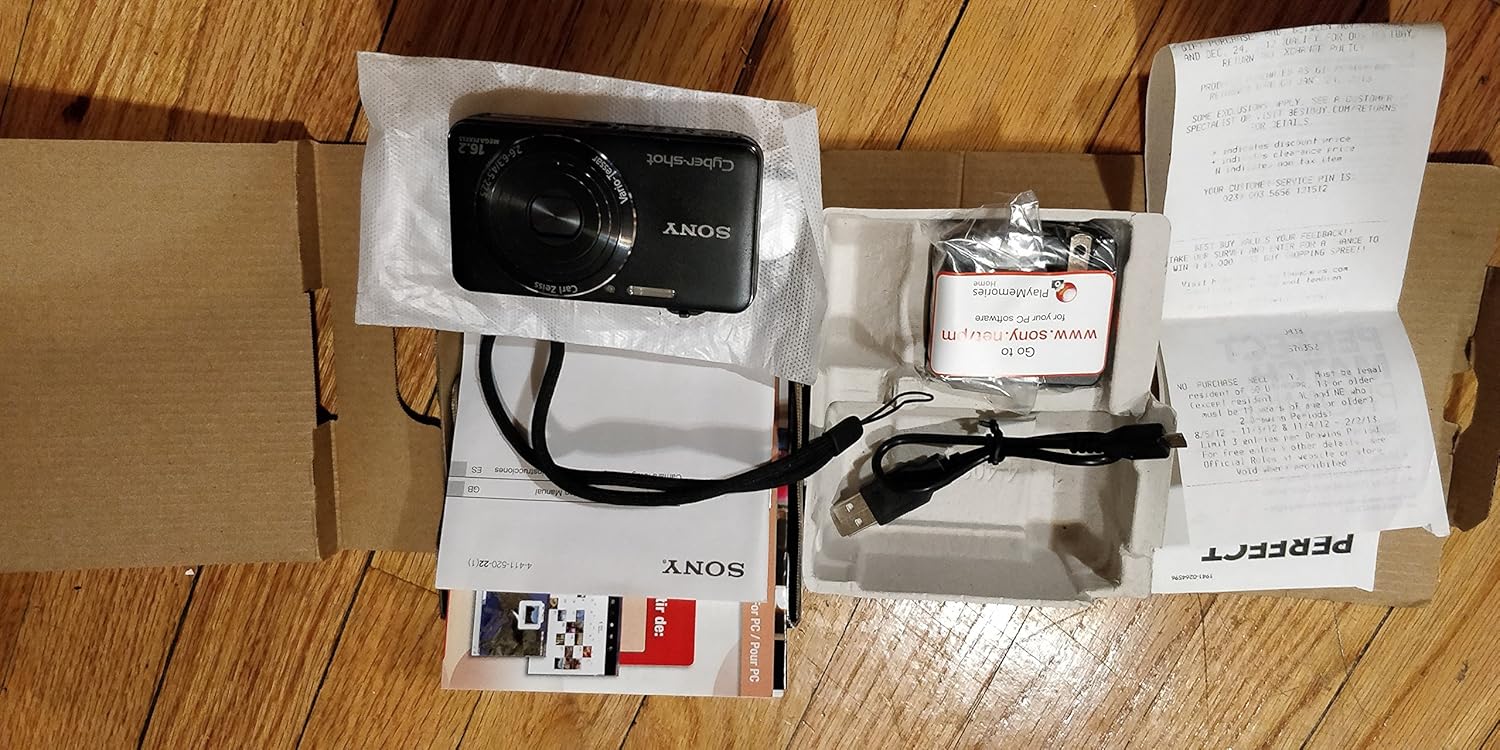
Què hi ha a la caixa
Carefully unpack your camera and ensure all items are present. The standard package contents include:
- Sony Cyber-shot DSC-WX50 Digital Camera
- Paquet de bateries recarregables
- Adaptador de CA
- Cable de connexió USB
- Corretja de canell
- Manuals d'instruccions i documentació
- HDMI Cable (Built-in Media)

Image: All contents of the Sony Cyber-shot DSC-WX50 package, including the camera, cables, and documentation, laid out.

Imatge: Un tancador view of the included accessories, such as the charger and USB cable, within their packaging.
Configuració
1. Carregant la bateria
Before first use, fully charge the supplied battery pack. Connect the camera to the AC adaptor using the USB cable, then plug the AC adaptor into a wall outlet. The charge lamp s'il·luminarà durant la càrrega i s'apagarà quan s'hagi completat.
2. Inserció de la bateria i la targeta de memòria
Open the battery/memory card cover on the bottom of the camera. Insert the charged battery pack firmly until it locks into place. Insert a compatible memory card (SD/SDHC/SDXC or Memory Stick Duo/Pro Duo/Pro-HG Duo) into the memory card slot until it clicks. Close the cover securely.

Imatge: Frontal view of the Sony Cyber-shot DSC-WX50 camera, showing the lens and flash.
3. Configuració inicial
Quan engegueu la càmera per primera vegada, se us demanarà que configureu la data, l'hora i la zona horària. Seguiu les instruccions que apareixen a la pantalla per completar aquesta configuració.
Funcionament de la càmera
Encès/Apagat
Premeu el botó PODER botó per encendre o apagar la càmera. L'objectiu s'estendrà quan s'engegui.
Basic Still Image Shooting (Intelligent Auto Mode)
- Enceneu la càmera.
- Estableix el dial de mode a Automòbil intel·ligent (green camera icon).
- Frame your subject on the 2.7-inch LCD screen.
- Premeu el botó de l'obturador fins a la meitat per enfocar. L'indicador d'enfocament es tornarà verd quan s'hagi aconseguit l'enfocament.
- Premeu el botó de l'obturador completament per fer la foto.
Imatge: Part posterior view of the Sony Cyber-shot DSC-WX50, highlighting the 2.7-inch LCD screen and control buttons.
Funció de zoom
Use the zoom lever around the shutter button to adjust the focal length. The camera features 5x optical zoom and Clear Image Zoom for enhanced magnification without significant quality loss.
Video Recording (Full HD 1080/60i)
To record movies, press the dedicated PEL·lícula button. Press it again to stop recording. The camera supports Full HD 1080/60i video in AVCHD format, allowing for high-quality video capture with Optical SteadyShot Active Mode for reduced blur.
Special Shooting Modes and Features
- Mode automàtic superior: Automatically detects 33 scenes and optimizes settings for dynamic pictures with reduced noise and improved clarity.
- Intelligent Sweep Panorama HR: Capture wide panoramic images by sweeping the camera. The camera stitches multiple frames automatically.
- 3D Still Image & 3D Sweep Panorama: Create 3D images for viewen pantalles 3D compatibles.
- Efecte d'imatge: Apply creative filters to your photos, such as Toy Camera, Pop Color, Partial Color, and more.
- Desenfocament de fons: Blurs the background to emphasize your subject, similar to DSLR effects.
- Mode de pell suau: Millora els retrats reduint l'aparició de taques i arrugues.
- Face Detection & Smile Shutter: Automatically detects faces and can trigger the shutter when a smile is detected.
- Funció anti-parpelleig: Helps prevent photos with subjects blinking by capturing multiple shots.
- Flaix natural: Corregeix els colors per obtenir imatges més realistes quan s'utilitza el flaix.
- Detecció de moviment: Ajusta l'ISO i la velocitat d'obturació per reduir el desenfocament en subjectes en moviment.
- Mode d'escombrat multiangle: Captures 15 images at different angles to create a 3D-like view a la pantalla LCD de la càmera quan està inclinada.
Manteniment
Neteja de la càmera
- Cos de la càmera: Netegeu amb un drap suau i sec. Per a la brutícia persistent, utilitzeu un drap lleugerament humit.ampesbandiu amb aigua o un detergent suau i després eixugueu-ho.
- Lent: Feu servir un raspall de lents per eliminar la pols i, a continuació, netegeu suaument amb un drap de neteja de lents. Eviteu tocar la superfície de la lent amb els dits.
- Pantalla LCD: Netegeu suaument amb un drap suau i sec. Eviteu pressionar fort la pantalla.
Cura de la bateria
Per allargar la durada de la bateria, eviteu exposar-la a temperatures extremes. Guardeu la bateria en un lloc fresc i sec quan no la feu servir. Si no heu d'utilitzar la càmera durant un període prolongat, traieu-ne la bateria.
Cura de la targeta de memòria
Always format new memory cards in the camera before first use. Avoid removing the memory card while the camera is writing data (indicated by a flashing access lamp) to prevent data corruption.
Resolució de problemes
Si teniu problemes amb la càmera, consulteu les solucions habituals següents:
| Problema | Solució |
|---|---|
| La càmera no s'encén. |
|
| "Writing to Memory card was incomplete" error. |
|
| Les imatges són borroses. |
|
| El flaix no es dispara. |
|
For further assistance, please contact Sony customer support.
Especificacions
| Característica | Detall |
|---|---|
| Resolució de fixes efectius | 16.2 MP |
| Tecnologia del sensor fotogràfic | CMOS BSI |
| Zoom òptic | 5x |
| Zoom digital | 20x |
| Mida de la pantalla | 2.7 polzades |
| Tipus de visualització | LCD |
| Estabilització d'imatge | SteadyShot òptic |
| Resolució de vídeo | Full HD 1080p (1080/60i AVCHD) |
| Admet File Format | JPEG (Exif 2.3), 3D: MPF, Video: MPEG-4, AVCHD |
| Compatibilitat amb targetes de memòria | SD/SDHC/SDXC, Memory Stick Duo/Pro Duo/Pro-HG Duo |
| Connectivitat | HDMI, USB |
| Distància focal mínima | 25 mil·límetres |
| Distància focal màxima | 125 mil·límetres |
| Apertura màxima | f/6.3 |
| Velocitat d'obturació mínima | 4 segons |
| Velocitat màxima d'obturació | 1/1600 segons |
| Pes de l'article | 0.26 lliures |
Garantia i Suport
Per obtenir informació sobre la garantia i l'assistència al client, consulteu la documentació inclosa amb el producte o visiteu el lloc web oficial d'assistència de Sony. weblloc web. Conserveu el comprovant de compra per a reclamacions de garantia.
Suport oficial de Sony: www.sony.com/electronics/support