1. Introducció
This manual provides instructions for the OM SYSTEM OLYMPUS SZ-12 14MP Digital Camera. The SZ-12 is an ultra-compact long zoom camera designed for capturing high-quality photos and videos. It features a powerful 24x optical zoom, 3D Photo Mode, and various creative Magic Art Filters.
For optimal performance and to ensure safe operation, please read this manual thoroughly before using the camera and keep it for future reference.
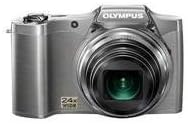
Figura 1: Frontal view of the Olympus SZ-12 Digital Camera in silver.
2. Configuració
2.1. Instal·lació de la bateria
The camera requires one Lithium Metal battery (included). To install the battery:
- Localitzeu la tapa del compartiment de la bateria a la part inferior de la càmera.
- Feu lliscar el pestell per obrir la coberta.
- Insert the battery according to the polarity indicators (+/-) inside the compartment.
- Tanqueu la tapa del compartiment de la bateria de manera segura fins que encaixi al seu lloc.
2.2. Memory Card Insertion (Sold Separately)
The camera uses SD/SDHC/SDXC memory cards. To insert a memory card:
- Obriu la tapa del compartiment de la bateria/targeta de memòria.
- Insert the memory card into the slot with the label facing the correct direction (usually towards the front of the camera). Push gently until it clicks into place.
- Tanqueu la tapa del compartiment.
2.3. Càrrega inicial
Before first use, ensure the battery is fully charged. Connect the camera to a power source using the supplied USB cable and AC adapter. The charging indicator will show the charging status.
3. Funcionament de la càmera
3.1. Encendre/apagar
Premeu el botó PODER botó situat a la part superior de la càmera per encendre-la o apagar-la.
3.2. Fotografia bàsica
Per fer una foto:
- Enceneu la càmera.
- Enquadra la teva foto amb la pantalla LCD de 3 polzades.
- Premeu el botó de l'obturador fins a la meitat per enfocar. El marc d'enfocament es tornarà verd quan s'hagi aconseguit enfocar.
- Premeu el botó de l'obturador fins al fons per capturar la imatge.
3.3. Funció de zoom
The camera features a 24x wide-angle optical zoom. Use the zoom lever around the shutter button to adjust the focal length. Push the lever towards W per a preses de gran angular i cap a T per a fotografies amb teleobjectiu (zoom d'apropament).
Video 1: Demonstration of Wide Angle Lens Technology and Magic Art Filters. This video highlights the camera's ability to capture broad scenes and apply creative effects directly in-camera.
3.4. HD Video Recording
The SZ-12 supports HD video recording. To start recording, press the dedicated movie record button. Press it again to stop recording. Playback on an HD television is possible via HDMI output (cable sold separately).
3.5. Magic Art Filters
Enhance your photos and videos with various in-camera Magic Art Filters. These filters are applied directly by the camera, eliminating the need for external software or additional editing time. Available filters include Pop Art, Pin Hole, Drawing, Fish Eye, Soft Focus, Punk, Watercolor, Sparkle, Miniature, and Reflection. Note that some filters may restrict the maximum image size.
3.6. Dual Image Stabilization
The camera features Dual Image Stabilization, which combines Sensor-Shift Image Stabilization with high ISO sensitivity and fast shutter speeds. This technology helps to reduce blur and produce crisp, clear images, even in challenging shooting conditions.
3.7. Intelligent Auto Mode
Intelligent Auto mode automatically identifies the scene you are shooting from up to 30 different scene modes (e.g., Portrait, Landscape, Night + Portrait, Macro, Sports). It then adjusts the camera settings for optimal results, simplifying the photography process.
4. Manteniment
4.1. Neteja de la càmera
- Feu servir un drap suau i sense borrissol per netejar el cos de la càmera.
- Per a la lent, feu servir un raspall de lents o un bufador per eliminar la pols i, a continuació, netegeu suaument amb un drap de neteja de lents. Eviteu tocar la superfície de la lent amb els dits.
- No utilitzeu dissolvents orgànics ni agents de neteja forts.
4.2. Cura de la bateria
- Guardeu la bateria en un lloc fresc i sec quan no la feu servir.
- Eviteu descarregar completament la bateria amb freqüència per allargar-ne la vida útil.
- Si no heu d'utilitzar la càmera durant un període prolongat, traieu-ne la bateria.
4.3. Emmagatzematge
Store the camera in a dry, well-ventilated area, away from direct sunlight, high temperatures, and humidity. Use a camera bag to protect it from dust and scratches.
5. Solució De Problemes
| Problema | Causa possible | Solució |
|---|---|---|
| La càmera no s'encén. | La bateria està morta o està inserida incorrectament. | Carregueu la bateria o torneu-la a inserir correctament. |
| Les imatges són borroses. | Camera shake; out of focus. | Hold the camera steady; ensure proper focus before shooting. Utilize Dual Image Stabilization. |
| Error de la targeta de memòria. | La targeta està plena, malmesa o incompatible. | Elimineu-les innecessàries files, formateu la targeta (això esborrarà totes les dades) o proveu una altra targeta compatible. |
6. Especificacions
- Model: SZ-12 Silver
- Megapíxels: 14 MP
- Zoom òptic: 24x Wide-Angle Zoom
- Pantalla LCD: 3 polzades
- Gravació de vídeo: Vídeo HD
- Estabilització d'imatge: Dual Image Stabilization (Sensor-shift)
- Dimensions: 4.17 x 1.57 x 2.72 polzades
- Pes de l'article: 8 unces
- Bateria: 1 bateria de metall de liti (inclosa)
- Admet File Format: JPEG
- Tecnologia del sensor fotogràfic: CMOS
- Relació d'aspecte: 16:9
- Muntatges compatibles: Micro Quatre Terços
- Primera data disponible: 18 de gener de 2012
7. Garantia i Suport
For warranty information and technical support, please refer to the official Olympus weblloc web o poseu-vos en contacte amb el servei d'atenció al client. Conserveu el comprovant de compra per a reclamacions de garantia.
També poden estar disponibles recursos en línia i preguntes freqüents a Botiga Olympus a Amazon.


