Olympus LS-100 Voice Recorder Instruction Manual
Model: LS-100
Introducció
This manual provides detailed instructions for the proper use and maintenance of your Olympus LS-100 Voice Recorder. The LS-100 is designed for high-fidelity audio capture, offering features such as 24-bit/96kHz Linear PCM recording, multi-track capabilities, and versatile input options including XLR with phantom power. Please read this manual thoroughly before operating the device to ensure optimal performance and longevity.
Informació de seguretat
- Seguretat de la bateria: Use only the specified Lithium Ion battery. Do not expose to extreme temperatures or attempt to disassemble.
- Aigua i humitat: Mantingueu el dispositiu allunyat de l'aigua i de la humitat elevada per evitar danys.
- Neteja: Use a soft, dry cloth for cleaning. Avoid liquid cleaners or solvents.
- Eliminació: Dispose of the device and batteries according to local regulations. Do not incinerate.
- Protecció auditiva: Eviteu escoltar a volums elevats durant períodes prolongats per evitar danys auditius.
Contingut del paquet
Verifiqueu que tots els elements siguin presents al paquet:
- Olympus LS-100 Digital Voice Recorder
- Bateria de ions de liti (preinstal·lada o separada)
- Cable USB
- Manual d'instruccions (aquest document)
Identificació de peces
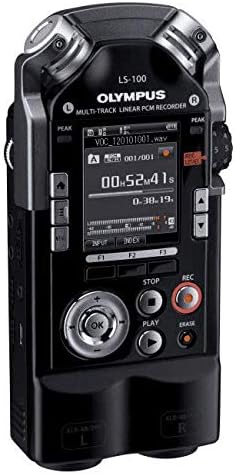
Davant View

Imatge: Frontal view of the Olympus LS-100 Voice Recorder, showing the display, control buttons, and built-in microphones.
- Micròfons estèreo integrats: Left and Right 90-degree directional condenser microphones.
- Pantalla LCD: Shows recording status, menu options, and file informació.
- Peak Level Indicators: LED lights to indicate audio input levels.
- Botó de menú: Accesses the device's settings and options.
- Botons de funció (F1, F2, F3): Botons sensibles al context per a diverses operacions.
- Navigation/OK Button: S'utilitza per a la navegació i selecció de menús.
- Botó d'aturada: Atura la gravació o la reproducció.
- Botó de reproducció: Inicia o posa en pausa la reproducció.
- Botó de gravació: Inicia la gravació.
- Botó d'esborrar: Elimina files.
- REC Level Dial: Adjusts recording input sensitivity.
- XLR/Phantom Power Inputs: Connect external microphones requiring XLR or phantom power.
posterior View
Imatge: Part posterior view of the Olympus LS-100 Voice Recorder, showing the battery compartment and external speaker.
- Compartiment de la bateria: Conté la bateria recarregable de ions de liti.
- Altaveu integrat: For basic audio playback.
- Muntatge de trípode: Standard thread for mounting on a tripod.
Configuració
Instal·lació i càrrega de la bateria
- Localitzeu el compartiment de la bateria a la part posterior del dispositiu.
- Obriu la coberta del compartiment.
- Insert the supplied Lithium Ion battery, ensuring correct polarity.
- Tanqueu bé la tapa del compartiment de la bateria.
- Connect the device to a power source using the supplied USB cable to charge the battery. The charging indicator will illuminate.
Inserció de la targeta SD
- Localitza la ranura per a targetes SD al lateral del dispositiu.
- Insert a compatible SD, SDHC, or SDXC card into the slot until it clicks into place.
- To remove, push the card gently until it ejects.
Encès/Apagat
- Per encendre: Press and hold the power button (usually located on the side) until the display illuminates.
- Per apagar: Manteniu premut el botó d'engegada fins que el dispositiu s'apaga.
Configuració inicial
Upon first power-on, you may be prompted to set the date, time, and language. Use the navigation buttons to select options and the OK button to confirm.
Instruccions de funcionament
Basic Recording (Internal Microphones)
- Assegureu-vos que el dispositiu estigui encès.
- Select your desired recording mode (e.g., PCM, MP3) and quality settings via the Menu.
- Adjust the REC Level dial to set the input sensitivity. Monitor the peak level indicators to avoid distortion.
- Premeu el botó Registre button to begin recording. The recording indicator will illuminate.
- Per aturar la gravació, premeu Registre botó de nou. Premeu-lo una vegada més per reprendre.
- Per aturar la gravació, premeu el botó Atureu-vos botó. El file es desarà automàticament.
Using External Microphones (XLR/Phantom Power)
The LS-100 features two XLR inputs with switchable phantom power for professional external microphones.
- Connect your XLR microphones to the corresponding L and R XLR inputs.
- If your microphones require phantom power, enable it through the device's menu settings.
- Adjust the individual input levels for each XLR channel using the REC Level dial or menu options.
- Proceed with recording as described in the Basic Recording section.
Reproducció
- Navegueu fins al que desitgeu file utilitzant els botons de navegació.
- Premeu el botó Jugar per iniciar la reproducció.
- Use the navigation buttons to fast-forward or rewind during playback.
- Premeu el botó Atureu-vos botó per finalitzar la reproducció.
File Gestió
- Transferència Files: Connect the LS-100 to a computer using the USB cable. The device will appear as a removable storage device, allowing you to drag and drop files.
- S'està suprimint Files: Seleccioneu el file voleu suprimir i premeu la tecla Esborrar button. Confirm the deletion when prompted.
- Organitzant Files: Files are typically saved into folders (e.g., Folder A, Folder B). You can manage these folders and move files within the device's menu.
Multi-Track Recording
The LS-100 supports up to eight tracks for multi-track recording. Refer to the on-screen menu for specific instructions on track layering, mixing, and editing functions.
Funcions especials
- Sintonitzador: An integrated tuner assists musicians with instrument tuning.
- Metrònom: Provides a rhythmic click for practice or recording.
- Lissajous Function: A visual tool for analyzing stereo phase relationships.
Manteniment
- Neteja: Netegeu l'exterior del dispositiu amb un drap suau i sec. No utilitzeu productes de neteja abrasius ni dissolvents.
- Emmagatzematge: Store the recorder in a cool, dry place away from direct sunlight and extreme temperatures. Remove the battery if storing for extended periods.
- Actualitzacions de firmware: Periodically check the Olympus support weblloc web per a les actualitzacions de firmware disponibles per garantir un rendiment òptim i l'accés a noves funcions.
Resolució de problemes
| Problema | Causa possible | Solució |
|---|---|---|
| El dispositiu no s'encén. | La bateria està esgotada o inserida incorrectament. | Carregueu la bateria o torneu-la a inserir correctament. |
| No hi ha so durant la reproducció. | Volume is too low; headphones not connected; file corruptes. | Increase volume; connect headphones; try playing another file. |
| El nivell d'enregistrament és massa baix o distorsionat. | REC Level is set too low/high; microphone issue. | Adjust REC Level; check microphone connections and settings. |
| No es pot desar files a la targeta SD. | SD card is full or write-protected; card error. | Elimineu-les innecessàries files; check write-protect switch; try a different SD card. |
| El dispositiu es bloqueja o deixa de respondre. | Error temporal de programari. | Remove and re-insert the battery to perform a hard reset. |
Especificacions
| Característica | Detall |
|---|---|
| Dimensions del producte | 6.3 x 2.8 x 1.3 polzades |
| Pes de l'article | 9.9 unces (0.28 quilograms) |
| Número de model de l'article | V313020BW000 |
| Bateries | Necessita 1 bateria de ions de liti (inclosa) |
| Fabricant | Olimp |
| Dispositius compatibles | Ordinador personal |
| Interfície del maquinari | Targeta digital segura |
| Factor de forma del micròfon | Integrat |
| Format d'enregistrament | WAV (up to 24 Bit/96 KHZ Linear PCM), MP3 |
| Conector d'auriculars | 3.5 mil·límetres |
| Capacitat d'emmagatzematge de memòria | 4 GB (intern) |
| Mida de la pantalla | 3.5 polzades |
| Micròfons | 90 degree directional, stereo condenser microphones |
| Entrades | XLR/Phantom Power Supply |
| Pistes | Eight Tracks (multi-track recording) |
Garantia i Suport
For warranty information and customer support, please refer to the warranty card included with your product or visit the official Olympus support weblloc web. Conserveu el comprovant de compra per a reclamacions de garantia.
Recursos en línia: For additional support, FAQs, and firmware updates, please visit the Olympus Global Weblloc.


