1. Introducció
1.1 Producte acabatview
The Triton TRA001 is a 3-1/4 HP dual mode precision plunge router designed for woodworking applications. It features a powerful motor capable of 8000 to 21000 RPM, allowing it to handle various materials and tasks. The router can operate in both plunge and fixed-base modes, offering versatility for different routing operations. Key design elements include a single-button mechanism for mode switching, a micro winder for fine depth adjustments, and an automatic spindle lock for simplified bit changes.
1.2 Característiques clau
- Single button switches between conventional plunge and fixed-base router modes with rack and pinion height adjustment.
- Single wrench bit change through the base, facilitated by an automatic spindle lock.
- Micro winder enables continuous fine depth adjustment throughout the full plunge range.
- Soft start and variable speed control for optimal performance across various cutter types.
- Easy-set, direct reading, 3-stage turret for precise preset cut depths.
- Safety switch shutter locks closed in bit change mode to prevent accidental power-on.
- Multi-Function fence provides control for handheld use and circle cutting.
- Removable plunge spring allows for easier bit adjustment when the router is table-mounted.
- Fully enclosed guarding provides protection from the cutting zone.
- Side air vents reduce dust intake into the motor casing when mounted upside-down in a router table.
- Quick access for changing worn motor brushes.
2. Informació de seguretat
Observeu sempre les precaucions de seguretat bàsiques per reduir el risc d'incendi, descàrrega elèctrica i lesions personals quan feu servir eines elèctriques. Llegiu i enteneu totes les instruccions abans d'utilitzar-les.
2.1 Advertències generals de seguretat d'eines elèctriques
- Seguretat de l'àrea de treball: Mantingueu la zona de treball neta i ben il·luminada. Les zones desordenades o fosques conviden als accidents. No feu servir eines elèctriques en atmosferes explosives, com ara en presència de líquids, gasos o pols inflamables.
- Seguretat elèctrica: Power tool plugs must match the outlet. Never modify the plug. Do not abuse the cord. Keep the cord away from heat, oil, sharp edges, or moving parts.
- Seguretat personal: Always wear eye protection. Use hearing protection when operating loud tools. Wear a dust mask if operations create dust. Dress properly; avoid loose clothing or jewelry. Secure long hair.
- Ús i cura de l'eina: No forceu l'eina elèctrica. Feu servir l'eina elèctrica adequada per a la vostra aplicació. Desconnecteu l'endoll de la font d'alimentació abans de fer qualsevol ajust, canviar accessoris o guardar eines elèctriques.
- Manteniment: Mantenir eines elèctriques. Comproveu si hi ha desalineació o enquadernació de peces mòbils, trencaments de peces i qualsevol altra condició que pugui afectar el funcionament de l'eina elèctrica.
2.2 Specific Router Safety Warnings
- Assegureu-vos sempre que la peça de treball estigui ben subjectaamped abans de l'encaminament.
- Use sharp router bits. Dull bits can cause kickback and overheating.
- Ensure the router bit is correctly inserted and tightened in the collet before operation.
- Never start the router with the bit in contact with the workpiece.
- Keep hands clear of the cutting area and rotating bit.
- Always feed the router against the rotation of the bit to prevent the router from running away.
- When routing small workpieces, use a router table or appropriate jigs for safety.
3. Components inclosos
The Triton TRA001 Dual Mode Precision Plunge Router package includes the following items:
- Triton TRA001 Dual Mode Plunge Router
- Multi-Function Fence
- Clau de pinça
- 1/2-inch Collet
- 1/4-inch Collet (reducer)
- Enrotllador d'alçada de taula
4. Configuració
Instal·lació d'4.1 bits
- Ensure the router is disconnected from the power supply.
- Press the spindle lock button. The automatic spindle lock engages when the power switch is closed.
- Insert the desired router bit into the appropriate collet (1/2-inch or 1/4-inch with reducer). Ensure the bit shank is fully seated.
- Use the provided collet wrench to tighten the collet nut securely. Do not overtighten.
- Allibereu el bloqueig del cargol.
4.2 Mode Selection (Plunge vs. Fixed-Base)
The TRA001 features a single button to switch between plunge and fixed-base modes.
- Per participar plunge mode, ensure the router is in the fully raised position, then press the mode selection button. The router will now plunge freely.
- Per participar fixed-base mode, depress the mode selection button while the router is at the desired depth. The rack and pinion system will lock the router at that depth.
4.3 Ajust de profunditat
The router offers multiple methods for depth adjustment:
- Micro Winder: For fine adjustments, use the micro winder knob. This allows for continuous, precise depth changes throughout the plunge range.
- 3-Stage Turret: The easy-set, direct reading 3-stage turret allows for quick setting of precise preset cut depths for stepped routing operations.
- Table-Mounted Adjustment: When mounted in a router table, the included table height winder can be used for above-table bit height adjustments. The removable plunge spring facilitates this process.

Image 1: Triton TRA001 Dual Mode Precision Plunge Router, front view. This image shows the overall design of the router, highlighting its handles, motor housing, and clear base.

Image 2: Triton TRA001 Router with its height adjustment mechanism extended. This view illustrates the plunge mechanism and the depth setting components.
5. Instruccions de funcionament
5.1 Engegada/Apagada i Control de Velocitat
- Connect the router to a suitable power outlet.
- The router features a soft start function, which gradually increases motor speed upon activation, reducing startup torque.
- Use the variable speed dial to select the appropriate RPM for your specific router bit and material. Refer to bit manufacturer recommendations.
- To turn on, press the power switch. To turn off, release or press the switch again, depending on the switch type.
5.2 Tècniques d'encaminament
- Encaminament per immersió: With the router in plunge mode, position the router over the workpiece. Start the motor, then slowly plunge the bit into the material to the desired depth. Guide the router along the cut path.
- Fixed-Base Routing: With the router locked at a fixed depth, start the motor. Carefully bring the rotating bit into contact with the workpiece and guide the router along the desired path.
- Using the Multi-Function Fence: Attach the multi-function fence for straight edge routing or for cutting circles. Adjust the fence to the desired offset from the bit.
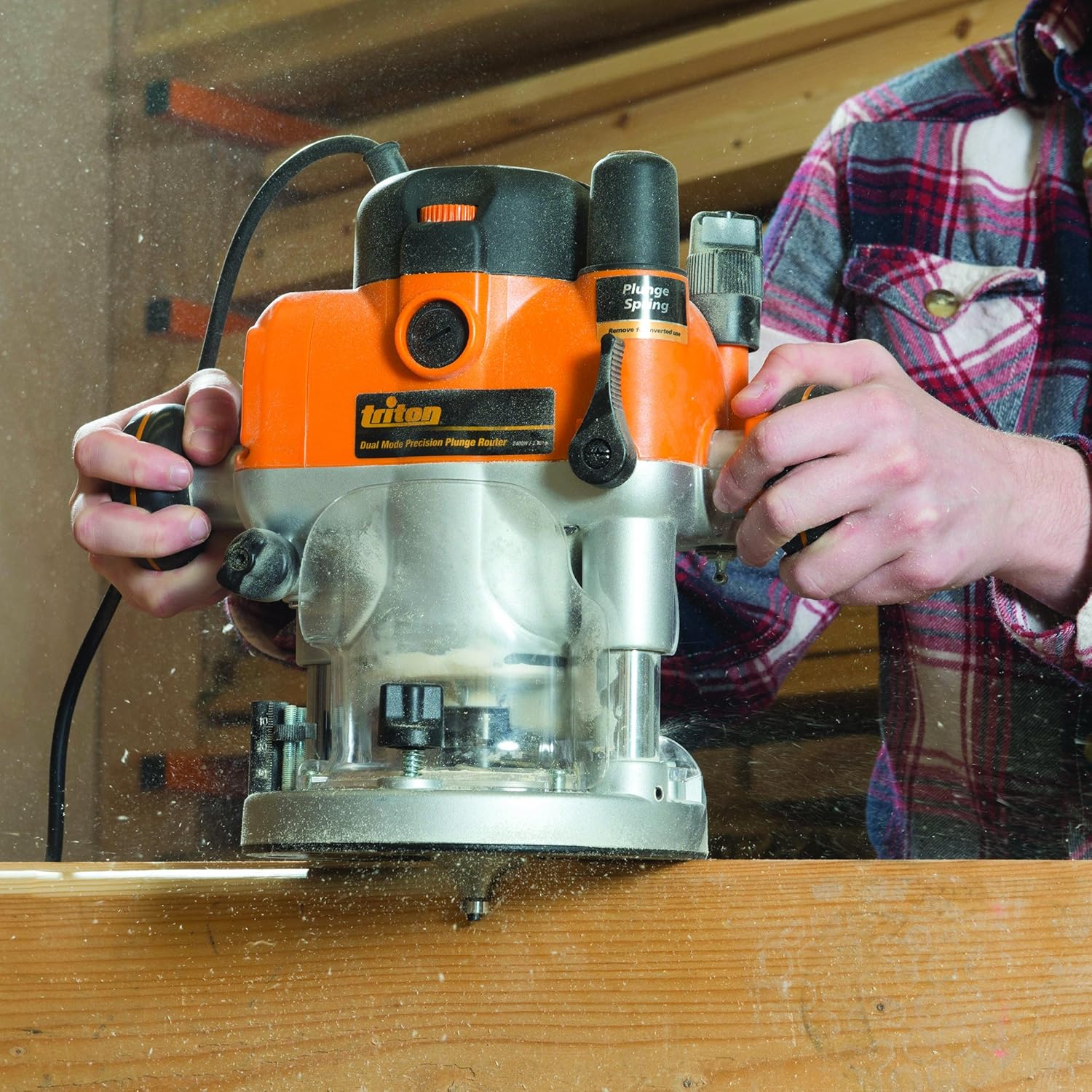
Image 3: A user operating the Triton TRA001 router on a wooden workpiece. This image demonstrates the router in use, highlighting proper hand placement and the dust generated during operation.

Imatge 4: Un primer pla view of a user operating the Triton TRA001 router. This image provides a detailed look at the router's base and the bit engaging with the wood.
5.3 Recollida de pols
The router is equipped with side air vents designed to reduce the intake of dust into the motor casing, particularly when the unit is mounted upside-down in a router table. For optimal dust management, connect a suitable dust extraction system to the router's dust port.
6. Manteniment
Regular maintenance ensures the longevity and safe operation of your Triton TRA001 router.
6.1 Neteja
- Always disconnect the router from the power supply before cleaning.
- Use a soft brush or compressed air to remove dust and debris from the motor vents and around the collet area.
- Wipe down the exterior of the router with a clean, damp tela. No utilitzeu productes químics o dissolvents aggressivs.
6.2 Substitució de les escombretes de carbó
The router features quick access points for carbon brush replacement. Refer to the specific instructions in the full manufacturer's manual for the correct procedure and replacement brush type. Worn brushes can lead to reduced performance or motor damage.
6.3 Inspecció general
- Periodically inspect the power cord for damage. If damaged, have it replaced by a qualified technician.
- Comproveu que tots els cargols i elements de fixació estiguin ben ajustats.
- Ensure the plunge mechanism operates smoothly and is free of debris.
7. Solució De Problemes
Aquesta secció tracta problemes comuns que podeu trobar amb el vostre encaminador.
| Problema | Causa possible | Solució |
|---|---|---|
| El router no s'inicia | Sense font d'alimentació Cable d'alimentació malmès Escombretes de carbó gastades Interruptor de seguretat activat | Comproveu la connexió i la presa de corrent Inspeccioneu el cable per detectar danys; substituïu-lo si cal Substituïu les escombretes de carbó Ensure safety switch is disengaged |
| Mala qualitat de tall / Fusta cremada | Dull router bit Configuració de velocitat incorrecta Too fast feed rate | Replace or sharpen bit Adjust speed to suit material and bit Reduir la velocitat d'alimentació |
| Vibració excessiva | Loose bit in collet Broca doblegada o danyada Unbalanced bit | Ensure bit is securely tightened Replace damaged bit Use a balanced, high-quality bit |
| Plunge mechanism stiff | Accumulated dust/debris Falta de lubricació | Clean plunge columns thoroughly Apply a light lubricant to plunge columns (consult manufacturer's guide) |
8. Especificacions
Technical specifications for the Triton TRA001 Dual Mode Precision Plunge Router:
| Especificació | Detall |
|---|---|
| Marca | Tritó |
| Número de model | TRA001 (TRI-523504) |
| Cavalls de força | 3.25 CV |
| Velocitat de rotació màxima | 21000 RPM |
| Font d'alimentació | Cable elèctric (CA) |
| Tipus de base | Submergir-se |
| Material | Metall |
| Pes de l'article | 13 lliures |
| Dimensions del producte | 12.9 cm d'amplada x 11.4 cm d'alçada |
| Nombre de nanses | 2 |
| Components inclosos | Router, Multi-Function Fence, Collet Wrench, 1/2" Collet, 1/4" Collet, Table Height Winder |
9. Garantia i Suport
For detailed warranty information, technical support, or to purchase replacement parts, please refer to the official Triton Tools weblloc web o poseu-vos en contacte amb el seu departament d'atenció al client. Conserveu el comprovant de compra per a reclamacions de garantia.


