Introducció
Thank you for choosing the VUPOINT Solutions PDS-ST441-VP Magic Wand Portable Scanner. This compact and versatile device allows you to easily scan color and monochromatic images, documents, and magazines on the go. With its high resolution capabilities and convenient preview display, it's an ideal tool for digitizing your important papers and visuals.
Contingut del paquet
Si us plau, comproveu el contingut del paquet per assegurar-vos que hi hagi tots els elements:
- VUPOINT Solutions PDS-ST441-VP Magic Wand Portable Scanner
- Cable USB 2.0
- 2 piles AA (incloses)
- Drap de neteja
- Bossa de transport
- Manual d'usuari (aquest document)
Producte acabatview
Familiarize yourself with the components of your Magic Wand Portable Scanner.
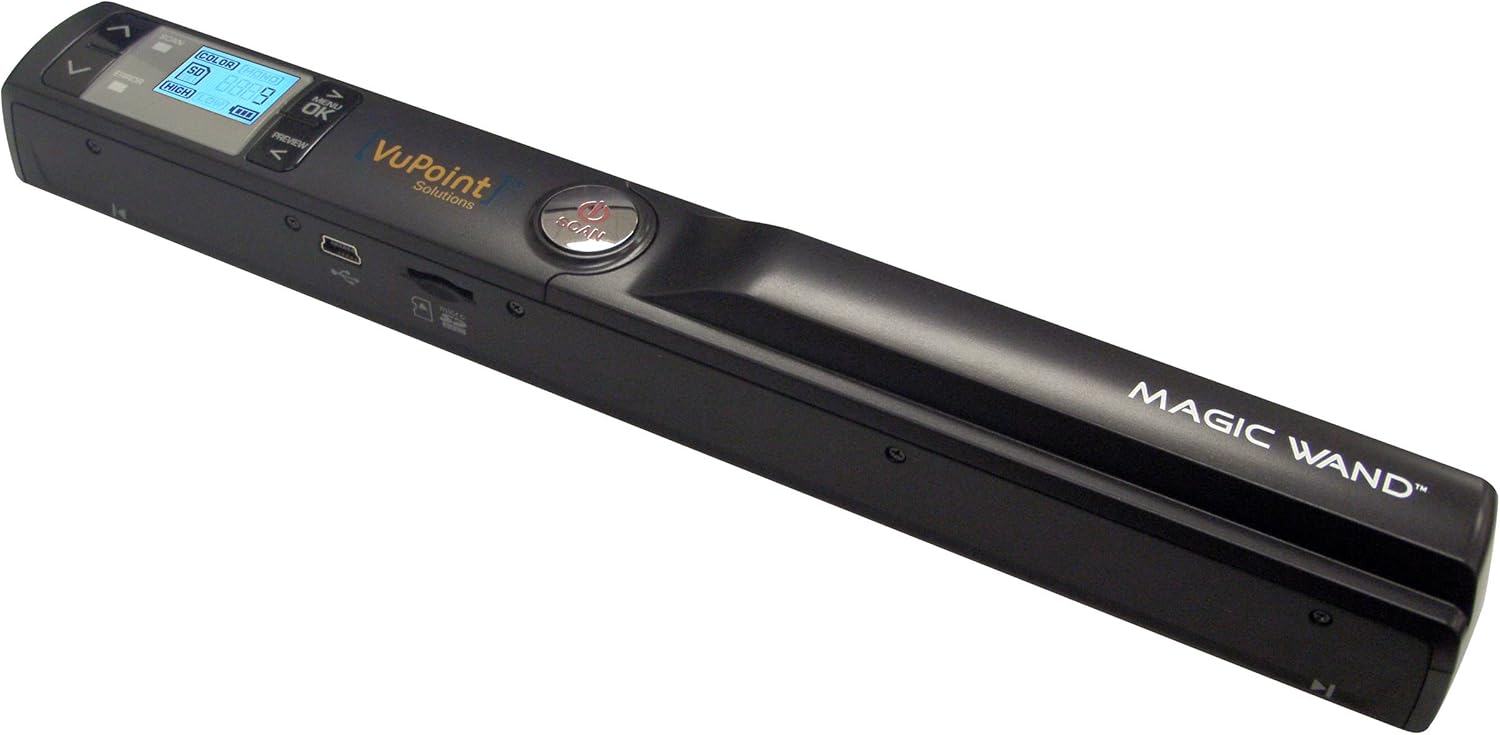
Figura 1: The VUPOINT Magic Wand Portable Scanner, showcasing its sleek black design, integrated color display, and control buttons. The scanner features a USB port and a microSD card slot on its side.
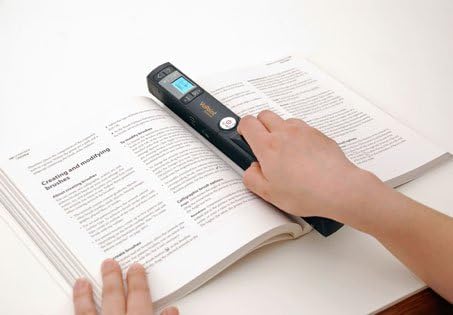
Figura 2: A user demonstrating the portable scanner in action, gliding it across an open book page. This illustrates the handheld nature and ease of use for digitizing printed materials.
Característiques principals:
- Portable design for on-the-go scanning.
- 1" CSTN LCD display for previewing scans.
- Multiple resolution settings: 300 DPI (Standard), 600 DPI (High), and 900 DPI (Fine).
- Supports JPEG and PDF file formats.
- 2x, 4x, 8x preview zoom capability.
- USB 2.0 connectivity for data transfer.
Configuració
1. Instal·lació de la bateria
- Locate the battery compartment cover on the scanner.
- Feu lliscar la coberta oberta.
- Introduïu dues (2) piles AA, assegurant-vos de la polaritat correcta (+/-) tal com s'indica a l'interior del compartiment.
- Tanqueu bé la tapa del compartiment de la bateria.
2. Inserció de la targeta MicroSD
The scanner requires a microSD card (not included, unless specified in package) to store scanned images.
- Locate the microSD card slot on the side of the scanner.
- Gently insert the microSD card into the slot with the gold contacts facing down, until it clicks into place.
- Per treure-la, premeu suaument la targeta fins que faci clic i, a continuació, deixeu-la anar per expulsar-la.
3. Engegada inicial
Press and hold the Power button until the display turns on. The scanner is now ready for use.
Instruccions de funcionament
1. Encès / apagat
- Per encendre: Manteniu premut el botó Poder botó fins que la pantalla LCD s'il·lumini.
- Per apagar: Manteniu premut el botó Poder button until the LCD screen turns off. The scanner will also automatically power off after a period of inactivity to conserve battery.
2. Setting Scan Mode and Resolution
Use the buttons next to the display to navigate and select settings:
- Configuració de DPI: Premeu el botó DPI button to cycle through 300 DPI (Std), 600 DPI (High), and 900 DPI (Fine). Higher DPI results in better quality but larger file mides.
- Mode de color: Premeu el botó Color/Mono button to switch between Color and Monochromatic (Black & White) scanning.
- File Format: Some models allow switching between JPEG and PDF. Refer to your scanner's display for this option.
3. Realització d'una exploració
- Place the document or image you wish to scan on a flat, stable surface.
- Subjecteu l'escàner fermament amb les dues mans.
- Align the scanner's scanning window with the top edge of the document.
- Premeu el botó ESCANEAR button once to start scanning. The scan indicator light will illuminate.
- Slowly and steadily glide the scanner downwards across the document, maintaining even pressure. Avoid tilting or lifting the scanner.
- Once you reach the end of the document, press the ESCANEAR button again to stop scanning. The scan indicator light will turn off.
- The scanned image will be saved to the microSD card.
Consell: For best results, practice scanning on a few scrap documents to get a feel for the optimal speed and pressure.
4. Previewing Scans
Use the built-in 1" CSTN LCD display to preview your scanned images. Use the navigation buttons to scroll through saved files. The display supports 2x, 4x, and 8x zoom for detailed inspection.
5. Transferència Files a un ordinador
There are two primary methods to transfer your scanned files:
- Connexió USB directa:
- Connecteu l'escàner a l'ordinador mitjançant el cable USB proporcionat.
- The scanner will appear as a removable disk drive on your computer.
- Open the drive to access the "DCIM" folder, where your scanned images are stored.
- Copieu i enganxeu el files to your desired location on the computer.
- Using a MicroSD Card Reader:
- Safely eject the microSD card from the scanner.
- Insert the microSD card into a compatible card reader connected to your computer.
- Access the card as a removable drive and transfer your files.
Manteniment
1. Neteja de l'escàner
- Assegureu-vos que l'escàner estigui apagat abans de netejar-lo.
- Use the provided cleaning cloth or a soft, lint-free cloth to gently wipe the exterior of the scanner.
- For the scanning glass/lens, use a specialized lens cleaning solution and a microfiber cloth. Do not use abrasive cleaners or solvents.
- Regularly clean the paper path and rollers to prevent dust and debris from affecting scan quality.
2. Cura de la bateria
- Remove batteries if the scanner will not be used for an extended period to prevent leakage.
- Use high-quality alkaline or rechargeable AA batteries for optimal performance.
3. Emmagatzematge
Store the scanner in a cool, dry place, away from direct sunlight, extreme temperatures, and high humidity. Use the provided carrying pouch for protection during transport.
Resolució de problemes
| Problema | Causa possible | Solució |
|---|---|---|
| L'escàner no s'encén. | Low or dead batteries; incorrect battery insertion. | Canvieu les piles o assegureu-vos que estiguin inserides amb la polaritat correcta. |
| Poor scan quality (streaks, blurry images). | Dirty scanning lens/rollers; uneven scanning speed; document movement. | Clean the scanner lens and rollers. Scan slowly and steadily. Ensure document is flat and still. |
| Cannot save scans. | MicroSD card full; card not inserted correctly; card error. | Suprimeix l'antic files or use a new/empty microSD card. Reinsert the card. Format the card (this will erase all data). |
| L'ordinador no reconeix l'escàner. | Loose USB connection; faulty USB cable; driver issue. | Ensure USB cable is securely connected. Try a different USB port or cable. Restart computer. |
Especificacions
| Característica | Detall |
|---|---|
| Dimensions del producte | 10.1 x 1.2 x 1.1 polzades |
| Pes de l'article | 4.8 unces |
| Número de model | PDS-ST441-VP |
| Bateries | 2 piles AA (incloses) |
| Tipus de suport | USB |
| Tipus d'escàner | Document |
| Marca | VuPoint |
| Tecnologia de connectivitat | USB |
| Resolució | 300 DPI, 600 DPI, 900 DPI |
| Mida del full | Carta, A4 |
| Requisits mínims del sistema | Windows 7 |
| UPC | 874121003710 |
Garantia i Suport
For warranty information and technical support, please refer to the warranty card included with your product or visit the official VuPoint Solutions weblloc web. Conserveu el rebut de compra com a comprovant de compra per a qualsevol reclamació de garantia.
For further assistance, you may contact VuPoint Solutions customer service through their official channels.


