1. Introducció
The Sprint Phone Connect device provides low-cost, unlimited Sprint phone service for your home or office. It allows you to connect your existing analog or cordless phones to the Sprint wireless network, offering a convenient alternative to traditional landline services. This manual provides essential information for setting up, operating, and maintaining your Sprint Phone Connect device.
2. Informació important de seguretat
Please read and understand all safety information before using the Sprint Phone Connect device. Failure to do so may result in injury or damage to the device.
- Font d'alimentació: Utilitzeu només l'adaptador d'alimentació subministrat amb el dispositiu.
- Ventilació: Ensure the device is placed in a well-ventilated area. Do not block ventilation openings.
- Aigua i humitat: No exposeu el dispositiu a l'aigua, la pluja o la humitat excessiva.
- Temperatura: Feu funcionar el dispositiu dins dels rangs de temperatura recomanats. Eviteu la calor o el fred extrems.
- 911 Calling: The Sprint Phone Connect device has built-in GPS for 911 calling. However, wireless 911 and E911 have inherent limitations compared to traditional landline 911, including automatic provision of precise location information, in-building coverage, and power outages. Always be prepared to provide your exact location and callback number to emergency responders.
- Compatibilitat: The device is not compatible with certain Home Security systems, IP-based or PBX office phone systems, fax machines, credit card machines, dial-up or DSL internet service, DVR or satellite TV services, medical alert services, or collect calls. Verify compatibility with your service providers.
- Còpia de seguretat de la bateria: The device includes battery backup to maintain service during power outages. Ensure the battery is properly installed and charged.
3. Contingut del paquet
Verify that all items are present in your Sprint Phone Connect package:
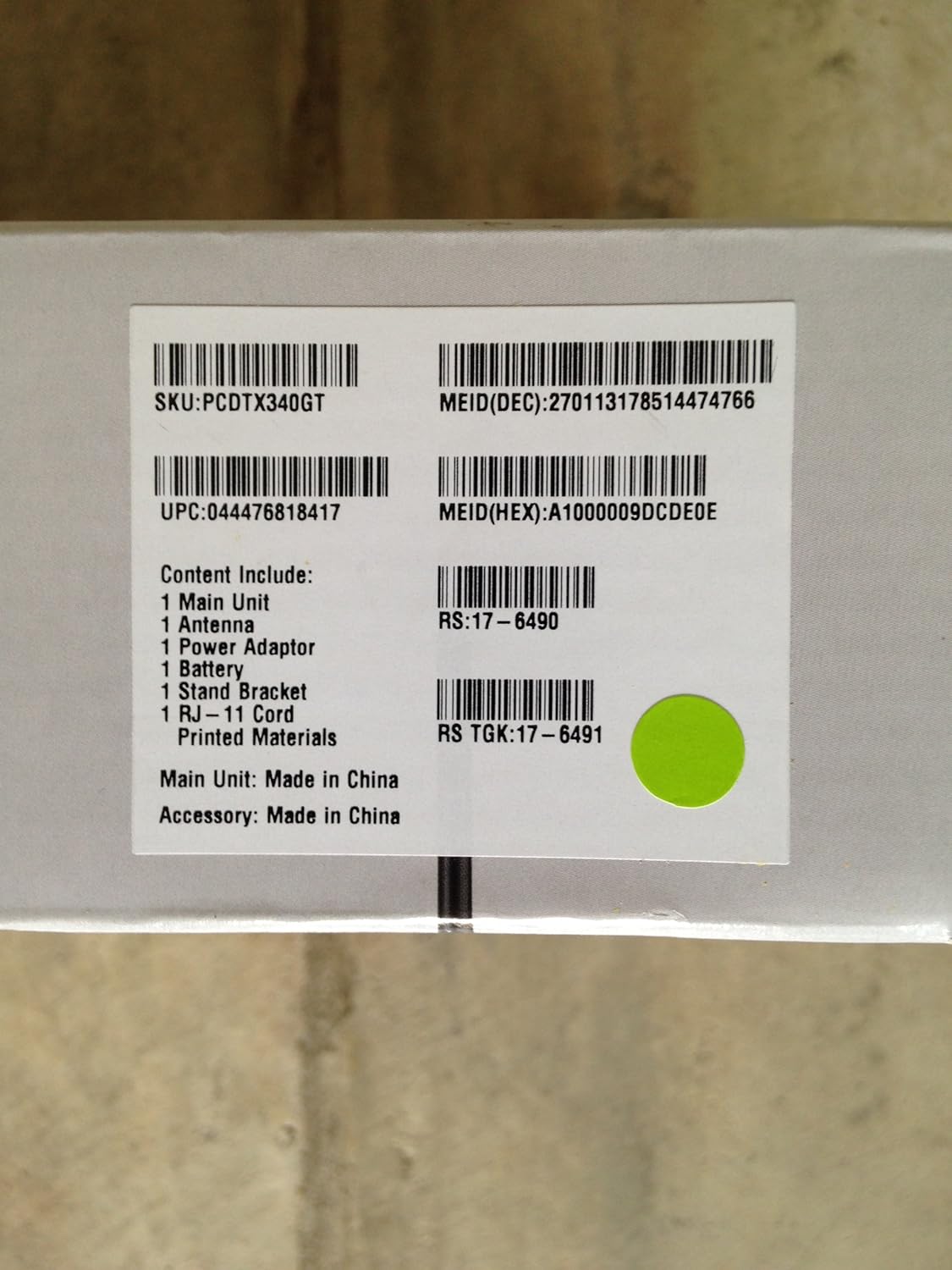
Image: Box label detailing package contents and product identifiers.
This image displays the product label from the Sprint Phone Connect box. It lists the included items and various product identification numbers such as SKU, UPC, and MEID. The label confirms the main unit and accessory are made in China.
- 1 x Main Unit (Sprint Phone Connect device)
- 1 x antena
- 1 x adaptador de corrent
- 1 x Battery (Lithium Ion, included)
- 1 x suport de suport
- 1 x RJ-11 Cord
- Printed Materials (User Manual, Quick Start Guide)
4. Guia de configuració
Follow these steps to set up your Sprint Phone Connect device:
- Desempaquetar el dispositiu: Traieu amb cura tots els components de l'embalatge.
- Instal·leu l'antena: Screw the antenna firmly into the antenna port on the back of the Sprint Phone Connect unit.
- Instal·leu la bateria: Open the battery compartment on the back of the device and insert the included Lithium Ion battery. Close the compartment securely. This battery provides backup power during outages.
- Connectar l'alimentació: Plug the power adapter into the DC IN port on the device, then plug the other end into a standard electrical outlet. The device will begin to power on.
- Connecta el teu telèfon: Plug your existing analog phone or cordless phone base station into one of the RJ-11 phone jacks on the Sprint Phone Connect device using the provided RJ-11 cord. You can connect up to two phones.
- Col·locació: Place the Sprint Phone Connect device in an area with good Sprint wireless signal reception. Avoid placing it near large metal objects, thick walls, or other electronic devices that may cause interference. The included stand bracket can be used for upright placement.
- Activació: If your service is not pre-activated, follow the instructions provided by Sprint or contact Sprint customer service to activate your device and phone number.

Imatge: Frontal view of the Sprint Phone Connect device and its retail packaging.
This image shows the Sprint Phone Connect device, model PCD TX340G, in its retail box. The device is black with an antenna and stands upright on a base. The packaging highlights the product name and brand.

Imatge: Enrere view of the Sprint Phone Connect device retail packaging.
This image displays the back of the Sprint Phone Connect retail box. It provides a brief description of the device's capabilities, such as connecting with traditional home and office phones, supporting standard phone features, and having battery backup for power outages.
5. Instruccions de funcionament
Once set up and activated, operating the Sprint Phone Connect is similar to using a traditional landline phone.
- Fer trucades: Pick up your connected phone handset and dial the desired number.
- Recepció de trucades: When your phone rings, pick up the handset to answer.
- Correu de veu: Access your voicemail by dialing the designated voicemail number provided by Sprint.
- Trucada en espera: If you are on a call and another call comes in, you will hear a tone. You can switch between calls as you would with a standard phone.
- Identificador de trucada: The device supports caller ID (number only) for incoming calls.
- Trucades a tres: This feature is supported. Refer to your phone's manual or Sprint's instructions for specific steps.
- Potència Outage: The built-in battery provides backup power, allowing you to continue making and receiving calls during a power outage. The duration of battery backup depends on usage.
6. Manteniment
To ensure optimal performance and longevity of your Sprint Phone Connect device, follow these maintenance guidelines:
- Neteja: Feu servir un drap suau i sec per netejar l'exterior del dispositiu. No utilitzeu netejadors líquids ni aerosols.
- Medi ambient: Keep the device in a clean, dry environment, away from dust, direct sunlight, and extreme temperatures.
- Cura de la bateria: The internal battery is designed for backup. If the device is unplugged for extended periods, the battery may discharge. Keep the device plugged in when not in use to ensure the battery remains charged for emergencies.
- Actualitzacions de firmware: Sprint may periodically release firmware updates for the device. These updates are typically performed automatically over the air. Ensure your device is powered on and connected to the network to receive updates.
7. Solució De Problemes
If you encounter issues with your Sprint Phone Connect device, refer to the following troubleshooting tips:
| Problema | Causa possible | Solució |
|---|---|---|
| Sense to de marcatge | Device not powered on; Phone not connected; No Sprint signal; Device not activated. | Check power connection and indicator lights. Ensure phone is securely plugged into the device. Relocate device to an area with better signal. Contact Sprint for activation status. |
| No puc fer/rebre trucades | No network signal; Account issues; Device malfunction. | Check signal strength indicator on device. Verify your Sprint account is active and in good standing. Power cycle the device (unplug, wait 30 seconds, plug back in). |
| Poca qualitat de trucada | Weak signal; Interference; Device placement. | Move the device to a location with stronger Sprint signal. Ensure antenna is securely attached. Keep device away from other electronics that may cause interference. |
| La bateria de reserva no funciona | Battery not installed; Battery discharged; Battery faulty. | Ensure battery is correctly installed. Keep device plugged in to allow battery to charge. If issues persist, contact Sprint support for battery replacement. |
| Incompatible with certain services (e.g., fax, security system) | Limitació del dispositiu. | The Sprint Phone Connect is not designed to work with all services. Refer to the compatibility section in the introduction or contact Sprint for clarification. |
8. Especificacions
| Característica | Detall |
|---|---|
| Model | PCD TX340G |
| Marca | Sprint |
| Dimensions (paquet) | 10.5 x 7.4 x 2.6 polzades |
| Pes de l'article | 1.49 lliures |
| Tipus de bateria | 1 bateria de ions de liti (inclosa) |
| Font d'alimentació | Alimentat per bateria (amb adaptador de CA) |
| Tipus de telèfon | Cordless (compatible with) |
| Color | Negre |
| Dispositius compatibles | Analog phones, cordless phones |
| Phone Talk Time (Battery) | 4.5 Hours (approximate) |
| Capacitat de trucades de conferència | Bàsica |
| Operació multilínia | Admet |
| Connectivitat | Wireless (Sprint network) |
| Trucades d'emergència | 911 with built-in GPS |
9. Garantia i Suport
For warranty information, technical support, or service inquiries, please contact Sprint customer service directly. Details regarding your specific warranty coverage can be found in the documentation provided at the time of purchase or on the official Sprint weblloc.
Sprint Customer Service: Please refer to your service agreement or Sprint's official weblloc web per obtenir la informació de contacte més actualitzada.
Recursos en línia: Visit the Sprint support website for FAQs, troubleshooting guides, and additional product information.


