1. Introducció
Thank you for choosing the VITAL USB-C™ 4-Port Hub. This device is designed to expand the connectivity options of your USB-C enabled computer or device, allowing you to connect multiple USB peripherals simultaneously. It provides a convenient solution for connecting both older USB-A devices and newer USB-C devices, including those requiring power delivery.
2. Producte acabatview
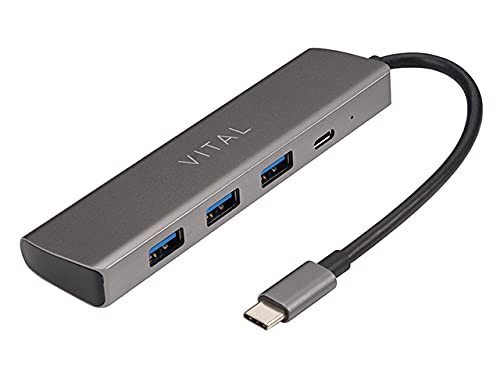
Figure 2.1: VITAL USB-C™ 4-Port Hub. This image displays the compact, rectangular hub in a dark grey finish, featuring three standard USB-A ports on one side and a single USB-C port on the end, alongside a small indicator light. An integrated USB-C cable extends from one end of the hub.
The VITAL USB-C™ 4-Port Hub is a compact and versatile accessory that expands the connectivity of your USB-C enabled devices. It features multiple ports to accommodate various peripherals, enhancing your productivity and device management.
3. Característiques
- Ports totals: 4
- Configuració del port: Includes 3 USB 3.0 Type-A Female ports and 1 USB-C port with Power Delivery (PD) and data transfer capabilities.
- Àmplia compatibilitat: Compatible with Windows 10 (32/64 bit), Windows 8.1/8 (32/64 bit), Windows 7 (32/64 bit), and Mac OS X 10.8.2 or later versions.
- Plug and Play: No calen controladors per a la majoria de sistemes operatius.
- Disseny compacte: Portàtil i fàcil de transportar.
4. Configuració
- Connecteu el concentrador: Insert the integrated USB-C connector of the VITAL 4-Port Hub into an available USB-C port on your computer, laptop, or compatible device.
- Instal·lació del controlador (automàtica): For most supported operating systems (Windows, macOS), the hub is plug-and-play. The necessary drivers will install automatically upon first connection. No manual driver installation is typically required.
- Connecteu els perifèrics: Once the hub is recognized, you can connect your USB-A devices (e.g., flash drives, keyboards, mice, external hard drives) to the three USB 3.0 Type-A ports.
- Connect USB-C Devices/Power: Use the USB-C port on the hub for additional USB-C peripherals or for power delivery to your host device (if your host device supports USB-C PD and you connect a compatible USB-C power adapter to the hub's USB-C port).
5. Instruccions de funcionament
The VITAL USB-C™ 4-Port Hub operates as a simple extension of your device's USB-C port. Once connected, it functions immediately.
- Transferència de dades: Connect USB flash drives, external hard drives, or other data storage devices to any of the USB 3.0 Type-A ports or the USB-C data port for high-speed data transfer.
- Connectivitat perifèrica: Use the ports to connect standard USB peripherals such as keyboards, mice, printers, and weblleves.
- Subministrament d'energia (PD): If your host device (laptop, tablet) supports charging via USB-C Power Delivery, you can connect your original USB-C power adapter to the hub's USB-C port. This allows the hub to pass through power to charge your host device while simultaneously using the other ports for data and peripherals. Note: The hub itself does not generate power; it passes through power from a connected power source.
- Intercanvi en calent: Devices can be connected and disconnected from the hub while it is in use, without needing to restart your computer.
6. Manteniment
- Neteja: Use a soft, dry, lint-free cloth to clean the surface of the hub. Do not use liquid cleaners or aerosol sprays.
- Emmagatzematge: Guardeu el concentrador en un lloc fresc i sec, allunyat de la llum solar directa i de temperatures extremes.
- Manipulació: Eviteu deixar caure el concentrador ni sotmetre'l a impactes forts. No intenteu desmuntar el dispositiu.
7. Solució De Problemes
- Dispositiu no reconegut:
- Ensure the hub's USB-C connector is fully inserted into your host device's USB-C port.
- Prova de connectar el concentrador a un port USB-C diferent del dispositiu amfitrió.
- Reinicieu l'ordinador o el dispositiu amfitrió.
- Assegureu-vos que el vostre sistema operatiu estigui actualitzat.
- Connected devices are not working:
- Verify that the connected peripheral is functioning correctly by plugging it directly into your host device (if possible).
- Ensure the peripheral is properly connected to the hub's port.
- Some high-power devices may require external power. If the hub's USB-C port is used for power delivery, ensure a sufficient power adapter is connected.
- Velocitats de transferència de dades lentes:
- Assegureu-vos que feu servir dispositius i cables compatibles amb USB 3.0 per obtenir velocitats òptimes.
- Verify that your host device's USB-C port supports USB 3.0 or higher speeds.
- Eviteu connectar massa dispositius d'ample de banda elevat simultàniament.
8. Especificacions
| Nom del producte | VITAL USB-C™ 4-Port Hub |
| Número de model | USB-C™ 4-Port Hub (ASIN: B007FASPPA) |
| Nombre de Ports | 4 |
| Tipus de ports | 3 x USB 3.0 Type-A Female, 1 x USB-C (with PD + data) |
| Connector Type (Host) | USB tipus C |
| Tipus de cable | USB |
| Dimensions del producte | 0.03 x 0.03 x 0.03 cm |
| Pes de l'article | 5 g |
| Fabricant | Vital |
9. Compatibilitat
The VITAL USB-C™ 4-Port Hub is compatible with a wide range of operating systems:
- Windows 10 (32 bits i 64 bits)
- Windows 8.1 / 8 (32-bit and 64-bit)
- Windows 7 (32 bits i 64 bits)
- Mac OS X 10.8.2 or later versions
Ensure your device has a functional USB-C port for connection.
10. Garantia i Suport
For warranty information or technical support, please refer to the Vital product packaging or visit the official Vital website. You may also contact Vital customer service directly for assistance with product setup, troubleshooting, or general inquiries.
Per obtenir la informació de suport més recent, visiteu: Vital Official Store on Amazon


