Introducció
This manual provides detailed instructions for the operation and maintenance of your Eton Grundig G2 AM/FM/Shortwave Radio Recorder. Please read this manual thoroughly before using the device to ensure proper function and longevity.
Contingut del paquet
Verifiqueu que tots els elements siguin presents al paquet:
- Eton Grundig G2 Radio Recorder
- Cable d'alimentació
- Bateria recarregable
- Manual d'usuari (aquest document)
Producte acabatview
Familiarize yourself with the various components and controls of your Grundig G2 radio.

Figure 1: Front Panel Controls and Display. This image shows the front of the Eton Grundig G2 radio, highlighting the LCD display, dual speakers, numeric keypad, and various function buttons for power, volume, tuning, and mode selection.

Figure 2: Portable Use Example. The radio is shown being held by two hands, demonstrating its compact and portable design suitable for use in various environments, such as outdoor events.

Figure 3: Rear Panel and Battery Compartment. This image displays the back of the radio, including the battery cover, product information, and ventilation grilles.

Figure 4: Top Panel with Micro SD Slot. A close-up of the top edge of the radio, showing the Micro SD card slot for media playback and recording storage.
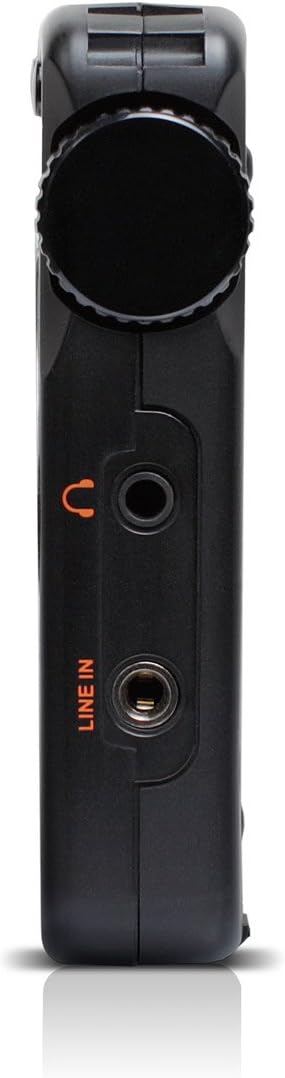
Figure 5: Left Side Panel. Això view highlights the headphone jack and line-in audio input on the left side of the device.

Figure 6: Right Side Panel. This image shows the USB port, microphone input, and power switch located on the right side of the radio.
Configuració
1. Instal·lació i càrrega de la bateria
- Locate the battery compartment on the rear of the radio (refer to Figure 3).
- Open the compartment cover and insert the provided rechargeable battery, ensuring correct polarity.
- Tanqueu bé la tapa del compartiment de la bateria.
- Connect the power cord to the radio's power input and a suitable power outlet. The radio will begin charging. Allow approximately four hours for a full charge during initial use.
2. Engegada inicial
- Ensure the battery is installed or the power cord is connected.
- Premeu el botó Poder button (usually located on the top left of the front panel) to turn on the radio.
- The LCD display will illuminate.
Instruccions de funcionament
Encès/Apagat
Premeu el botó Poder botó per encendre o apagar la unitat.
Ajust de volum
Utilitza el V- i V+ buttons to decrease or increase the volume level.
Radio Tuning (AM/FM/SW)
The Grundig G2 offers five tuning methods:
- Selecció de la banda: Premeu el botó FM, MW (AM), or SW buttons to select the desired frequency band.
- Jog Tuning: Rotate the tuning knob (often labeled MENÚ/ENTRAR or similar) to manually scan frequencies.
- Sintonització manual: Utilitza el Fletxa amunt/avall botons per ajustar la freqüència pas a pas.
- Sintonització automàtica: Manteniu premut el botó Fletxa amunt/avall botons per escanejar automàticament la següent emissora disponible.
- ATS (emmagatzematge d'afinació automàtica): Manteniu premut el botó SET button to automatically scan and store strong stations in the current band.
- Memory Tuning: Use the numeric keypad (0-9) to directly enter a stored station number or frequency.
Station Memory Storage
Per emmagatzemar una estació:
- Sintonitza l'emissora desitjada.
- Premeu el botó SET button. The memory location number will flash on the display.
- Use the numeric keypad or tuning knob to select a memory location.
- Premeu SET again to confirm. The station is now stored.
The radio supports up to 248 station memory storage locations.
MP3 and WMA Playback
The Grundig G2 can play MP3 and WMA audio files from a Micro SD card.
- Insert a Micro SD card containing MP3/WMA files into the Micro SD slot (refer to Figure 4).
- Premeu el botó RADIO/MP3 button to switch to MP3 mode.
- Utilitza el Reproduir/Pausa, Pista següent/anterior botons per controlar la reproducció.
Funció de gravació
The radio supports recording of radio broadcasts and external audio via the microphone or line-in input.
- Ensure a Micro SD card is inserted.
- To record radio: Tune to the desired station. Press the REC botó (si està disponible o una combinació com ara MENÚ/ENTRAR then select record).
- To record via microphone: Ensure the radio is in recording mode. Speak into the built-in microphone.
- To record via line-in: Connect an external audio source to the LINE IN jack (refer to Figure 5). Ensure the radio is in recording mode.
- Premeu el botó STOP button to end recording. Recordings are saved to the Micro SD card.
Configuració d'idioma
The radio supports multiple display languages. To change the language:
- Premeu el botó MENÚ/ENTRAR botó.
- Navigate through the menu options using the tuning knob or arrow buttons until you find "Language" or a similar setting.
- Select the desired language and confirm.
Manteniment
- Neteja: Use a soft, dry cloth to clean the radio's exterior. Do not use liquid cleaners or abrasive materials.
- Emmagatzematge: When not in use for extended periods, store the radio in a cool, dry place. Remove the battery if storing for several months.
- Cura de la bateria: Recharge the battery regularly to maintain its lifespan. Avoid fully discharging the battery frequently.
- Antena: Manipuleu l'antena telescòpica amb cura per evitar danys.
Resolució de problemes
| Problema | Causa possible | Solució |
|---|---|---|
| La ràdio no s'encén. | Battery is discharged or not installed correctly. Power cord is not connected. | Ensure battery is charged and correctly inserted. Connect the power cord. |
| Mala recepció de ràdio. | Weak signal. Antenna not extended. Interference from other electronics. | Extend the telescopic antenna fully. Reposition the radio. Move away from interfering devices. |
| MP3/WMA fileno està jugant. | Micro SD card not inserted or corrupted. Incorrect file format. | Ensure Micro SD card is properly inserted. Verify files are MP3 or WMA format. Try a different Micro SD card. |
| La gravació no funciona. | No Micro SD card inserted. Card full. | Insert a Micro SD card. Delete old files per alliberar espai. |
| Display shows incorrect time. | Time not set or ATS not used. | Manually set the time or use the ATS function on an FM station that broadcasts RDS time data. |
Especificacions
| Número de model | NG2B |
| Dimensions (L x A x A) | 7.5 x 3.5 x 0.8 polzades |
| Pes | 9.6 unces |
| Bandes de ràdio compatibles | AM, FM, ona curta (SW) |
| Mètodes d'afinació | Jog, Manual, Auto, Memory, ATS |
| Presets de memòria | 248 estacions |
| Reproducció d'àudio | MP3, WMA (via Micro SD card) |
| Gravació | Radio broadcasts, Microphone, Line-in |
| Connectivitat | USB |
| Font d'alimentació | Rechargeable Battery, Corded Electric |
| Components inclosos | Power Cord, Battery |
Garantia i Suport
For warranty information and technical support, please refer to the official Eton or Grundig weblloc web o poseu-vos en contacte amb el seu departament d'atenció al client. Conserveu el comprovant de compra per a reclamacions de garantia.
Nota: Els termes de garantia específics poden variar segons la regió i el distribuïdor.


