1. Introducció
Thank you for choosing the BONTEC TV Wall Bracket. This full-motion wall mount is designed to securely hold 37-80 inch LED LCD flat and curved screen televisions, offering exceptional flexibility for optimal viewing angles. Manufactured from reinforced, compressed steel, it ensures durability and safety for your television. This manual provides essential information for safe installation, operation, and maintenance of your TV wall bracket.
2. Informació de seguretat
Please read all instructions carefully before installation and use. Failure to follow these instructions may result in serious personal injury, property damage, or voiding of your warranty.
- Capacitat de pes: No supereu el pes màxim de càrrega de 65 kg (144 lliures).
- Tipus de paret: This bracket is designed for installation on wood studs, concrete walls, or brick walls. DO NOT MOUNT ON DRYWALL ALONE without securing to a stud or using appropriate heavy-duty anchors for hollow walls.
- Instal·lació professional: Si no esteu segurs del procés d'instal·lació o de l'adequació de la vostra paret, consulteu un professional qualificat.
- Comprova el patró VESA: Ensure your TV's VESA pattern is compatible with the bracket before beginning installation.
- Fixacions segures: Ensure all screws and bolts are securely tightened before mounting the TV. Do not overtighten.
- Gestió de cables: Route cables carefully to prevent pinching or damage when adjusting the TV.
3. Contingut del paquet
Verify that all components are present and undamaged before installation. If any parts are missing or defective, contact BONTEC customer support.
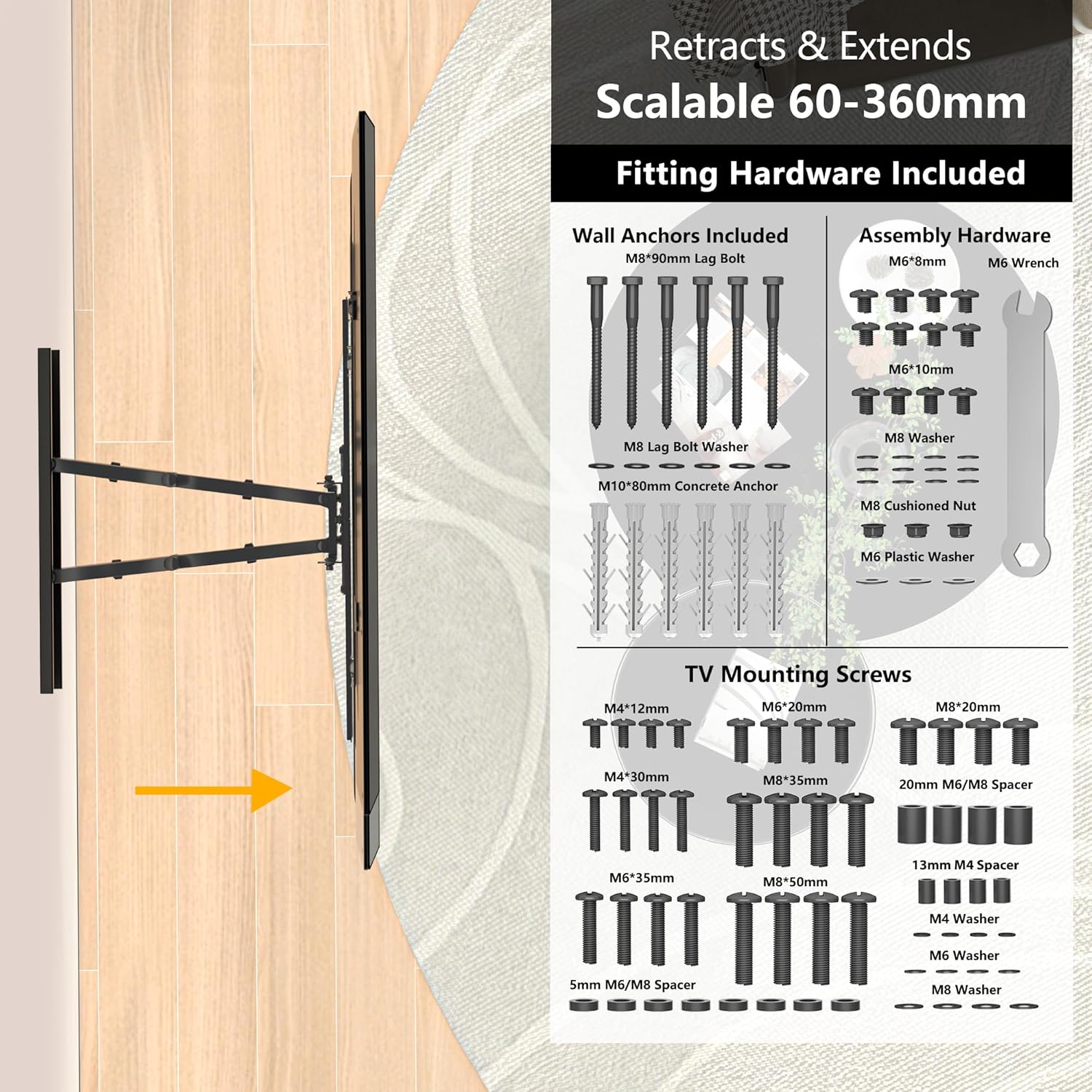
Imatge: Més deview of included fitting hardware and TV mounting screws.
- TV Wall Bracket Assembly
- Wall Anchors (M8*90mm Lag Bolts, M10*80mm Concrete Anchors)
- Assembly Hardware (M6*6mm, M6*10mm screws, M8 Washers, M8 Cushioned Nuts, M6 Plastic Washers, M6 Wrench)
- TV Mounting Screws (Various sizes: M4*12mm, M4*30mm, M6*20mm, M6*35mm, M8*20mm, M8*35mm, M8*50mm)
- Spacers (20mm M6/M8, 13mm M4, 5mm M6/M8)
- Washers (M4, M6, M8)
- Cable HDMI de 1.8 m
- Nivell d'esperit
- Instruccions il·lustrades
4. Especificacions
| Característica | Descripció |
|---|---|
| Mides de TV compatibles | 37 - 80 polzades |
| Compatibilitat VESA | 100x100, 200x100, 200x200, 300x200, 300x300, 400x200, 400x400, 600x400mm |
| Capacitat de càrrega màxima | 65 kg (144 lliures) |
| Angle d'inclinació | +5° (amunt) a -15° (avall) |
| Angle de gir | ±45° (left to right) |
| Ajust de rotació | ±3° (level adjustment) |
| Wall Distance (Retracted) | 60 mm |
| Wall Distance (Extended) | 360 mm |
| Material | Reinforced, Compressed Steel |
| Dimensions del producte | 64 x 45 x 43 cm |
| Pes del producte | 7.71 kg |

Image: TV size and VESA compatibility overview.
5. Configuració i instal·lació
Follow these steps for a secure and efficient installation. It is recommended to have at least two people for installation, especially when mounting the TV.
5.1. Comprovacions prèvies a la instal·lació
- Verifica la compatibilitat del televisor: Check your TV's VESA pattern and weight against the specifications.
- Identifiqueu el tipus de paret: Determine if your wall is wood stud, concrete, or brick. Use the appropriate anchors and drilling methods.
- Localitzar els montants (per a parets de fusta): Use a stud finder to accurately locate the center of wood studs.
- Àrea clara: Ensure the installation area is clear of obstructions, electrical wires, and plumbing.

Image: Diverse wall compatibility information.
5.2. Muntatge de la placa de paret
- Posicioneu la plantilla: Hold the wall plate or use the provided template against the wall at your desired height. Use the spirit level to ensure it is perfectly horizontal.
- Marqueu els forats de perforació: Marqueu els punts de perforació a través dels forats de la placa de paret.
- Forats: Drill pilot holes according to the marked points and the type of wall. For concrete/brick, use a masonry drill bit and insert concrete anchors. For wood studs, drill pilot holes directly into the center of the studs.
- Fixeu la placa de paret: Secure the wall plate to the wall using the appropriate lag bolts and washers. Tighten firmly but do not overtighten.
5.3. Fixació de suports al televisor
- Lay TV Face Down: Col·loqueu amb cura el televisor cara avall sobre una superfície suau i neta per evitar ratllades.
- Fixeu els suports de TV: Align the vertical TV brackets with the VESA mounting holes on the back of your TV. Use the correct size screws and spacers from the provided hardware kit. Ensure the brackets are securely fastened.
5.4. Hanging the TV and Final Adjustments
- Penjar la televisió: With assistance, carefully lift the TV and hook the TV brackets onto the wall plate. Ensure the TV is securely seated on the wall plate.
- Televisió segura: Use the safety screws or locking mechanisms on the TV brackets to secure the TV to the wall plate, preventing accidental dislodgement.
- Ajusta el nivell: Use the ±3° rotation adjustment feature to fine-tune the TV's level if needed.

Image: Easy installation steps.
6. Funcionament i ajustos
The BONTEC TV Wall Bracket offers full motion capabilities for an optimized viewexperiència.
6.1. Ajustament del gir
Gently push or pull the TV to swivel it up to 45° left or right. This allows you to direct the screen towards different viewing areas in your room.

Image: Swivel adjustment for optimal viewing.
6.2. Ajust de la inclinació
To adjust the vertical tilt, gently push the top or bottom of the TV. The bracket allows for a tilt of +5° up and -15° down, helping to reduce glare and improve viewcomoditat.

Image: Tilt and level adjustment features.
6.3. Extensió i retracció
The dual arms allow the TV to extend up to 360mm from the wall and retract to a low profile of 60mm, saving space when not in use.
6.4. Gestió de cables
Utilize the integrated cable management system on the bracket arms to neatly route and conceal unsightly cables, maintaining a clean and tidy appearance.
7. Manteniment
Un manteniment regular garanteix la longevitat i el funcionament segur del suport de paret per a TV.
- Neteja: Wipe the bracket with a soft, dry cloth. Avoid using abrasive cleaners or solvents that could damage the finish.
- Comprovacions periòdiques: Periodically check all mounting screws and bolts to ensure they remain tight and secure. Over time, vibrations or adjustments may cause them to loosen slightly.
- Lubricació: The moving parts are designed for smooth operation and generally do not require lubrication. If movement becomes stiff, consult BONTEC customer support.
8. Solució De Problemes
If you encounter any issues with your BONTEC TV Wall Bracket, refer to the following common problems and solutions.
- El televisor no està anivellat: Use the ±3° rotation adjustment feature to fine-tune the level. Ensure the wall plate was installed horizontally using the spirit level.
- Bracket feels unstable or sags:
- Verify that the TV weight does not exceed the 65 kg (144 lbs) maximum capacity.
- Ensure all wall mounting bolts and TV attachment screws are securely tightened.
- Confirm that the bracket is mounted to appropriate wall studs or solid concrete/brick, not just drywall.
- Difficulty adjusting the TV (swivel/tilt/extension):
- Comproveu si hi ha algun obstacle que impedeixi el moviment.
- Ensure no cables are caught in the moving parts.
- The joints are designed to be firm to hold the TV's position. Apply gentle, steady pressure.
If the problem persists after attempting these solutions, please contact BONTEC customer support for further assistance.
9. Garantia i Suport
For information regarding warranty coverage, returns, or technical support, please refer to the documentation provided at the time of purchase or visit the official BONTEC weblloc web. Conserveu el rebut de compra com a comprovant de compra.
BONTEC Customer Service: Please refer to the contact information provided on the product packaging or the official BONTEC weblloc web per obtenir els canals de suport més actualitzats.


