Introducció
Gràcies per la compraasing the GPX Weatherx WR282B Weather and Alert Radio. This portable radio is designed to provide you with AM/FM radio reception and access to all 7 NOAA weatherband channels, ensuring you stay informed during various conditions. It offers flexible power options, operating on either AC power or D-size batteries, making it suitable for both indoor and outdoor use.
Please read this manual thoroughly before operating the device to ensure proper use and to maximize its performance and longevity.
Informació important de seguretat
- Llegeix les instruccions: Totes les instruccions de seguretat i funcionament s'han de llegir abans d'utilitzar el producte.
- Instruccions de conservació: Les instruccions de seguretat i funcionament s'han de conservar per a futures consultes.
- Compte amb les advertències: S'han de respectar totes les advertències del producte i de les instruccions d'ús.
- Seguiu les instruccions: S'han de seguir totes les instruccions d'ús i funcionament.
- Aigua i humitat: Do not use this product near water (e.g., near a bathtub, washbowl, kitchen sink, laundry tub, in a wet basement, or near a swimming pool).
- Neteja: Netegeu només amb un drap sec.
- Ventilació: No bloquegeu cap obertura de ventilació. Instal·leu-ho d'acord amb les instruccions del fabricant.
- Calor: No instal·leu a prop de cap font de calor com ara radiadors, registres de calor, estufes o altres aparells (inclosos amplificadors) que produeixen calor.
- Protecció del cable d'alimentació: Eviteu que el cable d'alimentació sigui trepitjat o pessigat, especialment als endolls, els endolls i el punt on surten de l'aparell.
- Llamp: Desendolleu aquest aparell durant les tempestes amb llamps o quan no l'utilitzeu durant llargs períodes de temps.
- Manteniment: Demaneu tot el servei a personal de servei qualificat. El manteniment és necessari quan l'aparell s'ha fet malbé d'alguna manera, com ara el cable d'alimentació o l'endoll està danyat, s'ha vessat líquid o han caigut objectes a l'aparell, l'aparell ha estat exposat a la pluja o la humitat, no funciona amb normalitat. , o s'ha deixat caure.
Característiques
- Sintonitzador de ràdio AM/FM
- Weatherband - All 7 NOAA Channels
- Swivel Telescopic Antenna
- Control de volum
- Audio Line Input (Auxiliary Input)
- Mànec de transport integrat
- Dual Power Options: AC/DC Adapter or 3 x 'D' Batteries
Contingut del paquet
- GPX Weatherx WR282B Weather and Alert Radio
- Adaptador d'alimentació AC/DC
- Manual d'usuari (aquest document)
Controls i indicadors
Familiarize yourself with the various controls and indicators on your WR282B radio.
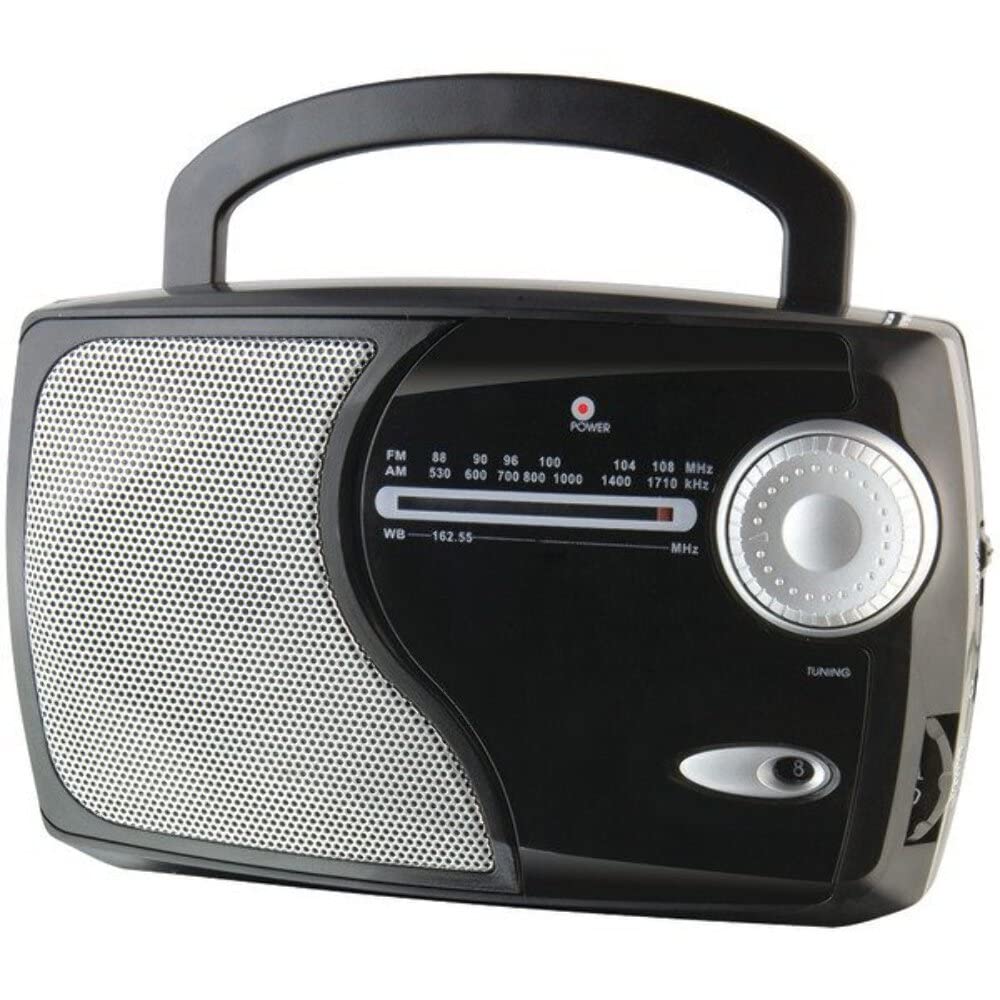
Imatge: Frontal view of the GPX Weatherx WR282B radio, showing the speaker, tuning dial, and control knobs.
- Control de potència/volum: Turns the radio on/off and adjusts the audio output level.
- Interruptor selector de banda: Selects between AM, FM, and Weatherband (WB) modes.
- Pom d'afinació: Adjusts the frequency to tune into desired radio stations or weather channels.
- Indicador d'afinació: Illuminates when a strong signal is received.
- Marcació de freqüència: Mostra la freqüència de ràdio actual.
- Antena telescòpica: Extendable antenna for improved FM and Weatherband reception.
- Entrada auxiliar (AUX IN): Jack de 3.5 mm per connectar dispositius d'àudio externs.
- Entrada d'alimentació de CA: Jack for connecting the included AC/DC power adapter.
- Compartiment de la bateria: Located on the back, holds 3 'D' size batteries.
- Nansa de transport: Per a una fàcil portabilitat.
Configuració
Alimentació de la ràdio
The WR282B radio can be powered using either the included AC/DC power adapter or three 'D' size batteries.
1. AC Power Operation
- Ensure the radio is turned off by rotating the Power/Volume knob counter-clockwise until it clicks.
- Insert the small plug of the AC/DC power adapter into the AC Power Input jack on the radio.
- Plug the other end of the AC/DC power adapter into a standard wall outlet (AC 120V~60Hz).
- La ràdio ja està a punt per al seu ús amb alimentació de CA.
Nota: When the AC adapter is connected, battery power is automatically disconnected.
2. Battery Power Operation
- Assegureu-vos que la ràdio estigui apagada.
- Localitzeu el compartiment de la bateria a la part posterior de la ràdio.
- Obriu la tapa del compartiment de la bateria.
- Insert three (3) 'D' size batteries (not included) into the compartment, observing the correct polarity (+/-) as indicated inside the compartment.
- Tanqueu bé la tapa del compartiment de la bateria.
- The radio is now ready for use with battery power.
Important: Traieu les piles si no heu d'utilitzar la ràdio durant un període prolongat per evitar fuites i danys.
Instruccions de funcionament
1. Turning On and Adjusting Volume
- Gira el Control de potència/volum clockwise to turn on the radio. Continue rotating to increase the volume to a comfortable listening level.
- Per apagar la ràdio, gireu el botó Control de potència/volum counter-clockwise until it clicks.
2. Selecting a Radio Band (AM/FM/Weatherband)
- Utilitza el Selector de banda to choose your desired listening mode:
- AM: Per Amplitude Modulation radio stations.
- FM: For Frequency Modulation radio stations.
- WB: For NOAA Weatherband channels.
3. Tuning to a Station or Channel
- Amplieu el antena telescòpica fully for optimal FM and Weatherband reception. For AM reception, the radio has a built-in antenna, and adjusting the radio's position may improve reception.
- Gira el Pom de sintonització to scan through frequencies on the Marcatge de freqüència.
- When a strong signal is received, the Indicador de sintonització la llum s'il·luminarà.
- For Weatherband (WB) mode, tune to one of the 7 NOAA weather channels (162.400 MHz to 162.550 MHz).
4. Using the Auxiliary Input (AUX IN)
- Connect a 3.5mm audio cable (not included) from your external audio device (e.g., MP3 player, smartphone) to the Auxiliary Input (AUX IN) jack on the radio.
- Ensure the radio is turned on and the volume is adjusted.
- The audio from your external device will now play through the radio's speaker. Control playback and track selection from your external device.
Manteniment
- Neteja: Wipe the exterior of the radio with a soft, dry cloth. Do not use abrasive cleaners, waxes, or solvents.
- Substitució de la bateria: Replace all three 'D' batteries when the radio's performance diminishes or if the unit will not be used for an extended period. Always replace with new batteries of the same type.
- Emmagatzematge: When storing the radio for a long time, remove the batteries to prevent leakage. Store in a cool, dry place away from direct sunlight and extreme temperatures.
- Cura de l'antena: Manipuleu l'antena telescòpica amb cura per evitar que es doblegui o es trenqui.
Resolució de problemes
| Problema | Causa possible | Solució |
|---|---|---|
| Sense poder |
|
|
| Mala recepció de ràdio |
|
|
| No sound from AUX IN |
|
|
Especificacions
- Model: WR282B
- Bandes de ràdio: AM, FM, Weatherband (7 NOAA channels)
- Font d'alimentació: AC 120V~60Hz (via included adapter) or 3 x 'D' Batteries (not included)
- Connectivitat: Entrada auxiliar de 3.5 mm
- Antena: Telescopic (FM/WB), Built-in Ferrite Bar (AM)
- Dimensions del producte: 8.86" L x 2.76" W x 5.51" H (approximately)
- Pes de l'article: 1.06 lliures (sense piles)
Garantia i Suport
For detailed warranty information and customer support, please refer to the warranty card included with your product or visit the official GPX weblloc web. Conserveu el rebut de compra com a comprovant de compra per a qualsevol reclamació de garantia.
If you experience issues not covered in the troubleshooting section, please contact GPX customer service for assistance.


