Producte acabatview
The Targus Presenter AMP09AP is a multimedia presentation remote designed for ease of use during presentations. It features a laser pointer for highlighting content, backlit buttons for low-light environments, and an ergonomic design for comfortable handling. This remote also offers cursor control for remote program access and volume adjustment for media. Its wireless technology provides a range of up to 50 feet, and the USB receiver conveniently stores within the presenter.
Guia de configuració
1. Desembalatge
Carefully remove the Targus Presenter AMP09AP and its components from the packaging. The box should contain:
- One Targus Presentation Remote
- One USB Receiver
2. Instal·lació de la bateria
The Targus Presenter AMP09AP requires batteries (not included). Use alkaline batteries for optimal performance.
- Locate the battery compartment on the back of the presenter.
- Obriu la tapa del compartiment de la bateria.
- Introduïu les piles necessàries, assegurant-vos de la polaritat correcta (+/-).
- Tanqueu bé la tapa del compartiment de la bateria.
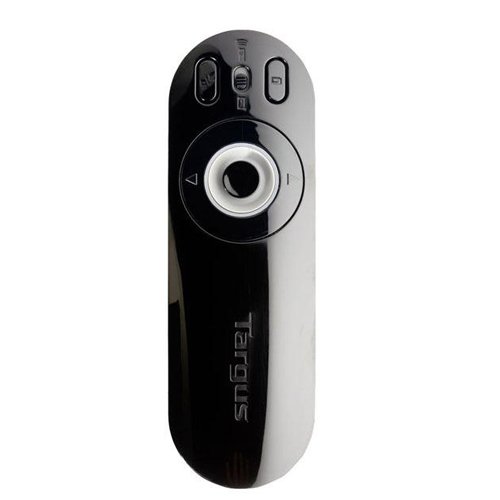
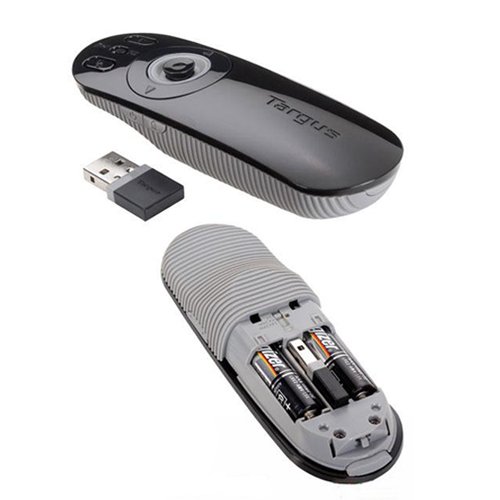
Image: The Targus Presenter AMP09AP, its USB receiver, and the open battery compartment revealing two AAA batteries.
3. Connexió del receptor USB
- Remove the USB receiver from its storage slot within the presenter.
- Connecteu el receptor USB a un port USB disponible de l'ordinador.
- L'ordinador hauria de detectar i instal·lar automàticament els controladors necessaris.
El comandament a distància ja està llest per al seu ús.
Instruccions de funcionament
Mode de presentació
The presenter's simplistic layout allows for easy navigation during presentations.
Imatge: Superior view of the Targus Presenter AMP09AP, highlighting the laser pointer button, slide navigation buttons, and the mode switch.
- Punter làser: Press and hold the dedicated laser button to activate the laser pointer for highlighting content.
- Diapositiva següent: Press the forward arrow button to advance to the next slide.
- Diapositiva anterior: Press the backward arrow button to return to the previous slide.
- Botons retroil·luminats: Buttons are backlit for visibility in dimly lit rooms.
Cursor Control Mode
The presenter features cursor control for remote access to programs and media functions.
- Activating Cursor Control: Use the mode switch (located at the top right of the remote) to toggle between presentation and cursor control modes.
- Moving Cursor: Use the central circular button (joystick/directional pad) to move the mouse cursor on the screen.
- Fent clic: Press the center of the circular button to perform a left-click action.
- Control de volum: Adjust the volume for music and videos remotely using the designated volume controls (if available on your specific model).
abast sense fils
The wireless technology allows operation up to 50 feet (approximately 15 meters) from the computer, providing flexibility during presentations.
Manteniment
- Neteja: Wipe the presenter with a soft, dry cloth. Avoid using harsh chemicals or abrasive cleaners.
- Substitució de la bateria: Replace batteries when the indicator light (if present) signals low power, or when performance degrades. Ensure correct polarity during replacement.
- Emmagatzematge: When not in use, store the USB receiver inside the presenter's dedicated slot to prevent loss. Store the presenter in a cool, dry place.
Resolució de problemes
| Problema | Causa possible | Solució |
|---|---|---|
| El presentador no respon | Bateries baixes o esgotades | Substituïu les piles per piles alcalines noves. |
| El presentador no respon | El receptor USB no està ben connectat | Assegureu-vos que el receptor USB estigui ben connectat a un port USB que funcioni de l'ordinador. Proveu-ho amb un altre port USB. |
| El presentador no respon | Fora de rang | Move closer to the computer (within 50 feet / 15 meters). |
| El punter làser no funciona | Bateria baixa | Substituïu les piles. |
| Cursor control erratic or not working | Interference or mode not activated | Ensure no obstructions between presenter and receiver. Check if cursor control mode is active using the mode switch. |
Especificacions
| Característica | Detall |
|---|---|
| Marca | Targus |
| Número de model | AMP09AP-51 |
| Color | Negre i gris |
| Dimensions (LxWxH) | 12.1 x 3.8 x 2.5 cm |
| Pes de l'article | 140 g |
| Tecnologia de connectivitat | Sense fil |
| abast sense fils | Fins a 50 peus (aproximadament 15 metres) |
| Tipus de bateria | Alcalí (no inclòs) |
| Components inclosos | Presentation Remote, USB Receiver |
| Característiques especials | Ergonomic design, Laser pointer, Cursor control, Backlit buttons |
Garantia i Suport
For warranty information and technical support, please refer to the documentation provided with your purchase or visit the official Targus weblloc web. Conserveu el comprovant de compra per a reclamacions de garantia.


