1. Introducció
Welcome to the user manual for your Logitech G600 MMO Gaming Mouse. This guide will assist you in setting up, understanding the features, and maintaining your new gaming mouse. Designed specifically for Massively Multiplayer Online (MMO) games, the G600 offers extensive customization and comfort for prolonged gaming sessions.
2. Producte acabatview i Característiques
The Logitech G600 MMO Gaming Mouse is engineered for precision and control, featuring a robust set of programmable buttons and customizable lighting.
Característiques principals:
- 20 MMO Tuned Buttons: Includes a unique 12-button thumb panel designed for quick, no-look navigation and command execution.
- G-Shift Ring Finger Button: A dedicated button that instantly doubles the number of actions you can perform with every other button, providing unparalleled control.
- Built for Comfort: Its sculpted shape and tuned buttons are designed to reduce click fatigue during marathon multiplayer sessions.
- Total Personalization: Customize thumb panel lighting colors, DPI levels, and button assignments through the Logitech G HUB software.
- Low Friction PTFE Feet: Ensures smoother motions, precise cursor movements, and improved accuracy on nearly any surface.

Figure 2.1: Logitech G600 MMO Gaming Mouse, top view, espectacleasing its ergonomic design and central scroll wheel with G7 and G8 buttons.

Figura 2.2: Angle view of the Logitech G600 MMO Gaming Mouse, highlighting the 12 programmable thumb buttons on the side, designed for easy access during gameplay.
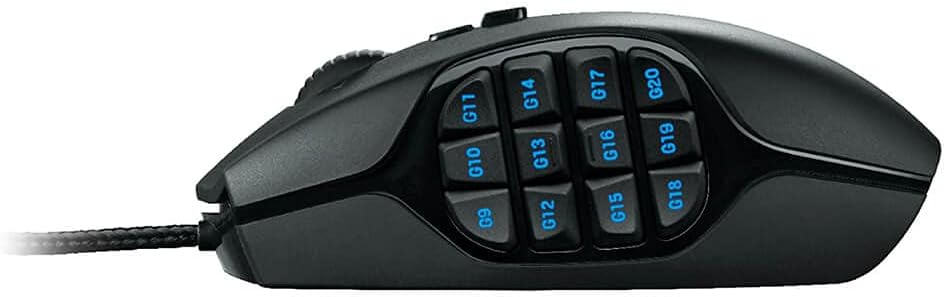
Figura 2.3: Pro lateralfile of the Logitech G600 MMO Gaming Mouse, clearly displaying the arrangement of the 12 G-keys on the thumb panel.
3. Configuració
3.1 Què hi ha a la caixa
- Ratolí per a jocs Logitech G600 MMO
- Documentació d'usuari
3.2 Connexió del ratolí
- Unpack the Logitech G600 mouse and its documentation.
- Localitza un port USB disponible al teu ordinador.
- Plug the USB connector of the G600 mouse into the USB port.
- Your operating system (Windows Vista, Windows 7, Windows 8, or later) will automatically detect and install basic drivers for the mouse.
3.3 Software Installation (Logitech G HUB)
To unlock the full customization potential of your G600 mouse, including programmable buttons, DPI settings, and RGB lighting, it is highly recommended to install the Logitech G HUB software.
- Obre el teu web browser and navigate to the official Logitech G HUB download page.
- Download the latest version of the Logitech G HUB software compatible with your operating system.
- Executeu l'instal·lador descarregat i seguiu les instruccions que apareixen a la pantalla per completar la instal·lació.
- Once installed, launch Logitech G HUB to begin customizing your G600 mouse.
4. Funcionament del ratolí
4.1 Funcions bàsiques
- Clic esquerre: Acció primària.
- Clic dret: Secondary action, typically context menus.
- Roda de desplaçament: Scroll up/down, and can be clicked for middle-click functionality.
- G7/G8 Buttons: Located behind the scroll wheel, these are typically used for on-the-fly DPI switching.
- Thumb Panel G-Keys (G9-G20): These 12 buttons are fully programmable for macros, keybinds, and other commands.
- G-Shift Button: The third click button, located under the ring finger, activates a secondary set of functions for all other buttons when held down.
4.2 Customizing with Logitech G HUB
Logitech G HUB allows you to create custom profiles for different games and applications, assign commands to buttons, adjust DPI sensitivity, and personalize RGB lighting.
- Assignacions de botons: Drag and drop commands from the G HUB interface onto any of the 20 programmable buttons.
- Sensibilitat DPI: Set up to five DPI levels, which can be cycled through using the G7/G8 buttons. This allows for quick adjustments between precise aiming and fast movement.
- Il·luminació: Customize the RGB backlighting of the thumb panel buttons to match your setup or game profile.
- Profiles: Crea i gestiona diversos professionalsfiles for different games or applications. G HUB can automatically switch profiles when you launch a specific game.
5. Manteniment
Proper care will ensure the longevity and optimal performance of your Logitech G600 mouse.
- Neteja: Utilitzeu un drap suau i sense pelusa lleugerament dampened with water or a mild cleaning solution to wipe down the mouse surface. Avoid harsh chemicals or abrasive materials.
- Cura del sensor: Keep the optical sensor on the underside of the mouse clean and free of dust or debris. Use a can of compressed air to gently blow away any particles.
- Gestió de cables: Eviteu doblegar bruscament o estirar excessivament el cable USB trenat per evitar danys interns.
- Emmagatzematge: Quan no l'utilitzeu, guardeu el ratolí en un entorn net i sec, allunyat de temperatures extremes.
6. Solució De Problemes
If you encounter issues with your Logitech G600 mouse, try the following troubleshooting steps:
| Problema | Possible solució |
|---|---|
| El ratolí no respon. |
|
| Buttons are not working or are unresponsive. |
|
| El moviment del cursor és erràtic o irregular. |
|
| RGB lighting is not working or incorrect. |
|
If these steps do not resolve your issue, please refer to the Logitech support weblloc o contacteu amb el servei d'atenció al client.
7. Especificacions
| Característica | Detall |
|---|---|
| Marca | Logitech |
| Número de model | 910-002864 |
| Tecnologia de connectivitat | USB (per cable) |
| Detecció de moviment | Òptic |
| Botons programables | 20 |
| Color | Negre |
| Pes de l'article | 4.7 unces (aproximadament 133 grams) |
| Dimensions del producte (LxWxH) | 4.6 x 2.9 x 1.6 polzades (11.7 x 7.4 x 4.1 cm) |
| Plataforma de maquinari | PC |
| Compatibilitat de sistemes operatius | Windows Vista, Windows 7, Windows 8, and later |

Figure 7.1: Logitech G600 MMO Gaming Mouse Dimensions.
8. Garantia i Suport
Logitech products are manufactured to the highest quality standards. For detailed warranty information, please refer to the warranty card included with your product or visit the official Logitech weblloc.
For additional support, FAQs, and driver downloads, please visit the Suport Logitech Weblloc. You can also refer to the official Guia de l'usuari (PDF) per a més detalls.


