Introducció
This user manual provides comprehensive instructions for the DISH Network 40.0 UHF 2G Remote, designed specifically for use with DISH Hopper and Joey Receivers. This remote offers reliable control over your entertainment system, utilizing a UHF signal for enhanced range and performance.
Configuració
1. Instal·lació de la bateria
The DISH Network 40.0 remote requires two (2) AA batteries for operation. Follow these steps to install them:
- Localitzeu el compartiment de la bateria a la part posterior del comandament a distància.
- Feu lliscar la tapa de la bateria cap avall i aixequeu-la.
- Introduïu dues piles AA, assegurant-vos que els terminals positiu (+) i negatiu (-) s'alineïn correctament amb els indicadors de l'interior del compartiment.
- Torneu a col·locar la tapa de la bateria fent-la lliscar fins que faci clic de manera segura.
2. Pairing the Remote with Your Receiver
The 40.0 remote operates using a UHF signal, which requires pairing with your Hopper or Joey receiver. This allows the remote to control the receiver without needing a direct line of sight.
- Ensure your Hopper or Joey receiver is powered on.
- Al comandament a distància, premeu el botó INFORMACIÓ DEL SISTEMA botó (o MENÚ then navigate to Configuració > Control remot > Parella el comandament a distància).
- Follow the on-screen prompts to complete the pairing process. This typically involves pressing a specific button combination on the remote or confirming a code displayed on the screen.
- Once successfully paired, a confirmation message will appear on your TV screen.
For detailed pairing instructions specific to your receiver model, refer to your receiver's user manual or the DISH Network support weblloc.
Instruccions de funcionament
The DISH Network 40.0 remote provides intuitive control over your Hopper or Joey receiver. Below is an overview of key buttons and their functions.
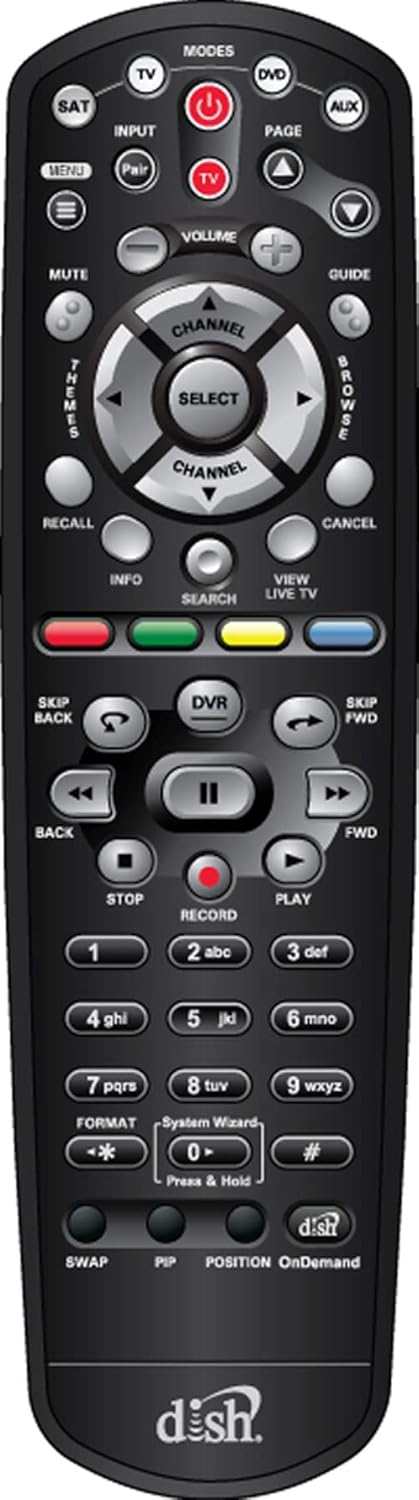
Figura 1: Frontal view of the DISH Network 40.0 UHF 2G Remote, showing all buttons and their layout.
Funcions del botó remot
| Botó | Funció |
|---|---|
| PODER | Encén/apaga el receptor i el televisor. |
| MODES (TV, DVD, AUX, SAT) | Selects the device the remote controls. Ensure SAT mode is selected for receiver control. |
| ENTRADA | Changes the input source on your TV. |
| MENÚ | Accesses the main menu of the DISH receiver. |
| GUIA | Mostra la guia del programa. |
| VOLUM (+/-) | Ajusta el volum del televisor. |
| CHANNEL (+/-) | Canvia el canal. |
| SELECT / Navigation Arrows | Navega pels menús i selecciona opcions. |
| DVR | Accesses your Digital Video Recorder (DVR) recordings. |
| PLAY, PAUSE, STOP, FWD, BACK, SKIP FWD, SKIP BACK | Controla la reproducció de televisió en directe i contingut gravat. |
| REGISTRAR | Inicia l'enregistrament del programa actual. |
| INFO | Mostra informació del programa. |
| CERCAR | Opens the search function for programs and content. |
| VIEW TV EN DIRECTE | Torna a la televisió en directe. |
| Botons de colors (vermell, verd, groc, blau) | Functions vary depending on the on-screen menu or application. For Hopper 3, these buttons may offer enhanced features like one-click Closed Captioning (Green button). |
| Teclat numèric (0-9) | Direct channel entry and text input. |
| CANVI | Switches between the current and previous channel. |
| PIP | Picture-in-Picture function (if supported by receiver/TV). |
| A la carta | Accedeix a contingut a la carta. |
For specific programming of the TV, DVD, or AUX modes, refer to the programming instructions provided with your receiver or on the DISH Network support website. The remote may come with a label sheet for custom input programming, as shown in Figure 2.

Figure 2: DISH Network 40.0 UHF 2G Remote shown with an accompanying sheet of input labels, which can be used to customize the remote's functions for various devices.
Manteniment
To ensure the longevity and optimal performance of your DISH Network 40.0 remote, follow these maintenance guidelines:
- Neteja: Feu servir un drap suau i sec per netejar el comandament a distància. Per a la brutícia persistent, netegeu lleugerament.ampNetegeu el drap amb aigua o un netejador suau i no abrasiu. Eviteu la humitat excessiva i els productes químics agressius.
- Substitució de la bateria: Replace batteries when the remote's response becomes sluggish or if the indicator light (if present) signals low battery. Always replace both batteries at the same time with new ones of the same type (AA).
- Emmagatzematge: Guardeu el comandament a distància en un lloc fresc i sec, allunyat de la llum solar directa, de temperatures extremes i d'alta humitat.
- Eviteu les gotes: Protegiu el comandament a distància d'impactes físics, ja que les caigudes poden danyar els components interns.
Resolució de problemes
If you encounter issues with your DISH Network 40.0 remote, try the following solutions:
| Problema | Possible causa/solució |
|---|---|
| El comandament a distància no respon. |
|
| Remote controls TV but not receiver. |
|
| Remote controls receiver but not TV (e.g., volume, power). |
|
| Els botons són enganxosos o no responen. |
|
If these steps do not resolve the issue, contact DISH Network customer support for further assistance.
Especificacions
| Característica | Detall |
|---|---|
| Número de model | EL-UDON-81457 (DISH Network 40.0) |
| Compatibilitat | DISH Hopper and Joey Receivers only |
| Tipus de comunicació | UHF (Ultra High Frequency) 2G Signal |
| Font d'alimentació | 2 x AA Batteries (required) |
| Dimensions (L x A x A) | 8.5 x 1.2 x 4.1 polzades (aproximadament) |
| Pes de l'article | 4 unces (aproximadament, sense piles) |
| Color | Negre |
| Nombre màxim de dispositius compatibles | 4 (SAT, TV, DVD, AUX) |
Garantia i Suport
Informació de la garantia
This product is typically covered by a limited warranty provided by DISH Network or the retailer from whom it was purchased. Warranty terms and conditions may vary. Please retain your proof of purchase for warranty claims.
Note: The provided product information includes a legal disclaimer from a specific seller regarding returns. For official product warranty, please refer to DISH Network's official documentation.
Atenció al client
For further assistance, technical support, or to inquire about replacement parts, please contact DISH Network customer service:
- DISH Network Official Weblloc: www.dish.com/support
- Suport telefònic: Refer to the DISH Network weblloc web per a números de contacte actuals.
When contacting support, please have your receiver model number and the remote's model number (EL-UDON-81457) readily available.


