1. Introducció
The Cisco Small Business 16-Port Gigabit Switch SG100-16 is an unmanaged network switch designed to provide basic network connectivity and reliability for small business environments. This device offers wire-speed Gigabit Ethernet connectivity, enabling high-performance data transfer for various business applications, including bandwidth-intensive video services. It is designed for ease of use, requiring no software installation or configuration.
Les característiques clau inclouen:
- Funcionament Plug and Play: No configuration required; ports automatically adjust for optimal speed and duplex mode.
- Alt rendiment: Supports Gigabit Ethernet speeds for fast file transfers and smooth application performance.
- Desplegament flexible: Available in desktop and rack-mount models with wall-mount options for discreet placement.
- Qualitat de servei (QoS): Supports advanced features to prioritize network traffic.
2. Configuració
This section outlines the steps for setting up your Cisco SG100-16 Gigabit Switch. The switch is designed for simple, plug-and-play installation.
2.1 Contingut del paquet
Comproveu que el vostre paquet contingui els elements següents:
- Cisco SG100-16 Gigabit Switch
- Adaptador/cable d'alimentació
- Rack-mount brackets (if applicable)
- Rubber feet for desktop placement
- Documentació (Guia d'inici ràpid)
2.2 Col·locació física
Choose a suitable location for the switch, considering:
- Ventilació: Ensure adequate airflow around the device to prevent overheating.
- Font d'alimentació: Proximity to a reliable power outlet.
- Gestió de cables: Easy access for network cables.
- Medi ambient: Avoid areas with excessive dust, moisture, or extreme temperatures.
The switch can be placed on a desktop, mounted on a wall, or installed in a rack using the provided brackets.

Figura 1: Frontal view of the Cisco SG100-16 Gigabit Switch, showing 16 Ethernet ports and status indicators. Rack-mount ears are attached.
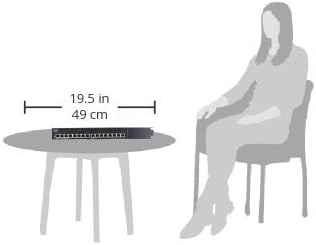
Figure 2: Illustrative diagram demonstrating the compact size of the Cisco SG100-16 switch, measuring approximately 19.5 inches (49 cm) in width, suitable for desktop placement.
2.3 Connexió del commutador
- Connectar l'alimentació: Plug the power cord into the switch's power input and then into a grounded electrical outlet. The Power LED on the front panel should illuminate.
- Connectar dispositius de xarxa: Connect your network devices (computers, printers, servers, routers, etc.) to any of the 16 Ethernet ports on the front panel using standard Ethernet cables. The Link/Act LED for each connected port will light up, indicating an active connection. It will blink to show network activity.
- Verifica les connexions: Ensure all connected devices are powered on and their network adapters are enabled. The switch will automatically detect the speed and duplex mode of each connected device.
3. Funcionament
The Cisco SG100-16 is an unmanaged switch, meaning it operates without requiring any user configuration. Once connected, it automatically facilitates network communication between connected devices.
3.1 Encès/Apagat
To power on the switch, connect it to a power source. There is no dedicated power button. To power off, disconnect the power cord.
3.2 Indicadors LED
El panell frontal inclou indicadors LED que proporcionen informació d'estat:
- LED PWR (alimentació):
- Verd sòlid: L'interruptor està encès i funciona amb normalitat.
- Apagat: L'interruptor està apagat o no rep alimentació.
- Link/Act (Link/Activity) LEDs (per port):
- Verd sòlid: S'ha establert un enllaç de xarxa vàlid al port.
- Verd intermitent: Les dades s'estan transmetent o rebent a través del port.
- Apagat: No device is connected, or the connected device is powered off/has no link.
3.3 Qualitat de servei (QoS)
The SG100-16 switch supports Quality of Service (QoS) to help prioritize network traffic. This feature automatically identifies and prioritizes delay-sensitive traffic, such as voice and video, to ensure smooth performance even during periods of high network utilization. No user configuration is required for this function.
4. Manteniment
The Cisco SG100-16 switch is designed for reliable, low-maintenance operation. Regular maintenance is minimal.
- Neteja: Periodically clean the exterior of the switch with a soft, dry cloth. Do not use liquid or aerosol cleaners. Ensure ventilation openings are free from dust accumulation.
- Actualitzacions de firmware: As an unmanaged switch, firmware updates are typically not user-installable or required. If a critical update is released by Cisco, consult the official Cisco support weblloc per obtenir instruccions.
- Condicions ambientals: Ensure the switch remains within its specified operating temperature and humidity ranges to prolong its lifespan.
5. Solució De Problemes
This section provides solutions to common issues you might encounter with your SG100-16 switch.
5.1 Sense poder
- Símptoma: The PWR LED is off.
- Solució:
- Ensure the power cord is securely connected to the switch and a working electrical outlet.
- Verifiqueu que la presa de corrent funciona connectant-hi un altre dispositiu.
5.2 No hi ha llum d'enllaç en un port
- Símptoma: The Link/Act LED for a connected device is off.
- Solució:
- Ensure the Ethernet cable is securely plugged into both the switch port and the device.
- Prova un cable Ethernet diferent per descartar un cable defectuós.
- Verify the connected device is powered on and its network adapter is enabled.
- Proveu de connectar el dispositiu a un port diferent de l'interruptor.
- Reinicieu el dispositiu connectat.
5.3 Rendiment de xarxa lent
- Símptoma: Data transfer speeds are slower than expected.
- Solució:
- Ensure all connected devices and cables support Gigabit Ethernet (Cat5e or Cat6 cables are recommended for Gigabit speeds).
- Comproveu si hi ha trànsit de xarxa excessiu o aplicacions que consumeixen molta amplada de banda i que s'executen en dispositius connectats.
- Verify that the Link/Act LEDs are solid green (indicating a Gigabit connection) rather than amber (which might indicate a 10/100 Mbps connection on some switches, though this model uses green for both link speeds).
- Isolate the issue by testing performance with fewer devices connected.
5.4 Connectivitat intermitent
- Símptoma: Network connection drops sporadically.
- Solució:
- Comproveu totes les connexions dels cables per si hi ha fluïdesa o danys.
- Ensure the switch is placed in a well-ventilated area to prevent overheating.
- Test with different cables and devices to pinpoint the source of the intermittency.
- Consider potential sources of electromagnetic interference (EMI) near the switch or cables.
6. Especificacions
The following table lists the technical specifications for the Cisco SG100-16 Gigabit Switch:
| Característica | Detall |
|---|---|
| Número de model | SG100-16-NA |
| Nombre de Ports | 16 Gigabit Ethernet |
| Velocitat de transferència de dades | 1000 megabits per segon (Mbps) |
| Tipus d'interfície | Ethernet |
| Dimensions (LxWxH) | 11" x 6.7" x 1.75" (279.4 x 170 x 44.5 mm) |
| Pes de l'article | 3.15 lliures (1.43 kg) |
| Voltage | 240 Volts (AC input, specific range depends on power adapter) |
| Compatibilitat de sistemes operatius | Linux, Mac OS, Windows (OS independent) |
| Color | Plata/Negre |
| Fabricant | Cisco |
7. Garantia i Suport
For detailed warranty information, please refer to the warranty card included with your product or visit the official Cisco website. Cisco provides various support resources for its products.
7.1 Suport tècnic
If you encounter issues that cannot be resolved using the troubleshooting steps in this manual, please contact Cisco Technical Support. Have your product model number (SG100-16-NA) and serial number ready when contacting support.
You can find support resources, including FAQs, documentation, and contact information, on the official Cisco weblloc:
- Suport de Cisco Weblloc: www.cisco.com/go/support
- Cisco Small Business Community: community.cisco.com
Please note that warranty terms and support availability may vary by region and product. Always refer to the most current information provided by Cisco.


