1. Instruccions de seguretat importants
Please read these instructions carefully before operating the unit and retain them for future reference. Following these guidelines will ensure safe and proper use of your GPX R602B radio.
- Aigua i humitat: Do not use this apparatus near water. Avoid exposure to rain or moisture.
- Fonts de calor: No instal·leu a prop de cap font de calor com ara radiadors, registres de calor, estufes o altres aparells (inclosos amplificadors) que produeixen calor.
- Ventilació: Assegureu-vos que hi hagi una ventilació adequada. No bloquegeu cap obertura de ventilació.
- Fonts d'alimentació: Operate only from the type of power source indicated on the marking label.
- Neteja: Netegeu només amb un drap sec.
- Adjunts: Utilitzeu només accessoris/accessoris especificats pel fabricant.
- Manteniment: Demaneu tot el servei a personal de servei qualificat. El manteniment és necessari quan l'aparell s'ha fet malbé d'alguna manera, com ara el cable d'alimentació o l'endoll està danyat, s'ha vessat líquid o han caigut objectes a l'aparell, l'aparell ha estat exposat a la pluja o la humitat, no funciona amb normalitat. , o s'ha deixat caure.
Seguretat de la bateria
- No barregeu piles velles i noves.
- No barregeu piles alcalines, estàndard (carboni-zinc) o recarregables (níquel-cadmi).
- Insert batteries correctly, observing the + and - polarities.
- Traieu les bateries esgotades ràpidament.
- Eliminar les piles correctament. No incinereu.
2. Característiques
The GPX R602B Portable AM/FM Radio offers a range of features designed for convenience and versatility:
- Portable AM/FM radio with a built-in handle for easy transport.
- Integrated speakers with analog volume control and durable metal grills.
- Digital clock with user-friendly setting buttons.
- Operates using the built-in AC power cable.
- Can also be powered by 3 C batteries (sold separately) for portable use.
- 3.5mm audio line input jack for connecting external audio devices.
- Telescopic antenna for improved FM reception.
- Stereo headphone jack for private listening.

Figure 2.1: Key features and connection points of the GPX R602B radio.
3. Contingut del paquet
Upon unpacking your GPX R602B radio, please ensure all the following items are present:
- GPX R602B Portable AM/FM Radio Unit
- Manual del propietari
- Built-in AC Power Adapter
4. Controls i indicadors
Familiarize yourself with the controls and indicators on your radio for optimal operation.
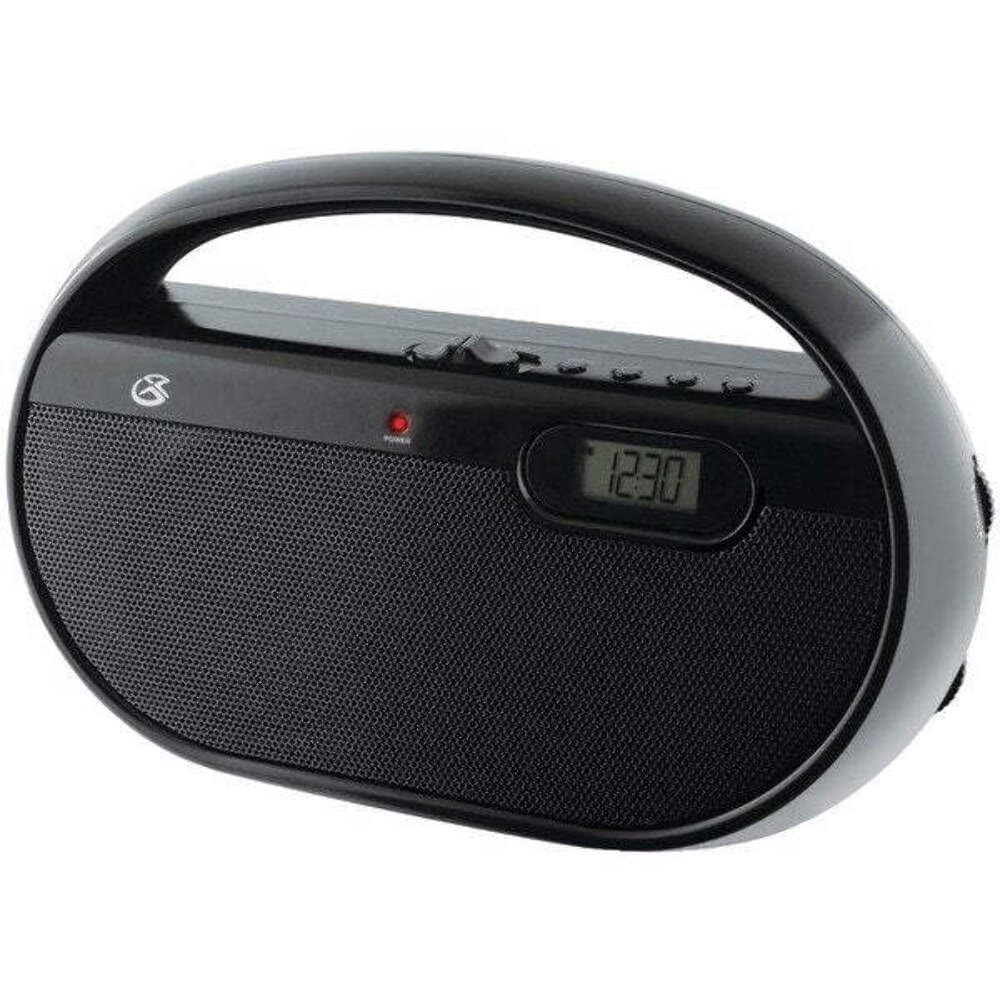
Figura 4.1: Frontal view of the GPX R602B radio.
Control Layout (Refer to Figure 4.1)
- Control de potència/volum: Rotates to turn the unit ON/OFF and adjust the volume level.
- Pom d'afinació: Rotates to select AM or FM radio stations.
- Interruptor selector de banda: Slides to select between AM and FM radio bands.
- Pantalla digital: Shows the current time or radio frequency.
- Botó Configura l'hora: Used in conjunction with H/M buttons to set the clock.
- H/M Buttons: Used to adjust hours and minutes when setting the clock.
- Display Time Button: Briefly shows the time when the radio is playing.
- Aux In Jack (3.5mm): Connecteu dispositius d'àudio externs.
- Presa d'auriculars (3.5 mm): Connecteu els auriculars per a una escolta privada.
- Antena telescòpica FM: Extend and adjust for optimal FM reception.
5. Alimentació de la unitat
The GPX R602B radio can be powered by either AC power or batteries.
Funcionament d'alimentació de CA.
- Locate the built-in AC power cord. This cord is typically stored in the battery compartment when not in use.
- Plug the AC power cord into a standard wall outlet (120V AC, 60Hz).
- La unitat ja està a punt per funcionar.
Funcionament amb bateria
For portable use, the radio requires 3 'C' size batteries (not included).
- Obriu la tapa del compartiment de la bateria situada a la part posterior de la unitat.
- Insert 3 'C' size batteries, ensuring the correct polarity (+ and -) as indicated inside the compartment.
- Tanqueu bé la tapa del compartiment de la bateria.
- The unit is now ready for battery-powered operation.

Figure 5.1: Power options for the GPX R602B radio.
6. Configuració i funcionament bàsic
Configuració inicial
- Connexió d'alimentació: Connect the radio to AC power or insert batteries as described in Section 5.
- Ajust de l'antena: For FM reception, extend the telescopic antenna fully. For AM reception, the unit has a built-in antenna, so no external adjustment is needed. Position the unit for best AM reception.
Funcionament de la ràdio
- Activar: Rotate the Power/Volume knob clockwise until it clicks and the unit powers on.
- Selecciona la banda: Slide the Band Selector switch to either AM or FM.
- Emissora de sintonització: Rotate the Tuning knob to find your desired radio station. The frequency will be displayed on the digital screen.
- Ajustar el volum: Rotate the Power/Volume knob to adjust the sound level.
- Apagar: Rotate the Power/Volume knob counter-clockwise until it clicks and the unit powers off.
Using the Line Input (Aux In)
You can connect external audio devices, such as smartphones or MP3 players, to play audio through the radio's speakers.
- Connect a 3.5mm audio cable (not included) from the headphone jack or line-out jack of your external device to the Aux In jack on the radio.
- Turn on the radio and your external device.
- Adjust the volume on both the radio and your external device for optimal sound.

Figure 6.1: Devices compatible with the Aux In feature.
Ús d'auriculars
For private listening, plug standard 3.5mm headphones (not included) into the Headphone Jack. The internal speakers will automatically mute.
Configuració del rellotge digital
The digital clock can be set when the radio is turned off.
- Ensure the radio is turned OFF using the Power/Volume knob.
- Premeu i manteniu premuts tots dos Estableix l'hora botó i el H/M botó simultàniament.
- Mentre sosteniu el Estableix l'hora button, repeatedly press the H/M button to adjust the hour and then the minutes.
- Allibera el Estableix l'hora button once the desired time is set.
- A view the time while the radio is playing, press the Temps de visualització button. The time will appear briefly on the digital display.
7. Manteniment
Proper care and maintenance will ensure the longevity of your GPX R602B radio.
- Neteja: Netegeu l'exterior de la unitat amb un drap suau i sec. No utilitzeu productes de neteja abrasius, ceres ni dissolvents.
- Substitució de la bateria: If using batteries, replace all three 'C' batteries when the unit's performance diminishes. Always replace with new batteries of the same type.
- Emmagatzematge: If storing the unit for an extended period, remove the batteries to prevent leakage and corrosion.
8. Solució De Problemes
If you encounter issues with your GPX R602B radio, refer to the following common problems and solutions:
| Problema | Causa possible | Solució |
|---|---|---|
| Sense poder | AC cord not plugged in; Batteries exhausted or incorrectly inserted. | Ensure AC cord is securely plugged into a live outlet. Replace batteries with new ones, checking polarity. |
| Mala recepció de ràdio | Antenna not extended (FM); Unit poorly positioned (AM); Weak signal. | Extend and adjust the telescopic FM antenna. For AM, rotate the unit for better reception. Try moving the radio to a different location. |
| No hi ha so dels altaveus | Volum massa baix; Auriculars connectats. | Increase the volume using the Power/Volume knob. Disconnect headphones if not desired. |
| Clock not setting correctly | Seqüència de botons incorrecta. | Ensure the radio is OFF. Press and hold both 'Set Time' and 'H/M' buttons simultaneously, then repeatedly press 'H/M' to adjust. Release 'Set Time' when done. |
| So distorsionat o poc clar | Volume too high; Poor reception; External device volume too high. | Lower the volume. Adjust antenna or unit position for better reception. If using Aux In, adjust volume on the external device. |
9. Especificacions
Detailed technical specifications for the GPX R602B Portable AM/FM Radio:
- Número de model: R602B
- Dimensions del producte (L x A x A): 9.62 x 3.74 x 6.3 polzades (24.43 x 9.50 x 16.00 cm)
- Pes de l'article: 1.76 lliures (0.80 kg)
- Font d'alimentació: AC 120V, 60Hz or 3 x 'C' size batteries (not included)
- Tecnologia del sintonitzador: AM/FM
- Bandes de ràdio admeses: 2-Band (AM/FM)
- Tecnologia de connectivitat: Radio, 3.5mm Aux In
- Característiques especials: Built-In AM Antenna, Built-In Clock, Portable, Telescopic FM Antenna, 3.5mm Headphone Jack
- Color: Negre
- Fabricant: Digital Products International, Inc.
- Data de primera disponibilitat: 5 de juny de 2012
10. Garantia i Suport
For warranty information and customer support regarding your GPX R602B radio, please refer to the warranty card included with your purchase or visit the official GPX weblloc web. Conserveu el rebut de compra com a comprovant de compra per a qualsevol reclamació de garantia.
If you require technical assistance or have questions not covered in this manual, please contact GPX customer service directly. Contact details are typically available on the manufacturer's weblloc o a l'embalatge del producte.