1. Introducció
Thank you for choosing the Hama 95236 8-inch LCD Digital Photo Frame. This manual provides important information regarding the safe operation, setup, and maintenance of your device. Please read it thoroughly before using the product and keep it for future reference.
2. Instruccions de seguretat
- Do not open the device. Incorrect assembly or repair can lead to electric shock.
- No utilitzeu el producte si està visiblement danyat.
- Protect the product from dirt, moisture, and overheating. Use it only in dry environments.
- No deixeu caure el producte ni l'exposeu a fortes vibracions.
- Utilitzeu el producte només per al propòsit previst.
- Mantingueu aquest producte, com tots els productes elèctrics, fora de l'abast dels nens.
- Eliminar el material d'embalatge immediatament d'acord amb la normativa local aplicable.
3. Contingut del paquet
Si us plau, comproveu que el paquet contingui els elements següents:
- Hama 95236 8-inch LCD Digital Photo Frame
- Adaptador d'alimentació
- Manual d'usuari (aquest document)
4. Producte acabatview
Familiarize yourself with the components and controls of your digital photo frame.
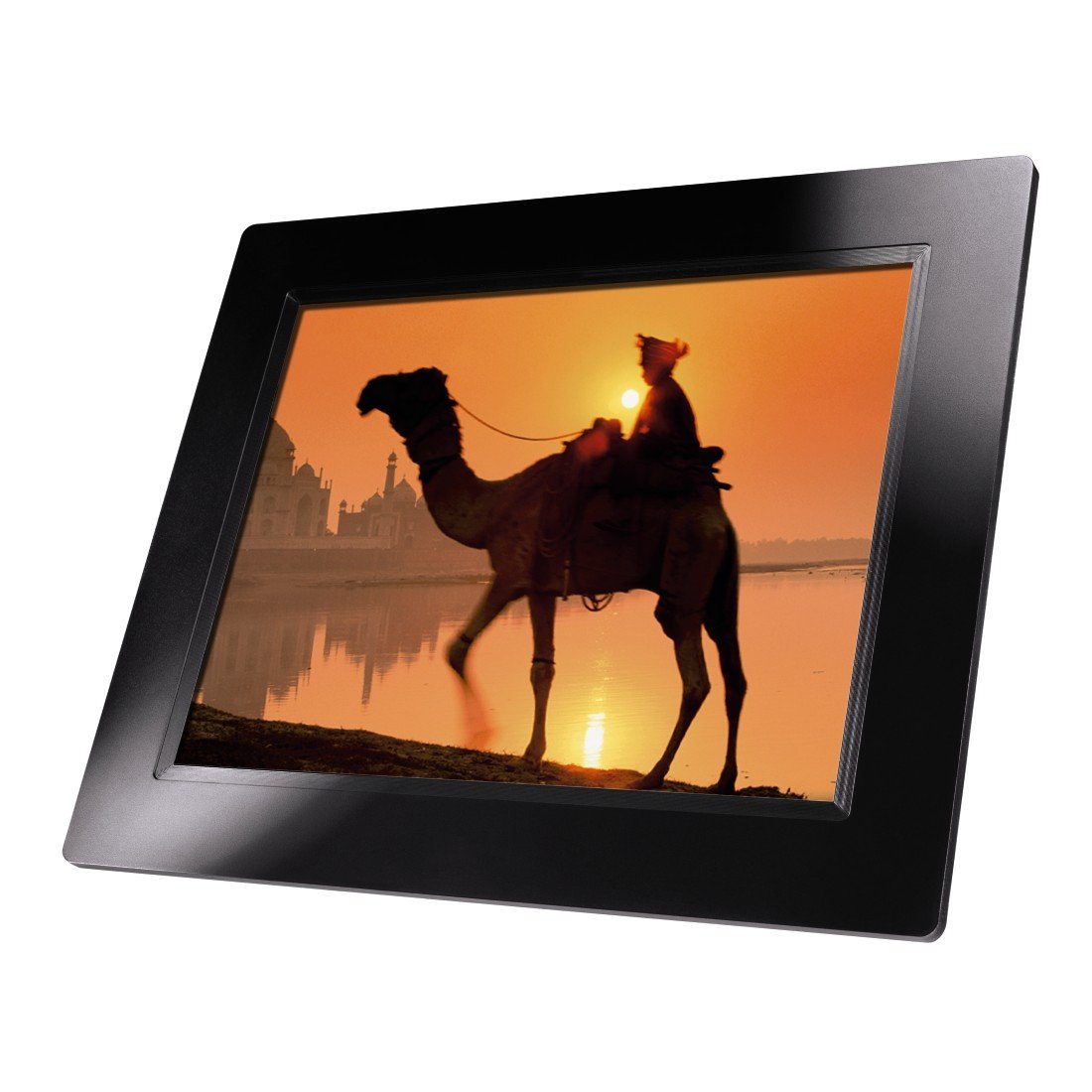
Figura 4.1: Davant view of the Hama 95236 Digital Photo Frame, showing the 8-inch LCD screen.

Figura 4.2: lateral view of the digital photo frame, highlighting the various input ports including the SD/MMC/MS card slot, USB port, and DC IN power port.

Figura 4.3: posterior view of the digital photo frame, showing the stand attachment point, ventilation grilles, and the control panel with power, navigation, and menu buttons.
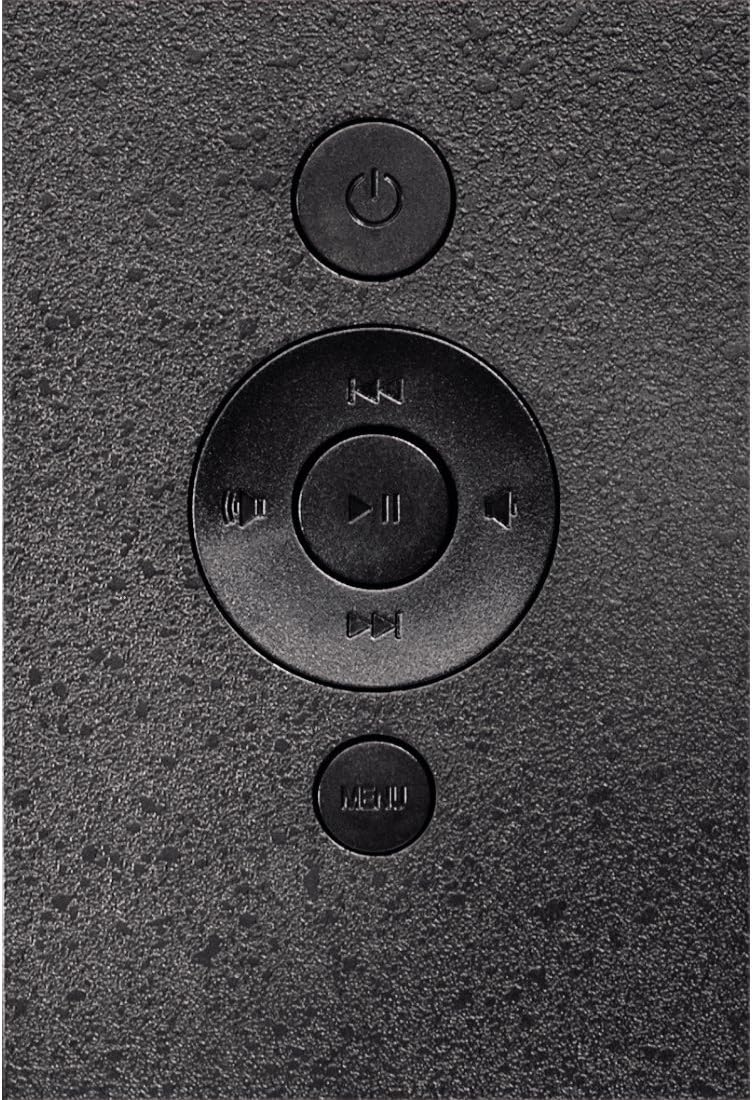
Figura 4.4: Close-up of the control buttons located on the back of the frame. These include the power button, directional navigation buttons (up, down, left, right), play/pause/enter button, and the menu button.
4.1. Ports i controls
- SD/MMC/MS Card Slot: For inserting memory cards to display photos and videos.
- Port USB: For connecting USB flash drives or other compatible USB storage devices.
- DC IN: Power input for connecting the provided power adapter.
- Botó d'encesa: Encén o apaga el dispositiu.
- Botons de navegació (amunt/avall/esquerra/dreta): Serveix per navegar pels menús i seleccionar opcions.
- Play/Pause/Enter Button: Confirms selections or controls media playback.
- Botó de menú: Accedeix al menú principal per a la configuració i les opcions.
5. Configuració
5.1. Fixació del suport
Insert the metal stand into the designated slot on the back of the digital photo frame. Ensure it is securely fastened to provide stable support for the frame.
5.2. Connexió d'alimentació
- Connect the power adapter to the DC IN port on the back of the photo frame.
- Connecteu l'adaptador d'alimentació a una presa de corrent adequada.
- El marc normalment s'encén automàticament o es pot encendre amb el botó d'engegada.
5.3. Inserting a Memory Card or USB Drive
The Hama 95236 supports SD/MMC/MS memory cards and USB flash drives.
- Locate the SD/MMC/MS card slot or the USB port on the side of the frame (refer to Figure 4.2).
- Carefully insert your memory card or USB drive into the corresponding slot/port. Ensure it is inserted correctly to avoid damage.
- The frame should automatically detect the storage device and prompt you to view its contents or start a slideshow.
6. Instruccions de funcionament
6.1. Navegació bàsica
Use the navigation buttons on the back of the frame to move through menus and options. The Play/Pause/Enter button confirms your selection.
6.2. Menú principal
Premeu el botó MENÚ button to access the main menu. From here, you can select different modes and settings:
- Foto: View photos in a slideshow or individually.
- Música: Reprodueix àudio files.
- Vídeo: Reprodueix el vídeo files.
- Calendar/Clock: Display the calendar and time.
- Configuració: Adjust various device parameters.
6.3. Photo Playback
- Al menú principal, seleccioneu Foto.
- Navigate to your desired folder or select all photos.
- Premeu el botó Reproduir/Pausa/Entrar button to start the slideshow.
- During a slideshow, you can use the navigation buttons to skip photos or pause playback.
6.4. Configuració del sistema
Accedeix al Configuració menu to customize your photo frame:
- Configuració de la pantalla: Adjust brightness, contrast, and display mode.
- Configuració de la presentació de diapositives: Configure transition effects, display time per photo, and repeat mode.
- Data i hora: Estableix la data i l'hora actuals. Note: Some users have reported that date and time settings may reset after power loss.
- Idioma: Select your preferred language for the menu interface.
- Informació d'emmagatzematge: View details about connected storage devices.
7. Manteniment
7.1. Neteja del dispositiu
- Desconnecteu sempre el dispositiu de la font d'alimentació abans de netejar-lo.
- Clean the screen and exterior surfaces with a soft, dry, lint-free cloth.
- Do not use aggressive cleaning agents, solvents, or abrasive materials.
7.2. Emmagatzematge
Si guardeu el dispositiu durant un període prolongat, desconnecteu-lo de l'alimentació i guardeu-lo en un lloc fresc i sec, allunyat de la llum solar directa i de temperatures extremes.
8. Solució De Problemes
| Problema | Causa possible | Solució |
|---|---|---|
| El dispositiu no s’encén. | L'adaptador de corrent no està connectat o està defectuós. | Ensure the power adapter is securely connected to both the frame and the power outlet. Test the outlet with another device. |
| No es mostren imatges. | No memory card/USB drive inserted or files not supported. | Insert a compatible memory card or USB drive with supported image formats (e.g., JPEG). Check if the storage device is properly inserted. |
| Restabliment de la data i l'hora després de l'apagada. | No hi ha bateria interna de reserva per al rellotge. | This model may not retain date/time settings without continuous power. Re-enter settings if necessary after power interruption. |
| Video playback is choppy or distorted. | Unsupported video format or high bitrate. | Assegura't de fer servir el vídeo files are in a supported format and resolution. Convert videos to a lower resolution or bitrate if issues persist. |
| Els botons no responen. | Error temporal de programari. | Disconnect the power adapter, wait a few seconds, then reconnect it to restart the device. |
9. Especificacions
| Característica | Detall |
|---|---|
| Número de model | 00095236 |
| Mida de la pantalla | 8 polzades |
| Resolució de visualització | 800 x 600 píxels |
| Relació d'aspecte | 4:3 |
| Emmagatzematge intern | 2 GB (2048 MB) |
| Connectivitat | USB, SD/MMC/MS Card Slot |
| Dimensions (L x A x A) | 2.6 x 22.2 x 17.8 cm |
| Pes | 550 g |
| Fabricant | Hama |
10. Informació de la garantia
Hama GmbH & Co KG provides a manufacturer's warranty for this product. The specific terms and conditions of the warranty period and coverage are subject to the purchase date and the region of purchase. Please retain your proof of purchase (receipt) for any warranty claims.
For detailed warranty information, please refer to the official Hama weblloc web o contacteu directament amb el seu servei d'atenció al client.
11. Atenció al client
Should you have any questions regarding this product, please contact Hama Customer Support:
- Weblloc: Visit the official Hama website for FAQs, drivers, and further product information. www.hama.com
- Contacte: Refer to the contact section on the Hama weblloc web per obtenir números de telèfon o correu electrònic d'assistència a la vostra regió.
Please have your model number (00095236) and proof of purchase ready when contacting support.


