1. Introducció
This manual provides detailed instructions for the operation and maintenance of your Deli Scientific Calculator, model DELI-91-1710. This calculator is designed for a wide range of mathematical and scientific calculations, offering 240 functions to support various academic and professional needs.
Key features include advanced scientific functions, statistical calculations, fraction operations, and memory capabilities. Please read this manual thoroughly to ensure proper use and to maximize the calculator's potential.
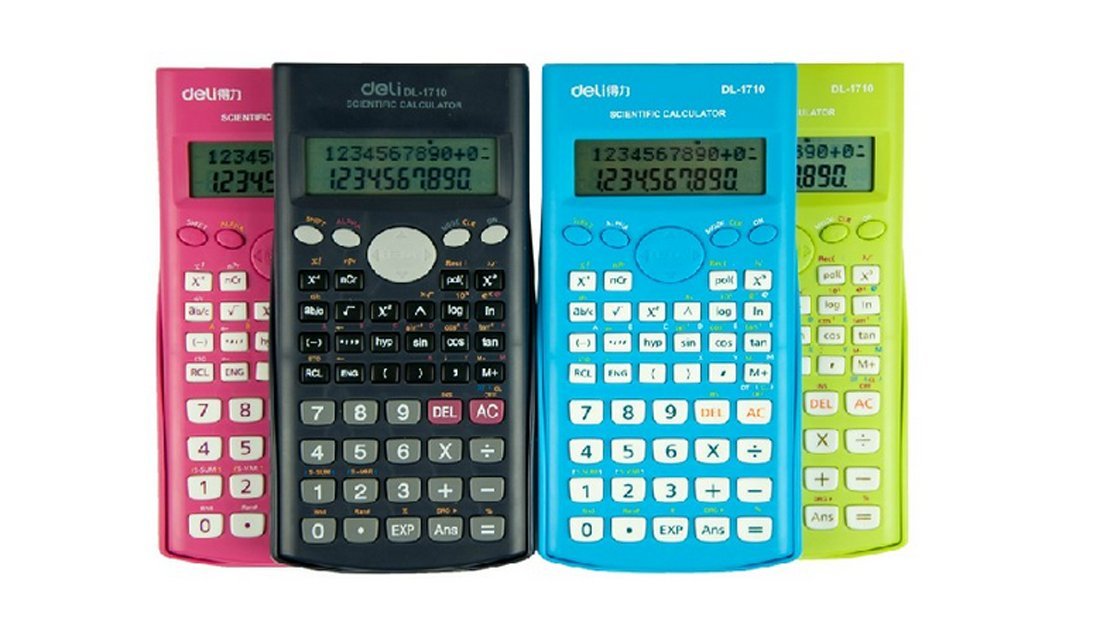
Figura 1: Deli Scientific Calculator DELI-91-1710. This image shows the calculator from an angled perspective, displaying its full keypad and display screen.
2. Configuració
2.1 Instal·lació de la bateria
The Deli Scientific Calculator DELI-91-1710 typically uses standard button cell batteries. To install or replace batteries:
- Assegureu-vos que la calculadora estigui apagada.
- Localitzeu la tapa del compartiment de la bateria a la part posterior de la calculadora.
- Use a small screwdriver (if required) to open the battery compartment.
- Insert new batteries, ensuring correct polarity (+/-) as indicated inside the compartment.
- Tanqueu de manera segura la tapa del compartiment de la bateria.
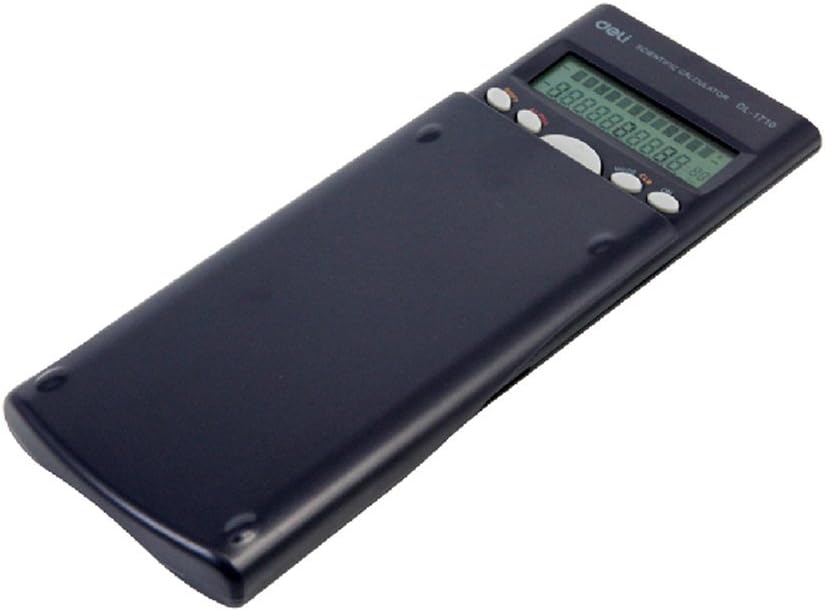
Figura 2: Enrere view of the Deli Scientific Calculator with its protective slide cover. The battery compartment is typically located on this side.
2.2 Encès inicial
Després de la instal·lació de la bateria, premeu el botó [ACTIVAT] button to power on the calculator. The display should show '0' or a similar initial state. If the display remains blank, recheck battery installation or replace with fresh batteries.
3. Instruccions de funcionament
This section details the various functions and operations of your Deli Scientific Calculator.
3.1 Operacions aritmètiques bàsiques
Feu sumes, restes, multiplicacions i divisions utilitzant la funció [+], [-], [×], [÷] claus. Premeu [=] per obtenir el resultat.
- ExampLI: Per calcular 15 + 7, premeu 1 5 [+] 7 [=].
3.2 Funcions científiques
The calculator supports 240 scientific functions. Access these using dedicated keys or by pressing the [MAJÚS] key followed by another function key.
- Funcions trigonomètriques: Ús [sin], [cos], [tan] for sine, cosine, and tangent. Inverse trigonometric functions (pecat-1, cos-1, bronzejat-1) are typically accessed via [MAJÚS].
- Funcions logarítmiques: Ús [log] for common logarithm (base 10) and [ln] for natural logarithm (base e).
- Potències i arrels: Ús [x2] per al quadrat, [√] for square root, and [xy] for general powers.
- Factorial: The factorial function (x!) is usually accessed via [MAJÚS].
3.3 Angle Modes
The calculator can operate in Degree (DEG), Radian (RAD), or Grad (GRA) modes. Press the [MODE] key repeatedly or use a dedicated [DRG] clau (sovint [MAJÚS] + [DRG]) to cycle through these modes. The current mode is indicated on the display.
3.4 Càlculs de fraccions
To perform calculations with fractions, use the fraction key (often denoted as [a b/c] or [d/c]). This allows input of mixed numbers and improper fractions.
- ExampLI: To input 1 2/3, press 1 [a b/c] 2 [a b/c] 3.
3.5 Funcions de memòria
The calculator includes independent memory functions.
- [M+]: Adds the displayed value to the memory.
- [M-]: Subtracts the displayed value from the memory.
- [RCL]: Recalls the value stored in memory to the display.
- [STO]: Stores the displayed value into a specific memory variable (if available).
- [MC]: Clears the memory (often [MAJÚS] + [M+] or a dedicated key).
3.6 Statistical Calculations
The calculator supports statistical calculations, including standard deviation and data editing.
- Enter STAT mode (usually via [MODE]).
- Input data points using the data entry key (e.g., [DADES] or [M+] in STAT mode).
- Use specific keys (often [MAJÚS] + statistical function keys) to calculate mean, standard deviation, sum of squares, etc.
3.7 Other Advanced Functions
- ANS Function: El [ANS] key recalls the result of the previous calculation.
- Multi-step Functional Importance: The calculator automatically applies the correct order of operations (PEMDAS/BODMAS).
- Continuous Calculation: Allows you to use the result of a previous calculation directly in the next operation without re-entering it.
- Permutacions i combinacions: Utilitza el [nPr] i [nCr] functions (often accessed via [MAJÚS]).
- Coordinate Conversion: Convert between rectangular and polar coordinates (e.g., [Pol] i [Rec] functions).
4. Manteniment
4.1 Neteja
Per netejar la calculadora, netegeu suaument la superfície amb un drap suau i sec. Per a la brutícia persistent, netegeu lleugeramentampen the cloth with water or a mild, non-abrasive cleaner. Avoid using strong solvents, alcohol, or abrasive materials, as these can damage the casing i pantalla.
4.2 Emmagatzematge
When not in use, store the calculator in a cool, dry place away from direct sunlight and extreme temperatures. Always use the protective slide cover to prevent damage to the keys and display.
4.3 Substitució de la bateria
Refer to section 2.1 for detailed instructions on battery replacement. Replace batteries promptly when the display becomes dim or erratic to ensure optimal performance and prevent data loss.
5. Solució De Problemes
If you encounter issues with your Deli Scientific Calculator, refer to the following common problems and solutions:
| Problema | Causa possible | Solució |
|---|---|---|
| La pantalla està en blanc o tènue. | Piles baixes o gastades; instal·lació incorrecta de la bateria. | Canvieu les piles, assegurant-vos de la polaritat correcta. |
| Resultats de càlcul incorrectes. | Incorrect mode setting (e.g., angle mode); syntax error; previous calculation error. | Check angle mode (DEG/RAD/GRA). Clear all calculations ([AC]) and re-enter. Perform a full reset if necessary. |
| La calculadora no respon a les tecles premudes. | Calculator frozen; low batteries. | Proveu de prémer [ACTIVAT] or [AC]. If unresponsive, remove and reinsert batteries to perform a hard reset. |
| Missatge d'error a la pantalla. | Mathematical error (e.g., division by zero, invalid input for function). | Review your input and the operation performed. Clear the error with [AC] or [CE]. |
5.1 Restablir la calculadora
If the calculator behaves erratically, a full reset may resolve the issue. This typically clears all memory and returns settings to default. Consult the specific instructions for your model, but often involves pressing [MAJÚS] aleshores [CLR] (Clear) or [RESET], and confirming the reset.
6. Especificacions
- Marca: xarcuteria
- Model: DELI-91-1710
- Número de peça: DELI-91-1710
- ASIN: B008WXTE40
- UPC: 702168016298
- Funcions: 240 scientific functions, including trigonometric, logarithmic, power, root, fraction, statistical (standard deviation, data editing), permutations, combinations, coordinate conversion, ANS function, multi-step functional importance, continuous calculation, independent memory.
- Modes d'angle: Degrees, Radians, Grads
- Font d'alimentació: Battery (type not specified, typically button cell)
- Visualització: Single-line LCD (typical for this model type)
7. Garantia i Suport
For warranty information, technical support, or service inquiries regarding your Deli Scientific Calculator DELI-91-1710, please refer to the documentation provided at the time of purchase or visit the official Deli weblloc web. Les dades de contacte del servei d'atenció al client solen estar disponibles al lloc web del fabricant. weblloc web o a través del vostre distribuïdor.


