1. Introducció
The Logitech C920 HD Pro Webcam is designed to deliver high-definition video and clear audio for video calls, streaming, and recording. Featuring Full HD 1080p video capture and a 78-degree field of view, això webcam connects via USB for easy integration with your computer system. This manual provides instructions for setting up, operating, maintaining, and troubleshooting your C920 weblleva.

Figura 1: Frontal view of the Logitech C920 HD Pro Webcam. The camera lens is centered, flanked by stereo microphones, with the Logitech logo on the right.
2. Contingut del paquet
Verifiqueu que tots els elements siguin presents al vostre paquet:
- Logitech C920 HD Pro Weblleva
- Cable USB integrat
- Manual d'usuari (aquest document)
3. Instruccions de configuració
Follow these steps to set up your Logitech C920 HD Pro Weblleva:
- Desempaquetar el Weblleva: Traieu amb cura webcam and its integrated USB cable from the packaging.
- Col·loca el Weblleva:
The C920 features a versatile clip/stand that allows it to be mounted on various surfaces:
- En una pantalla de monitor/ordinador portàtil: Obriu el clip i col·loqueu-lo webcam on top of your monitor or laptop screen. Adjust the clip to securely grip the back of the screen.
- En un trípode: El webcam includes a standard tripod thread on the bottom of its stand. Screw the webcam onto a compatible tripod for more flexible positioning.
- En un escriptori: Fold the clip into a flat stand and place the webcam on a stable, flat surface.

Figure 2: Logitech C920 Webcam with its multi-position clip/stand unfolded, ready for mounting on a monitor or tripod.
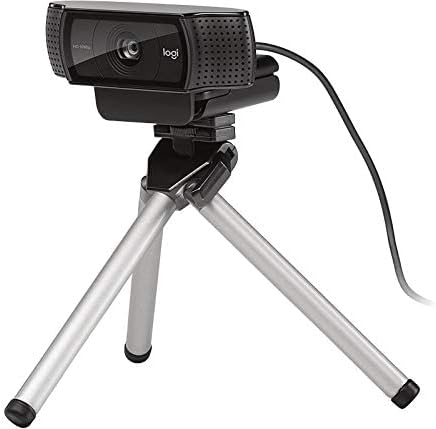
Figure 3: Logitech C920 Webcam securely mounted on a small tripod, demonstrating its versatility.
- Connexió a l'ordinador: Plug the integrated USB cable into an available USB port on your computer. The webcam is a plug-and-play device and typically does not require additional driver installation on most modern operating systems (Windows, macOS, Chrome OS).
- Instal·lació del programari (opcional): For advanced features and settings, you may download the Logitech Capture software from the official Logitech weblloc (www.logitech.com/support/c920).
- Prova el Weblleva: Open a video conferencing application (e.g., Zoom, Skype, Google Meet) or your computer's camera application to verify that the webcam is recognized and functioning correctly.
4. Instruccions de funcionament
The Logitech C920 HD Pro Webcam is designed for ease of use. Once connected, it functions as a standard video input device for most applications.
4.1. Video Calls and Conferencing
- Launch your preferred video conferencing application (e.g., Zoom, Microsoft Teams, Google Meet, Skype).
- Navigate to the application's settings or preferences.
- Select "Logitech C920" as your video input device and, if applicable, as your microphone input device. The C920 features dual stereo microphones for clear audio.
- Adjust your position and lighting for optimal video quality. The C920 includes automatic light correction.
4.2. Gravació de vídeo
- Open a video recording application (e.g., Windows Camera app, QuickTime Player on macOS, or Logitech Capture software).
- Ensure the C920 is selected as the video source.
- Start recording. The C920 supports Full HD 1080p video recording at 30 frames per second.
4.3. Advanced Settings (with Logitech Capture)
If you have installed Logitech Capture software, you can access additional features:
- Custom Resolution and Frame Rate: Adjust video resolution (up to 1080p) and frame rate.
- Controls de la càmera: Pan, tilt, and zoom digitally.
- Ajustaments d'imatge: Fine-tune brightness, contrast, saturation, and white balance.
- Canvi de font: Easily switch between multiple cameras or screen sharing.
5. Manteniment
To ensure the longevity and optimal performance of your Logitech C920 HD Pro Webcàmera, seguiu aquestes senzilles pautes de manteniment:
- Neteja de la lent: Gently wipe the camera lens with a soft, lint-free cloth. For stubborn smudges, slightly dampen the cloth with water or a lens cleaning solution. Avoid abrasive materials or harsh chemicals.
- Neteja del cos: Utilitzeu un drap suau i sec per netejar-lo webel cos de la càmera. No utilitzeu productes de neteja líquids directament sobre el dispositiu.
- Emmagatzematge: Quan no s’utilitzi, emmagatzemeu el fitxer webcam in a clean, dry place away from extreme temperatures and direct sunlight.
- Cura del cable: Avoid bending or twisting the USB cable excessively. Do not pull the cable to disconnect the webcam; always grasp the USB connector.
6. Solució De Problemes
If you encounter issues with your Logitech C920 HD Pro Webcàmera, consulteu els següents problemes i solucions habituals:
| Problema | Causa possible | Solució |
|---|---|---|
| Webcàmera no detectada per l'ordinador. | Connexió USB fluixa, port USB defectuós, problema amb el controlador. |
|
| No video or black screen in applications. | Incorrecte webcam selection, privacy settings, application conflict. |
|
| Mala qualitat de vídeo (borrós, fosc, granulós). | Il·luminació insuficient, lent bruta, configuració incorrecta. |
|
| No hi ha àudio o hi ha mala qualitat d'àudio. | Incorrect microphone selection, microphone muted, environmental noise. |
|
7. Especificacions
Key technical specifications for the Logitech C920 HD Pro Weblleva:
| Característica | Detall |
|---|---|
| Número de model | 960-000764 |
| Resolució de captura de vídeo | Full HD 1080p at 30fps (H.264 video compression) |
| Resolució màxima de vídeo | FHD |
| Tecnologia del sensor fotogràfic | CMOS BSI |
| Camp de View | Diagonal de 78 graus |
| Enfocament automàtic | Sí |
| Micròfon | Dual stereo microphones with automatic noise reduction |
| Tecnologia de connectivitat | USB 2.0 (USB 3.0 ready) |
| Plataforma de maquinari | Ordinador portàtil, escriptori |
| Pes de l'article | 5.6 unces (aproximadament 158.7 grams) |
| Dimensions del paquet | 3.98 x 3.31 x 2.24 polzades |
| Color | Negre |
| Sistema operatiu compatible | Windows 7 or later, macOS 10.10 or later, Chrome OS, Android v 5.0 or above |
8. Garantia i Suport
Logitech products are manufactured to high quality standards and are designed to provide superior performance. For detailed warranty information, please refer to the warranty card included with your product or visit the official Logitech weblloc.
Informació de la garantia:
- Typically, Logitech offers a limited hardware warranty for its webcams. The duration and terms may vary by region.
- Conserveu el vostre comprovant de compra per a reclamacions de garantia.
Atenció al client:
For technical assistance, driver downloads, FAQs, and further support, please visit the Logitech support weblloc:
You can also find contact information for Logitech customer service in your region on their weblloc.


