1. Introducció
The Olympus E-PL5 is a compact mirrorless digital camera designed for both photography enthusiasts and casual users. It features a 16MP Live MOS sensor, a TruePic VI image processor, and a versatile 14-42mm lens, offering high-quality imaging in a portable form factor. This manual provides essential information for setting up, operating, and maintaining your camera.
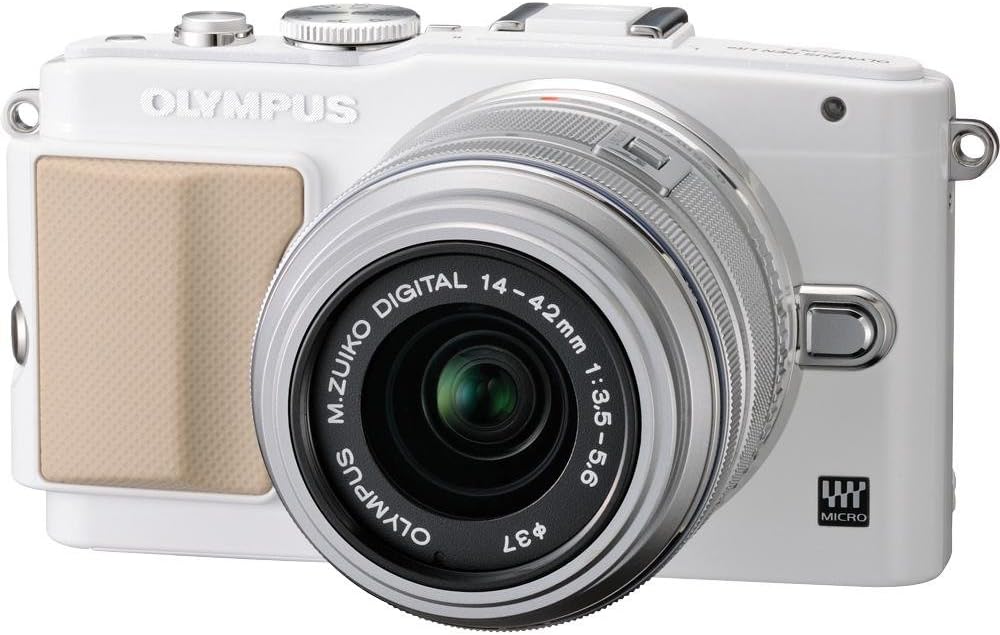
Figura 1: Frontal view of the Olympus E-PL5 Mirrorless Digital Camera with the 14-42mm lens attached.
2. Configuració
2.1 Instal·lació de la bateria i la targeta de memòria
- Obriu la tapa de la bateria/targeta de memòria que es troba a la part inferior de la càmera.
- Insert the battery with the correct orientation until it clicks into place.
- Insert an SD/SDHC/SDXC memory card into the slot until it clicks. Ensure the card is facing the correct direction.
- Tanqueu la coberta de manera segura.
2.2 Fixació de la lent
- Traieu la tapa del cos de la càmera i la tapa posterior de l'objectiu.
- Alineeu el punt blanc de l'objectiu amb el punt blanc del cos de la càmera.
- Munteu la lent girant-la en sentit horari fins que encaixi al seu lloc.
- Traieu la tapa frontal de la lent.

Figura 2: Frontal view of the camera, illustrating the lens attachment point.
3. Funcionament
3.1 Modes bàsics de tret
Turn the mode dial to select your desired shooting mode:
- i-Auto: Intelligent Auto mode for automatic scene detection.
- P (Programa automàtic): La càmera ajusta l'obertura i la velocitat d'obturació per a una exposició òptima.
- A (Prioritat d'obertura): Tu controles l'obertura, la càmera ajusta la velocitat d'obturació.
- S (Prioritat d'obturació): Tu controles la velocitat d'obturació, la càmera ajusta l'obertura.
- M (Manual): Control manual complet sobre l'obertura i la velocitat d'obturació.
- SCN (Scene Modes): Modes preestablerts per a situacions específiques (per exemple, Retrat, Paisatge).
- ART (Art Filters): Aplica efectes creatius a les teves fotos.
3.2 Using the Touch LCD Screen
The 3.0-inch flip self-portrait touch LCD screen allows for intuitive control:
- Obturador tàctil: Toca la pantalla per enfocar i fer una foto.
- Touch AF: Tap to set the autofocus point.
- Live Guide System: Adjust settings like brightness, color, and background blur by touching on-screen sliders and previewefectes ing.
- The screen can be tilted for various shooting angles, including self-portraits.

Figura 3: posterior view of the Olympus E-PL5, showing the LCD screen in use.

Figura 4: lateral view of the Olympus E-PL5 with its tilting LCD screen extended.
3.3 Gravació de vídeo
The E-PL5 supports Full 1080i HD video recording with Art Filter Movie and Effects. To record a video:
- Set the mode dial to the movie recording mode (usually indicated by a film camera icon).
- Press the dedicated movie record button to start and stop recording.
- Utilize the Art Filters for creative video effects.
Video 1: This video showcases the Olympus E-PL5 camera being used in a 72-hour filmmaking challenge, demonstrating its capabilities for video production in various environments.
4. Manteniment
4.1 Neteja de la càmera
- Cos de la càmera: Netegeu el cos de la càmera amb un drap suau i sec. Per a la brutícia persistent, utilitzeu un drap lleugerament humit.ampacabat amb aigua. Eviteu els productes químics durs.
- Lent: Use a lens brush or blower to remove dust. For smudges, use a specialized lens cleaning solution and a microfiber cloth. Never touch the lens surface with your fingers.
- Pantalla LCD: Netegeu suaument la pantalla amb un drap suau i sense borrissol. Eviteu prémer massa fort.
4.2 Emmagatzematge
When not in use, store the camera in a cool, dry place away from direct sunlight and extreme temperatures. Remove the battery if storing for extended periods to prevent leakage.
5. Solució De Problemes
5.1 Problemes comuns i solucions
- La càmera no s'encén: Assegureu-vos que la bateria estigui completament carregada i inserida correctament. Comproveu si els contactes de la bateria estan nets.
- Les imatges són borroses: Check if the lens is clean and properly attached. Ensure the autofocus is working correctly or try manual focus. Verify that the shutter speed is appropriate for the lighting conditions to prevent camera shake.
- LCD screen is blank or unresponsive: Press the DISPLAY button to cycle through display modes. If the screen is unresponsive to touch, try restarting the camera. Ensure the screen is not physically damaged.
- Error de la targeta de memòria: Assegureu-vos que la targeta de memòria estigui inserida correctament i que no estigui plena. Intenteu formatar la targeta (això esborrarà totes les dades, així que primer feu-ne una còpia de seguretat). Si el problema persisteix, proveu una altra targeta de memòria.
- El flaix no es dispara: Check if the flash is enabled in the camera settings and if the shooting mode allows flash. Ensure the external flash (if used) is properly mounted and powered.
6. Especificacions
| Característica | Detall |
|---|---|
| Nom del model | Olympus E-PL5 |
| Resolució del sensor fotogràfic | 16 MP |
| Tipus de sensor | MOS |
| Muntatges compatibles | Micro Quatre Terços |
| Estabilització d'imatge | Canvi de sensor |
| Tipus de lent | Zoom (14-42mm) |
| Apertura màxima | 3.5 f |
| Mida de la pantalla | 3 polzades |
| Tipus de visualització | LCD, Tilting, Touch Screen |
| Resolució de vídeo | Full HD 1080i |
| Admet File Format | RAW, JPEG, RAW+JPEG, MPO(3D still) |
| Tipus de memòria flash | SD/SDHC/SDXC |
| Tecnologia de connectivitat | HDMI, USB, Wireless |
| Pes de l'article | 0.72 lliures |
7. Garantia i assistència
For detailed warranty information and customer support, please refer to the official Olympus weblloc web o contacteu directament amb el seu servei d'atenció al client. Conserveu el comprovant de compra per a qualsevol reclamació de garantia.
Online resources, FAQs, and software updates may also be available on the Olympus support pages.


