Introducció
The MXR M198 Dual Loop Box is a versatile effects routing device designed to integrate two independent effects loops into your signal chain. It allows musicians to easily switch between or bypass entire effects chains, providing greater control and flexibility over their sound.
Informació de seguretat
Please read these instructions carefully before operating the MXR M198 Dual Loop Box. Keep this manual for future reference.
- Font d'alimentació: Use only a 9V DC power supply with a center-negative polarity. Incorrect power supply can damage the unit and void the warranty.
- Medi ambient: Do not expose the unit to water, excessive moisture, or extreme temperatures. Avoid operating in dusty environments.
- Manipulació: Manipuleu la unitat amb cura. Eviteu deixar-la caure ni sotmetre-la a impactes forts.
- Manteniment: No intenteu fer el manteniment d'aquesta unitat vosaltres mateixos. Envieu totes les tasques de manteniment a personal de servei qualificat.
Característiques
- Two independent effects loops (Loop A and Loop B).
- True bypass switching for each loop.
- Individual mute switches for each loop.
- Compact and durable metal housing.
Controls i connexions
The MXR M198 Dual Loop Box features a straightforward layout for easy integration and operation.
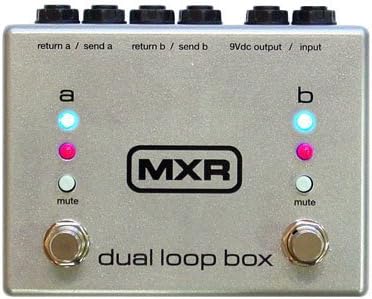
Imatge: Panell frontal view of the MXR M198 Dual Loop Box. The unit is silver with black text. At the top, from left to right, are four jacks: "return a / send a", "return b / send b", and "9Vdc output / input". Below these, two footswitches are visible at the bottom, one for each loop. Above each footswitch are two indicator LEDs (blue and pink) and a small "mute" button. The MXR logo is centered on the unit.
Connexions del panell superior:
- RETURN A / SEND A: These are the input and output jacks for Loop A. Connect the output of your effects pedal(s) to RETURN A and the input of your effects pedal(s) to SEND A.
- RETURN B / SEND B: These are the input and output jacks for Loop B. Connect the output of your effects pedal(s) to RETURN B and the input of your effects pedal(s) to SEND B.
- 9Vdc OUTPUT / INPUT: This jack serves as the main input for your instrument signal and the main output to your amplifier. It also provides a 9V DC output for powering other pedals (check power requirements of other pedals before connecting).
Controls del panell frontal:
- LOOP A Footswitch: Activates or bypasses Loop A. When active, the blue LED above it illuminates.
- LOOP B Footswitch: Activates or bypasses Loop B. When active, the blue LED above it illuminates.
- MUTE A Button: Mutes the signal passing through Loop A. The pink LED above it illuminates when muted.
- MUTE B Button: Mutes the signal passing through Loop B. The pink LED above it illuminates when muted.
- Indicadors LED: Blue LEDs indicate loop activation. Pink LEDs indicate loop mute status.
Configuració
- Connexió d'alimentació: Connect a 9V DC center-negative power supply to the 9Vdc input jack.
- Entrada d'instrument: Connect your instrument (e.g., guitar) to the "9Vdc output / input" jack.
- AmpSortida de lifier: Connect the "9Vdc output / input" jack to your ampl'entrada del lificador.
- Loop A Connection: Connect the input of your Loop A effects pedal(s) to the "SEND A" jack and the output of your Loop A effects pedal(s) to the "RETURN A" jack.
- Loop B Connection: Connect the input of your Loop B effects pedal(s) to the "SEND B" jack and the output of your Loop B effects pedal(s) to the "RETURN B" jack.
Nota: The "9Vdc output / input" jack functions as both the main signal input/output and the power input. Ensure proper signal flow when connecting.
Instruccions de funcionament
Activating/Bypassing Loops:
Press the respective footswitch (LOOP A or LOOP B) to toggle the corresponding effects loop on or off. When a loop is active, the blue LED for that loop will illuminate, indicating that the signal is passing through the effects connected in that loop. When the blue LED is off, the loop is bypassed, and the signal passes directly through the Dual Loop Box without going through the effects in that loop.
Muting Loops:
Press the small "MUTE" button above each footswitch to mute the signal of the corresponding loop. When a loop is muted, the pink LED for that loop will illuminate, and no signal will pass through that specific loop, regardless of whether the loop is active or bypassed. This is useful for silent switching or for temporarily cutting off a specific effects chain.
Using Both Loops:
You can use both loops independently or simultaneously. For example, you can have a distortion pedal in Loop A and a delay pedal in Loop B. You can then activate or bypass each effect chain as needed using their respective footswitches.
Manteniment
The MXR M198 Dual Loop Box is designed for durability and requires minimal maintenance.
- Neteja: Feu servir un drap suau i sec per netejar la unitat. No utilitzeu productes de neteja abrasius ni dissolvents.
- Emmagatzematge: When not in use for extended periods, store the unit in a dry, cool place away from direct sunlight.
- Connexions: Periodically check all cable connections for wear and tear. Ensure jacks are free of debris.
Resolució de problemes
| Problema | Causa possible | Solució |
|---|---|---|
| No sound when loop is active. | Incorrect cable connection; Mute button engaged; Faulty pedal in loop. | Check all cables are securely connected. Ensure the MUTE button is not engaged (pink LED off). Bypass the loop and test individual pedals. |
| La unitat no s'encén. | No power supply connected; Incorrect power supply; Faulty power supply. | Ensure a 9V DC center-negative power supply is connected. Verify power supply specifications. Try a different power supply. |
| Signal is noisy. | Ground loop; Faulty cables; Interference. | Use isolated power supply. Try different cables. Move unit away from power sources or other electronics. |
Especificacions
- Format del senyal: Analògic
- Voltage: 9 Volts DC
- Tipus de control: Pom
- Audio Output Effect: Distorsió
- ASIN: B009B5QRU2
- Primera data disponible: 15 de setembre de 2012
Nota: Some specifications provided may be general product category attributes rather than specific to the Dual Loop Box's function.
Garantia i Suport
For warranty information and technical support, please contact MXR customer service or visit the official MXR weblloc web. Conserveu el rebut de compra com a comprovant de compra.
Weblloc: www.jimdunlop.com/mxr/
Nota: Specific warranty terms may vary by region. Please consult the official MXR website or your local distributor for detailed information.


