Introducció
This manual provides comprehensive instructions for the setup, operation, and maintenance of your AT&T CL2940 Corded Phone. The CL2940 is designed for ease of use, featuring a large tilt display, extra-large buttons, a speakerphone, Caller ID/Call Waiting, and Audio Assist functionality. Please read this manual thoroughly to ensure proper use and to take full advantage of all available features.
Contingut del paquet
Assegureu-vos que tots els elements estiguin presents al vostre paquet:
- AT&T CL2940 Corded Speakerphone with Large Display
- Telèfon
- Cable enrotllat del telèfon
- Cordó de línia telefònica
- Manual d'usuari (aquest document)
- Note: 4 AA batteries (not included) are required for Caller ID functionality.
Producte acabatview
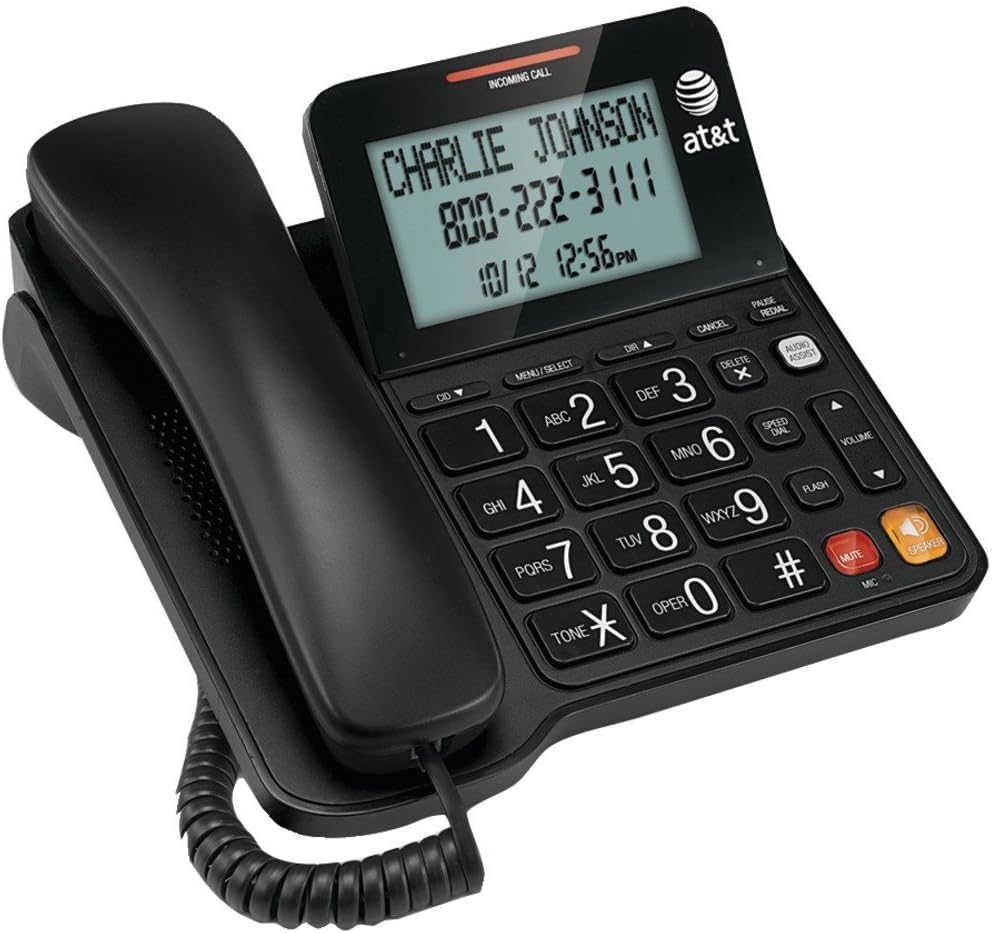
Figure 1: AT&T CL2940 Corded Phone
This image shows the AT&T CL2940 corded phone in black. The phone features a large, easy-to-read tilt display that currently shows an incoming call from 'CHARLIE JOHNSON' with the number '800-222-3111' and the date/time '10/12 12:56PM'. The large, clearly labeled buttons are visible on the keypad, including number keys, navigation buttons, and dedicated buttons for Speaker, Mute, Volume, and Audio Assist. The coiled handset cord connects the handset to the main unit.
Key Features and Components:
- Extra-Large Tilt Display: Provides clear visibility of Caller ID information, time, and menu options.
- Extra-Large Buttons: Designed for easy dialing and navigation.
- Altaveu: Permet converses amb mans lliures.
- Audio Assist: Enhances audio clarity during calls.
- Identificador de trucada/Trucada en espera: Displays incoming caller information and manages multiple calls.
- Directori de l'agenda telefònica: Emmagatzema fins a 25 noms i números.
- De marcatge ràpid: 10-number speed dial for frequently called contacts.
- Extra-Loud Ringer: Adjustable ringer volume for clear alerts.
- Muntatge a la paret: Es pot col·locar sobre un escriptori o muntar a la paret.
Configuració
1. Connexió del telèfon
- Connect one end of the coiled handset cord to the handset and the other end to the jack labeled TELECOMPLE on the side of the phone base.
- Connect one end of the telephone line cord to the jack labeled LÍNIA on the back of the phone base.
- Connecteu l'altre extrem del cable de la línia telefònica a una presa telefònica de paret.
2. Installing Batteries (for Caller ID/Display)
The phone operates without AC power for basic calling functions. However, to enable the Caller ID display and other display-dependent features, 4 AA batteries (not included) are required.
- Locate the battery compartment on the underside of the phone base.
- Obriu la tapa del compartiment de la bateria.
- Introduïu 4 piles AA, observant la polaritat correcta (+ i -) tal com s'indica a l'interior del compartiment.
- Substituïu la tapa del compartiment de la bateria.
3. Muntatge a la paret (opcional)
The CL2940 can be mounted on a wall to save desk space. Ensure you have a standard wall plate with two pins spaced appropriately.
- Remove the desk stand if attached.
- Align the two keyhole slots on the back of the phone with the wall plate pins.
- Slide the phone downwards to secure it in place.
Instruccions de funcionament
Fent una trucada
- Agafeu el telèfon o premeu PONENT botó.
- Marqueu el número de telèfon desitjat amb el teclat.
- To end the call, place the handset back on the cradle or press the PONENT botó de nou.
Recepció d'una trucada
- Quan soni el telèfon, agafeu l'auricular o premeu la tecla PONENT botó per respondre.
- To end the call, place the handset back on the cradle or press the PONENT botó.
Ús de l’altaveu
- To activate the speakerphone during a call, press the PONENT botó.
- To switch back to the handset, pick up the handset.
- Per finalitzar una trucada amb altaveu, premeu la tecla PONENT botó de nou.
Identificació de trucades i trucada en espera
- When an incoming call is received, the caller's name and number will appear on the display (requires battery installation and subscription to Caller ID service).
- Utilitza el CID ▼ i DIR ▲ botons per desplaçar-se pel registre d'identificació de trucades.
- If you subscribe to Call Waiting, a tone will indicate a second incoming call. Press FLASH per canviar entre trucades.
Phonebook and Speed Dial
The phone allows you to store frequently called numbers for quick access.
- Programming Phonebook Entries: Refer to the detailed instructions in the full user manual for programming names and numbers into the 25-entry phonebook.
- Using Speed Dial: Premeu el botó DE MARCATGE RÀPID button, then the corresponding number (0-9) for the stored entry.
Assistència d'àudio
Premeu el botó ASSISTÈNCIA D'ÀUDIO button during a call to temporarily boost the audio volume and clarity, making conversations easier to hear.
Control de volum i silenci
- Volum: Utilitza el VOLUME ▲/▼ buttons to adjust the listening volume during a call (for both handset and speakerphone).
- Silenciar: Premeu el botó MUT button to temporarily silence your microphone during a call. The other party will not hear you, but you can still hear them. Press MUT again to resume speaking.
Manteniment
Neteja del telèfon
To keep your phone in good condition, periodically wipe it with a soft, slightly damp cloth. Avoid using harsh chemicals or abrasive cleaners, as these can damage the phone's finish or electronic components.
Canvi de bateria
If the Caller ID display becomes dim or unresponsive, it may be time to replace the 4 AA batteries. Follow the battery installation steps outlined in the "Setup" section.
Resolució de problemes
If you experience issues with your AT&T CL2940 phone, try the following common troubleshooting steps:
- Sense to de marcatge:
- Ensure the telephone line cord is securely connected to both the phone and the wall jack.
- Test the wall jack with another working phone to confirm the line is active.
- L'identificador de trucada no es mostra:
- Verify that 4 AA batteries are correctly installed in the battery compartment.
- Check if your telephone service provider offers Caller ID service and that it is activated on your line.
- Substituïu les piles velles per unes de noves.
- Mala qualitat d'àudio:
- Ajusteu el volum amb el botó VOLUM botons.
- Assegureu-vos que el cable del telèfon estigui connectat correctament.
- If using the speakerphone, ensure you are within a reasonable distance from the microphone.
- Try activating the ASSISTÈNCIA D'ÀUDIO característica.
- Botons que no responen:
- Ensure the phone is connected to a live telephone line.
- If the issue persists, try disconnecting the phone from the wall jack for a few minutes, then reconnecting it.
For more detailed troubleshooting or persistent issues, please refer to the full product support documentation or contact AT&T customer service.
Especificacions
| Marca | AT&T |
| Número de model | CL2940 |
| Tipus de telèfon | Cordat |
| Color | Negre |
| Dimensions del producte | 7.9 x 8.8 x 3.7 polzades |
| Pes de l'article | 1 lliures |
| Font d'alimentació | Telephone Line Powered (Batteries for Caller ID/Display) |
| Piles necessàries | 4 AA batteries (for Caller ID/Display, not included) |
| Fabricant | Vtech |
| Característiques | Caller ID/Call Waiting, Speakerphone, Audio Assist, Extra-Large Tilt Display, Extra-Large Buttons, Extra-Loud Ringer, 10-Number Speed Dial, 25-Name/Number Phonebook |
Garantia i Suport
Your AT&T CL2940 Corded Phone is manufactured by Vtech. For warranty information and customer support, please refer to the documentation included with your purchase or visit the official AT&T or Vtech support websites. Keep your purchase receipt as proof of purchase.
For assistance, you may contact AT&T customer service directly.


