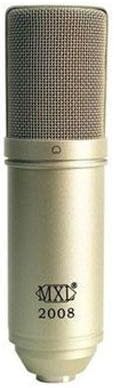
Thank you for choosing the MXL2008 PF001 Bundle. This professional condenser microphone system is designed to deliver high-quality audio capture for a variety of applications, including studio recording, broadcasting, and live sound. This manual provides essential information for the proper setup, operation, and maintenance of your microphone to ensure optimal performance and longevity.
Si us plau, llegiu aquest manual detingudament abans d'utilitzar el producte i conserveu-lo per a futures consultes.
Informació important de seguretat
To prevent electric shock, fire, or damage to the unit, please observe the following precautions:
Do not expose the microphone to rain or moisture.
Avoid extreme temperatures or high humidity.
Do not attempt to disassemble or modify the microphone. Refer all servicing to qualified personnel.
Ensure proper phantom power (48V) is supplied by your audio interface or mixer, if required.
Manipuleu el micròfon amb cura per evitar danys físics.
Què hi ha a la caixa
The MXL2008 PF001 Bundle typically includes:
Micròfon de condensador MXL 2008
Shock Mount (PF001 component)
Hard Mount Adapter
Drap de neteja
Manual d'usuari (aquest document)
Image: The MXL 2008 condenser microphone, a cylindrical microphone with a metallic mesh grille at the top and the MXL 2008 logo on its body. This is the primary component of the bundle.
Guia de configuració
Follow these steps to set up your MXL2008 PF001 Bundle:
Muntatge del micròfon:
Attach the shock mount (PF001) to a standard microphone stand.
Carefully insert the MXL 2008 microphone into the shock mount. Ensure it is securely held by the elastic bands. The shock mount helps to isolate the microphone from vibrations and handling noise.
Connecting to Audio Interface/Mixer:
Connect one end of an XLR cable (not included) to the XLR output at the base of the MXL 2008 microphone.
Connect the other end of the XLR cable to an available XLR input on your audio interface, mixer, or preampmés viu.
Applying Phantom Power:
The MXL 2008 is a condenser microphone and requires 48V phantom power to operate.
Activate the +48V phantom power switch on your audio interface or mixer for the input channel connected to the microphone.
Precaució: Ensure the microphone is connected before activating phantom power to avoid potential pops or damage.
Configuració del guany d'entrada:
With phantom power active, gradually increase the input gain (preamp level) on your audio interface or mixer.
Speak or sing into the microphone at your typical performance level and adjust the gain until you achieve a strong signal without clipping (distortion). Most interfaces have a peak indicator light to help with this.
Instruccions de funcionament
The MXL 2008 is a versatile microphone suitable for various recording scenarios. Here are general guidelines for operation:
Col·locació del micròfon:
Position the microphone approximately 6-12 inches (15-30 cm) from the sound source for vocals or acoustic instruments. Adjust distance based on desired proximity effect and room acoustics.
The MXL 2008 has a cardioid polar pattern, meaning it picks up sound primarily from the front and rejects sound from the sides and rear. Point the front of the microphone (where the MXL logo is) directly at the sound source.
Ús del filtre pop:
For vocal recordings, it is highly recommended to use an external pop filter (not included) placed between the vocalist and the microphone. This helps to reduce plosive sounds (P's and B's) and protect the microphone capsule from moisture.
Seguiment:
Monitor your audio through headphones or studio monitors connected to your audio interface/mixer. This allows you to hear the microphone's output and make necessary adjustments to gain and placement.
Programari de gravació:
Ensure your Digital Audio Workstation (DAW) software is configured to recognize your audio interface and the correct input channel.
Activa la pista per a la gravació i comença a capturar l'àudio.
Manteniment i cura
Proper care will extend the life and maintain the performance of your MXL 2008 microphone:
Neteja: Use a soft, dry, lint-free cloth to wipe the microphone body. Do not use liquid cleaners or solvents, as they may damage the finish or internal components.
Emmagatzematge: When not in use, store the microphone in its original packaging or a protective case to shield it from dust, moisture, and physical impact.
Condicions ambientals: Avoid exposing the microphone to extreme temperatures, high humidity, or direct sunlight for prolonged periods.
Manipulació: Always handle the microphone by its body, not by the cable or grille.
Resolució de problemes
If you encounter issues with your MXL 2008 microphone, refer to the following common problems and solutions:
Problema
Causa possible
Solució
Sense sortida de so
No phantom power
Cable XLR defectuós
Incorrect input selection
Low gain setting
Ensure +48V phantom power is enabled on your interface/mixer.
Prova amb un altre cable XLR.
Verify the correct input channel is selected in your DAW/mixer.
Increase the input gain.
So distorsionat
Guany d'entrada massa alt
Microphone too close to source
Reduce the input gain on your interface/mixer.
Augmenta la distància entre el micròfon i la font de so.
Soroll de brunzit o brunzit
Bucle de terra
Interferències d'altres aparells electrònics
Cable defectuós
Assegureu-vos que tots els equips estiguin correctament connectats a terra.
Move the microphone or cables away from power supplies, monitors, or other electronic devices.
Prova amb un altre cable XLR.
If the problem persists after trying these solutions, please contact MXL customer support.
Especificacions
Característica
Detall
Fabricant
MXL
Número de model
2008PF001
Pes de l'article
5.05 lliures (aprox. 2.29 kg)
ASIN
B009TT7AO2
Data de primera disponibilitat
14 d'abril de 2012
Components inclosos
Microphone (MXL 2008), PF001 (Shock Mount)
Nota: Les especificacions estan subjectes a canvis sense previ avís per tal de millorar el producte.
Garantia i Suport
MXL products are manufactured to the highest quality standards. For information regarding warranty coverage, please refer to the warranty card included with your product or visit the official MXL weblloc.
For technical support, troubleshooting assistance beyond this manual, or service inquiries, please contact MXL customer support through their official channels. Always provide your product model number (MXL2008 PF001) and ASIN (B009TT7AO2) when seeking support.
Podeu trobar més informació i recursos de suport visitant la MXL Store on Amazon.
Manual d'usuari de MXL Mic Mate Pro | Interfície d'àudio USB portàtil Manual d'usuari de l'MXL Mic Mate Pro, una interfície d'àudio USB portàtil i un previ de micròfon.ampAprèn sobre les seves característiques, la configuració per a Windows i macOS i consells de gravació per a àudio de qualitat professional allà on siguis. Inclou alimentació phantom de 48 V, monitorització de latència zero i controls de guany i auriculars ajustables.
MXL BCD-1 Broadcast Dynamic Microphone: Specifications, Features, and Warranty Detailed information about the MXL BCD-1 Broadcast Dynamic Microphone, including its general characteristics, technical specifications, frequency response chart, polar pattern, care instructions, and warranty details from Marshall Electronics.
MXL AC-40EXT Gooseneck Extension Microphone for Web Conferència Detailed information on the MXL AC-40EXT, a USB gooseneck extension microphone designed for web conferencing, featuring a flexible neck, individual mute button, and simple connection for multiple users.