Introducció
This manual provides comprehensive instructions for the setup, operation, and maintenance of your Polycom RealPresence Group 300 video conferencing system. The RealPresence Group 300 is designed for small to medium-sized meeting rooms, offering high-definition video and audio communication capabilities.
The system includes the Group 300 HD codec, an EagleEye III camera, a microphone array, and a universal remote control.
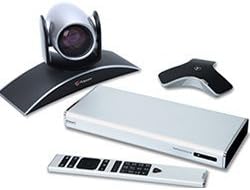
Figure 1: Polycom RealPresence Group 300 system components. This image displays the main components of the system: the sleek silver HD codec unit, the EagleEye III camera mounted on a curved base, a triangular microphone array, and the universal remote control.
Configuració
Follow these steps to correctly set up your Polycom RealPresence Group 300 system.
- Desempaquetar components: Carefully remove all components from the packaging. Verify that you have the Group 300 HD codec, EagleEye III camera, microphone array, universal remote, HDMI cable (1.8m), CAT 5E LAN cable (3.6m), HDCI analog cable (3m), and power cable (AMER-Type B, NEMA 5-15).
- Posicionar la càmera: Place the EagleEye III camera on a stable surface, such as a monitor or shelf, ensuring it has a clear view of the meeting participants.
- Connecteu la càmera: Connect the EagleEye III camera to the HD codec using the provided HDCI analog cable. The HDCI port is typically located on the rear panel of the codec.
- Connect the Microphone Array: Connect the microphone array to the codec. The microphone array connects to a dedicated audio input port on the codec.
- Connecta a la pantalla: Use the HDMI cable to connect the HD codec's HDMI output port to an HDMI input port on your display (monitor or projector).
- Connexió de xarxa: Connect the CAT 5E LAN cable from the codec's LAN port to your network router or switch. This provides network access for video conferencing.
- Connexió d'alimentació: Connect the power cable to the codec and then to a suitable power outlet. Ensure the power outlet matches the NEMA 5-15 standard.
- Encesa inicial: Once all connections are secure, power on the system. The system will initiate its boot sequence.
Instruccions de funcionament
This section outlines the basic steps for operating your Polycom RealPresence Group 300 system.
- Encès/apagat: Press the power button on the universal remote control or the front panel of the codec to turn the system on or off.
- Navega pels menús: Use the arrow keys and the 'OK' button on the remote control to navigate through the on-screen menus.
- Ajustar el volum: Use the volume up/down buttons on the remote to adjust the audio output level.
- Initiate a Call:
- From the main menu, select 'Call' or 'Directory'.
- Enter the IP address, SIP URI, or H.323 alias of the remote participant.
- Press the 'Call' button to establish the connection.
- Finalitzar una trucada: Press the 'End Call' button on the remote control.
- Control de la càmera: Use the joystick or dedicated camera control buttons on the remote to pan, tilt, and zoom the EagleEye III camera.
Manteniment
Regular maintenance ensures optimal performance and longevity of your Polycom RealPresence Group 300 system.
- Neteja: Use a soft, dry cloth to clean the exterior surfaces of the codec, camera, and microphone array. Do not use liquid cleaners or abrasive materials.
- Ventilació: Ensure that the codec's ventilation openings are not obstructed to prevent overheating. Maintain adequate space around the unit for airflow.
- Actualitzacions de firmware: Periodically check the Polycom support website for available firmware updates. Keeping the firmware current can improve performance and add new features. Refer to the system's administration guide for update procedures.
- Gestió de cables: Ensure all cables are securely connected and neatly organized to prevent accidental disconnections or damage.
Resolució de problemes
This section provides solutions to common issues you might encounter with your system.
| Problema | Causa possible | Solució |
|---|---|---|
| Sense poder | Cable d'alimentació desconnectat; problema amb la presa de corrent | Check power cable connection to codec and outlet. Verify outlet functionality. |
| No es mostra cap vídeo | HDMI cable disconnected; incorrect display input selected | Ensure HDMI cable is securely connected. Select correct HDMI input on your display. |
| No hi ha àudio dels altaveus | Volume too low; audio cables disconnected | Increase volume using remote. Check audio cable connections from codec to display/speakers. |
| El micròfon no capta el so | Microphone array disconnected; microphone muted | Verify microphone array connection to codec. Ensure microphone is not muted on the remote or system interface. |
| No es pot connectar a la xarxa | LAN cable disconnected; network configuration issue | Check LAN cable connection. Verify network settings on the codec and ensure network is active. |
Especificacions
Detailed technical specifications for the Polycom RealPresence Group 300 system.
| Característica | Detall |
|---|---|
| Número de model | 7200-63420-001 |
| Components del sistema | Group 300 HD codec, EagleEye III camera, microphone array, universal remote |
| Resolució de vídeo | 720p |
| Cables inclosos | 1 HDMI (1.8m), 1 CAT 5E LAN (3.6m), 1 HDCI analog (3m) |
| Tipus de potència | AMER-Type B, NEMA 5-15 |
| Marca | Polycom |
| Fabricant | Polycom Inc. |
| Data de primera disponibilitat | 16 de novembre de 2012 |
| UPC | 885913900025 |
| Dimensions del paquet | 19 x 15 x 12 polzades |
Garantia i Suport
Polycom requires a maintenance service contract for this system to ensure continued support and access to updates. For detailed information regarding service contracts and support options, please refer to the official Polycom documentation or contact your Polycom authorized reseller.
For technical assistance or further inquiries, please visit the official Polycom support website or contact their customer service department. Keep your model number (7200-63420-001) and serial number ready when seeking support.


