Introducció
The Cooler Master CM Storm QuickFire TK is a compact mechanical gaming keyboard engineered for performance and durability. It features high-quality CHERRY MX Brown mechanical switches, vibrant white LED backlighting, and a unique layout that integrates the numeric keypad with the navigation cluster, offering a space-saving design without sacrificing functionality. This manual provides detailed instructions for setting up, operating, maintaining, and troubleshooting your keyboard.
Contingut del paquet
Si us plau, verifiqueu que tots els elements siguin presents al vostre paquet:
- CM Storm QuickFire TK Mechanical Gaming Keyboard
- Cable USB desmuntable
Configuració
Segueix aquests passos per connectar el teclat a l'ordinador:
- Locate the mini-USB port on the back of the keyboard.
- Connect the smaller end of the provided USB cable to the keyboard's mini-USB port.
- Connecteu l'extrem USB-A estàndard del cable a un port USB disponible de l'ordinador.
- The keyboard features cable routing grooves on its underside. Route the cable through the central, left, or right channel as desired for optimal desk organization.
- Your operating system should automatically detect and install the necessary drivers. The keyboard is ready for use once installation is complete.
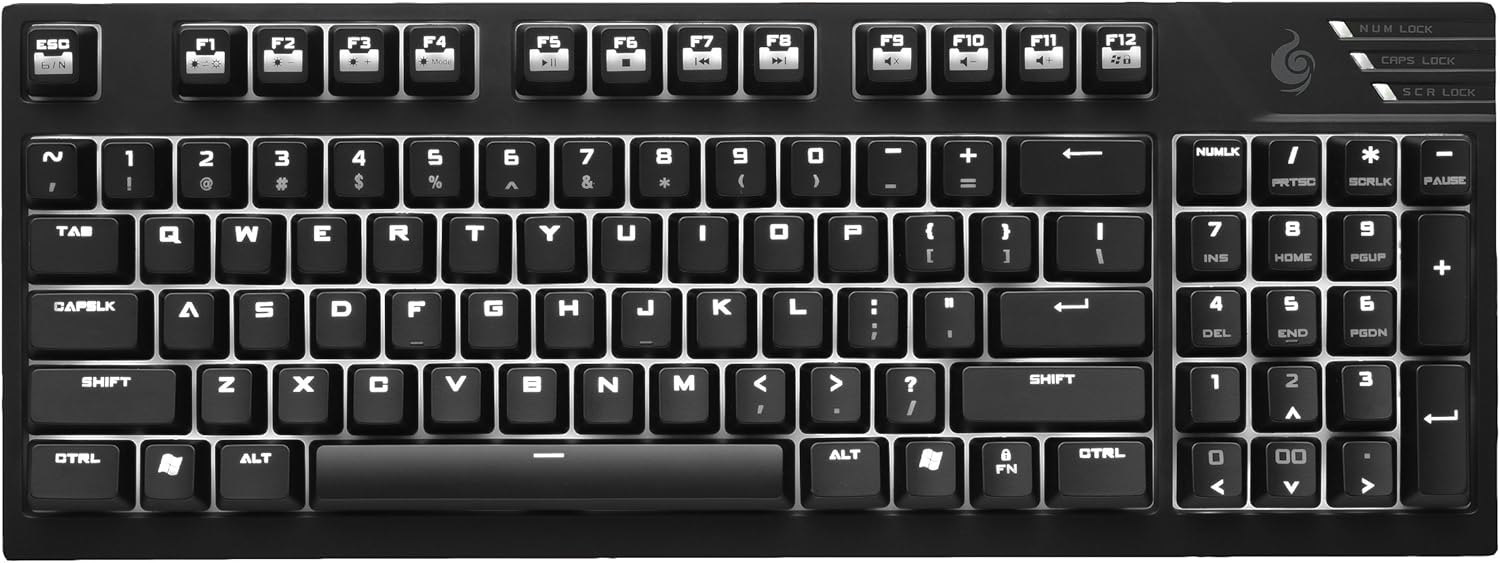
Imatge: De dalt a baix view of the Cooler Master CM Storm QuickFire TK mechanical gaming keyboard, illustrating its compact layout and key arrangement.
Instruccions de funcionament
CHERRY MX Brown Mechanical Switches
The QuickFire TK is equipped with durable CHERRY MX Brown mechanical switches, known for their tactile feedback and quiet operation. These switches have a lifespan of over 50 million keystrokes, ensuring long-term reliability and consistent performance.
Integrated Numeric Keypad and Navigation Keys
The keyboard's compact design integrates the numeric keypad with the arrow and navigation keys (Home, End, Page Up, Page Down, Insert, Delete). To switch between these functions, use the Bloq num key located above the numeric keypad.
- Quan Bloq num is active (indicated by an LED), the keys in this block function as a standard numeric keypad.
- Quan Bloq num is inactive, these keys function as arrow keys and navigation keys.

Imatge: Anglesa view of the Cooler Master CM Storm QuickFire TK, showing the combined numeric keypad and navigation key cluster on the right side.
Retroil·luminació LED blanca
The keyboard features full white LED backlighting with multiple modes and 5 adjustable brightness levels. Use the FN (Function) key in combination with the F-keys to control the backlighting:
- FN + F1: Redueix la brillantor de la retroiluminació.
- FN + F2: Augmenta la brillantor de la retroiluminació.
- FN + F3: Cycle through backlight modes (e.g., Full Backlight, WASD only, Gaming Cluster, Breathing, Off).
- FN + F4: Adjust backlight effect speed (for modes like Breathing).
Tecles de drecera multimèdia
Access multimedia controls quickly using the FN key in combination with the F-keys:
- FN + F5: Play/Pause media.
- FN + F6: Stop media.
- FN + F7: Previous track.
- FN + F8: Pista següent.
- FN + F9: Silencia l'àudio.
- FN + F10: Disminuir el volum.
- FN + F11: Augmenta el volum.
Bloqueig de tecles de Windows
To prevent accidental interruptions during gaming, the Windows key can be disabled. Press FN + F12 (or the key with the Windows logo and lock icon) to toggle the Windows key lock function. An indicator LED will illuminate when the Windows key is locked.
Canvi de clau N (NKRO)
The QuickFire TK supports N-Key Rollover (NKRO) via USB, allowing for unlimited simultaneous key presses. This ensures that every keystroke is registered accurately, even during intense gaming sessions.
Manteniment
Proper maintenance helps extend the lifespan and performance of your keyboard:
- Neteja: Use a soft, dry cloth to wipe down the keyboard surface. For deeper cleaning, you may use a can of compressed air to remove dust and debris from between the keycaps. For stubborn grime, a slightly damp cloth with a mild cleaning solution can be used, ensuring no liquid enters the switches.
- Eliminació de tecles: If necessary, keycaps can be carefully removed using a keycap puller (not included) for thorough cleaning. Exercise caution to avoid damaging the switches.
- Eviteu els líquids: Do not spill liquids on the keyboard. If a spill occurs, immediately disconnect the keyboard from your computer and allow it to dry completely before reconnecting.
- Emmagatzematge: When not in use for extended periods, store the keyboard in a clean, dry environment away from extreme temperatures.
Resolució de problemes
If you encounter issues with your QuickFire TK keyboard, refer to the following common solutions:
- El teclat no respon: Ensure the USB cable is securely connected to both the keyboard and the computer. Try connecting the keyboard to a different USB port. Restart your computer.
- La retroiluminació no funciona: Check if the backlighting is turned off or set to the lowest brightness level using FN + F1/F2/F3. Ensure the keyboard is receiving sufficient power from the USB port.
- Les claus no es registren: Clean the affected key area to remove any debris that might be obstructing the switch. If the issue persists, it may indicate a hardware fault.
- Numpad/Arrow Keys Not Switching: Assegureu-vos que Bloq num key is functioning correctly. Press it to toggle between numeric and navigation modes.
- Tecla de Windows bloquejada: If the Windows key is unresponsive, press FN + F12 per desbloquejar-lo.
If these steps do not resolve your issue, please contact Cooler Master customer support for further assistance.
Especificacions
| Fabricant | Cooler Master |
| Número de model de l'article | SGK-4020-GKCM3-US |
| Dimensions del producte | 37.85 x 13.72 x 3.3 cm |
| Pes | 798.32 grams |
| Dispositius compatibles | Ordinador portàtil, ordinador de sobretaula |
| Tecnologia de connectivitat | Amb cable (USB) |
| Descripció del teclat | Jocs |
| Característiques especials | Backlit, Ergonomic, Integrated Steel Backplate, Super-grip Rubber Feet |
| Color | Black (TK - Cherry MX Brown) |
| Estil | Compact layout with integrated numeric keypad |
| Components inclosos | Cable USB |
| Orientació de la mà | Ambidextre |
Informació de la garantia
Cooler Master products are covered by a manufacturer's warranty. For specific warranty terms, duration, and conditions applicable to your region, please refer to the warranty card included with your product or visit the official Cooler Master weblloc web. Conserveu el comprovant de compra per a reclamacions de garantia.
Suport
For technical support, driver downloads, FAQs, or to register your product, please visit the official Cooler Master support weblloc:
You may also find helpful resources and community forums on the Cooler Master weblloc.


