1. Introducció
El lector de codis CarScan Innova 30203 és una eina de diagnòstic dissenyada per ajudar a identificar i resoldre problemes relacionats amb el sistema de diagnòstic a bord II (OBD2) del vostre vehicle. Aquest dispositiu és compatible amb la majoria de cotxes, camionetes lleugeres, SUV i monovolums del 1996 i posteriors, inclosos els models nacionals i d'importació, així com amb vehicles dièsel i híbrids més nous que compleixen amb OBD2. Proporciona informació essencial de diagnòstic i verificació de reparacions a través d'una pantalla retroil·luminada intuïtiva.
Les característiques clau inclouen:
- Compatible amb tots els vehicles compatibles amb OBD2 de 1996 i posteriors.
- Pantalla retroil·luminada tot en un que mostra més de 20 dades de diagnòstic.
- Enllaços a tots els protocols OBD2, inclòs CAN, per descodificar problemes amb la llum "Check Engine".
- Actualització automàtica de dades cada 30 segons quan està connectat al vehicle.
- 15 inspeccions de manteniment i cobertura del monitor per a la verificació de reparacions.
- Pantalla retroil·luminada tot en un patentada única i pantalla LED de 3 colors per a comprovacions ràpides de preparació per a les emissions de l'estat.
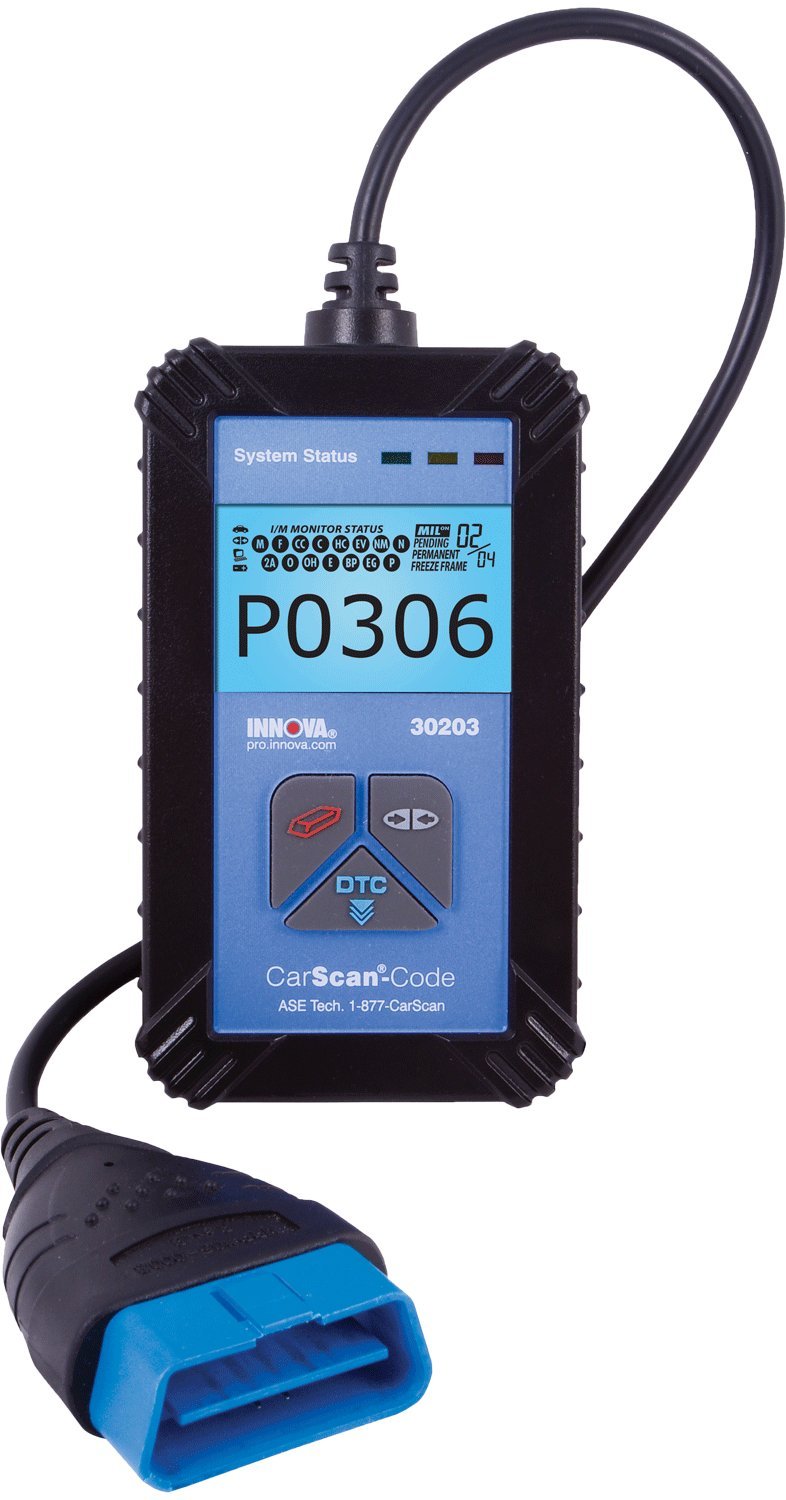
Figura 1: El lector de codis Innova 30203 CarScan, que mostra la seva unitat principal i el cable connector OBD2.
2. Configuració
Abans d'utilitzar el lector de codis Innova 30203 CarScan, assegureu-vos que el vehicle estigui apagat. Localitzeu el connector d'enllaç de diagnòstic OBD2 (DLC) del vehicle. Aquest connector normalment es troba sota el tauler de control, al costat del conductor, tot i que la seva posició exacta pot variar segons el model del vehicle. Consulteu el manual de servei del vehicle per conèixer la ubicació precisa si cal.
- Localitza el port OBD2: Identifiqueu el DLC OBD2 de 16 pins del vostre vehicle.
- Connecteu el dispositiu: Connecteu fermament el connector del lector de codis CarScan al DLC OBD2 del vehicle. Assegureu-vos que la connexió sigui segura.
- Encès: Un cop connectat, gireu el contacte del vehicle a la posició "ON" (no engegueu el motor). El lector de codis CarScan s'engegarà automàticament i començarà a comunicar-se amb l'ordinador del vehicle.

Figura 2: El lector de codis Innova 30203 CarScan inclòs amb el seu manual d'instruccions i un cable USB per a possibles actualitzacions.
3. Instruccions de funcionament
Després de la connexió i l'engegada correctes, el lector de codis CarScan mostrarà l'estat del sistema i la informació de diagnòstic. El dispositiu està dissenyat per a un funcionament senzill.
3.1 Lectura de codis de diagnòstic d'errors (DTC)
El dispositiu busca automàticament codis de diagnòstic d'errors (DTC) un cop connectat i alimentat. La pantalla retroil·luminada mostrarà qualsevol codi detectat, com ara "P0306", tal com es veu a les imatges del producte, cosa que indica un problema específic del vehicle.
- Interpretació de la pantalla: La pantalla retroil·luminada tot en un presenta més de 20 informació de diagnòstic vital simultàniament. Això inclou els DTC, l'estat del monitor I/M i altres paràmetres del sistema.
- Llum "Revisar motor": El dispositiu es connecta a tots els protocols OBD2, inclosa la Xarxa d'Àrea de Control (CAN), per descodificar la causa d'un llum "Check Engine" encès. El DTC que es mostra correspondrà a l'avaria específica.
- Actualització automàtica: Les dades que es mostren a la pantalla s'actualitzen automàticament cada 30 segons quan el dispositiu està connectat al vehicle. Aquesta funció permet supervisar els canvis i verificar la finalització de la reparació.
3.2 Comprovació de la preparació per a les emissions de l'estat
El lector de codis CarScan compta amb una pantalla LED de 3 colors que proporciona una indicació ràpida de l'estat de preparació per a les emissions del vehicle. Això és útil per a la comprovació prèvia abans de les proves oficials d'emissions.
- LED verd: Indica que tots els monitors estan preparats per a les proves d'emissions.
- LED groc: Indica que alguns monitors no estan preparats. Pot ser necessari conduir més perquè l'ordinador del vehicle completi els seus cicles de diagnòstic.
- LED vermell: Indica un problema important o que diversos monitors no estan preparats, cosa que suggereix que el vehicle probablement no superarà una prova d'emissions.
3.3 Inspecció i manteniment (I/M) Cobertura del monitor
El dispositiu proporciona cobertura per a 15 monitors de manteniment d'inspecció. Això permet als usuaris verificar que les reparacions s'han completat correctament i que el vehicle ha completat el seu cicle de conducció complet, garantint que tots els sistemes funcionin correctament després de la reparació.

Figura 3: El lector de codis Innova 30203 CarScan utilitzat dins d'un vehicle, demostrant la seva mida compacta i la facilitat d'ús mentre està connectat al port OBD2.
4. Manteniment
Per garantir la longevitat i el funcionament correcte del vostre lector de codis Innova 30203 CarScan, seguiu aquestes pautes de manteniment:
- Neteja: Feu servir un drap suau i sec per netejar el dispositiu. Eviteu utilitzar productes de neteja o dissolvents abrasius, que poden danyar la pantalla o el dispositiu.asing.
- Emmagatzematge: Guardeu el dispositiu en un entorn net i sec, allunyat de temperatures extremes i de la llum solar directa. La bossa d'emmagatzematge inclosa (si escau) us pot ajudar a protegir-lo.
- Cura del cable: Eviteu doblegar o doblegar bruscament el cable de diagnòstic. Agafeu sempre el connector quan el connecteu o el desconnecteu per evitar danys al cable o als pins.
- Actualitzacions de programari: El dispositiu està dissenyat per ser actualitzable. Comproveu periòdicament les especificacions del fabricant. weblloc web per a les actualitzacions de programari disponibles per garantir la compatibilitat amb els models de vehicles i els protocols de diagnòstic més recents. Les instruccions per a les actualitzacions normalment es proporcionen amb la descàrrega del programari.
5. Solució De Problemes
Si teniu problemes mentre feu servir el lector de codis CarScan Innova 30203, tingueu en compte els passos següents per resoldre problemes:
- El dispositiu no s'encén:
- Assegureu-vos que el dispositiu estigui connectat correctament al port OBD2 del vehicle.
- Verifiqueu que el contacte del vehicle estigui en la posició "ON" (motor apagat).
- Comproveu el fusible del vehicle per al port OBD2 (consulteu el manual del vehicle).
- Sense comunicació amb el vehicle:
- Confirmeu que el vehicle compleix amb la normativa OBD2 (generalment del 1996 i posteriors).
- Assegureu-vos que la connexió al port OBD2 sigui ferma i correcta.
- Prova el dispositiu en un altre vehicle compatible amb OBD2 per descartar un problema específic del vehicle.
- Codis incorrectes o que falten:
- Assegureu-vos que la bateria del vehicle estigui carregada adequadament. Baix volumtagDe vegades pot afectar la comunicació diagnòstica.
- Realitzeu una actualització de programari si està disponible, ja que això pot millorar la compatibilitat i la precisió del diagnòstic.
- El llum "Revisar motor" roman encès després de la reparació:
- Després d'una reparació, pot ser necessari esborrar els codis de diagnòstic d'errors (DTC) amb el dispositiu. Consulteu el menú en pantalla del dispositiu per a la funció "Esborra codis" o "Esborra DTC".
- Conduïu el vehicle durant un cicle de conducció complet per permetre que tots els monitors es reiniciïn i confirmin la reparació.
Per obtenir més ajuda, consulteu la informació de suport que es proporciona a la secció 7.
6. Especificacions
| Característica | Especificació |
|---|---|
| Número de model | 30203 |
| Marca | Innova |
| Fabricant | INNOVA |
| Dimensions del producte (LxWxH) | 23.37 x 13.97 x 3.05 cm (9.2 x 5.5 x 1.2 polzades) |
| Pes de l'article | 907 g (2 lliures) |
| Font d'alimentació | Elèctric amb cable (via port OBD2) |
| Compatibilitat | Vehicles compatibles amb OBD2 de 1996 i posteriors (nacionals, importats, dièsel, híbrids) |
| Mostra | Pantalla retroil·luminada tot en un, pantalla LED de 3 colors |
| UPC | 042713030233, 042173030231 |
7. Garantia i Suport
Per a assistència tècnica o consultes sobre el vostre lector de codis Innova 30203 CarScan, poseu-vos en contacte amb el servei d'atenció al client d'Innova. El dispositiu en si indica que ofereix assistència d'"ASE Tech".
- Suport tècnic: 1-877-CarScan (tal com s'indica al dispositiu)
- Informació de la garantia: No es proporcionen detalls específics de la garantia en aquest manual. Consulteu la documentació inclosa amb la compra del producte o visiteu el lloc web oficial d'Innova. weblloc web per consultar la política de garantia més actualitzada.
Assegureu-vos sempre d'utilitzar els canals d'assistència oficials per obtenir assistència precisa i fiable.


