1. Introducció
This manual provides essential instructions for the safe and efficient use of your Epson L110 Colour Inkjet Printer. The Epson L110 is designed for personal and work projects, offering efficient performance with low running costs. It features a compact design and an integrated ink tank system.
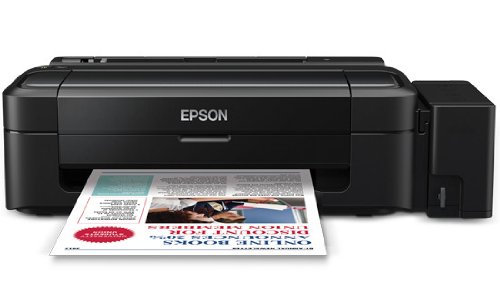
Figura 1: Frontal view of the Epson L110 Colour Inkjet Printer.
2. Configuració
2.1 Desembalatge
Carefully remove the printer from its packaging. Ensure all protective tapes and packing materials are removed from the printer's exterior and interior. Retain the packaging for future transport or storage.
2.2 Connexió d'alimentació
- Connecteu el cable d'alimentació a l'entrada d'alimentació de la impressora.
- Connecteu l'altre extrem del cable d'alimentació a una presa de corrent amb connexió a terra.
- Do not power on the printer until ink tanks are filled.
2.3 Omplir els dipòsits de tinta
The Epson L110 features an integrated ink tank system. Use only genuine Epson ink bottles for optimal performance and to prevent damage.
- Obriu la tapa de la unitat del dipòsit de tinta que hi ha al lateral de la impressora.
- Uncap the ink bottle for the corresponding color (Cyan, Magenta, Yellow, Black).
- Carefully pour the ink into the correct tank, aligning the bottle nozzle with the tank's filling port. The "Fast Ink Top-Up Technology" is designed for mess-free refills.
- Fill each tank to the upper line.
- Tanqueu bé la tapa de la unitat del dipòsit de tinta.
Figure 2: Illustration of filling the ink tanks. Ensure correct color matching.
2.4 Instal·lació del controlador
After filling the ink tanks, connect the printer to your computer using a USB cable. Install the printer drivers from the provided CD-ROM or download the latest drivers from the official Epson support weblloc. Seguiu les instruccions que apareixen a la pantalla per completar la instal·lació.
3. Funcionament de la impressora
3.1 Càrrega de paper
- Obriu el suport del paper i traieu l'extensió.
- Fan the edges of the paper stack to separate the sheets.
- Load paper into the sheet feeder with the print side facing up.
- Adjust the edge guide to the width of your paper. The maximum input sheet capacity is 50 sheets.
Figure 3: Proper paper loading into the input tray.
3.2 Impressió bàsica
- Assegureu-vos que la impressora estigui engegada i connectada a l'ordinador.
- Obriu el document o la imatge que voleu imprimir a l'ordinador.
- Seleccioneu "Imprimeix" al menú de l'aplicació (per exemple, File > Imprimeix).
- In the print dialog box, select "Epson L110" as your printer.
- Ajusteu els paràmetres d'impressió com ara la mida del paper, la qualitat d'impressió i el nombre de còpies.
- Feu clic a "Imprimeix" per iniciar el procés d'impressió.
The Epson L110 offers a print speed of up to 27 pages per minute (ppm) for black prints and 15 ppm for color prints. It produces high-resolution prints of 5760 x 1440 dpi.
4. Manteniment
4.1 Reompliment de tinta
Monitor ink levels regularly. When an ink tank is low, refill it promptly using genuine Epson ink bottles. A single ink bottle provides a high page yield of up to 4000 prints (black) and 6500 prints (color).
Important: When transporting the printer, ensure the choke valve is locked to prevent messy leaks and ink wastage.
4.2 Neteja del capçal d'impressió
If print quality declines (e.g., missing lines, faded colors), perform a print head cleaning. This can typically be done through the printer utility software on your computer. Refer to the software's help section for detailed steps.
4.3 Neteja general
Netegeu l'exterior de la impressora amb un drap suau i secamp cloth. Do not use abrasive cleaners or solvents. Keep the paper path clear of dust and debris.
5. Solució De Problemes
- La impressora no respon:
- Comproveu la connexió d'alimentació i assegureu-vos que la impressora estigui engegada.
- Verify the USB cable connection between the printer and computer.
- Reinicieu tant la impressora com l'ordinador.
- Assegureu-vos que els controladors de la impressora estiguin instal·lats correctament.
- Mala qualitat d'impressió:
- Comproveu els nivells de tinta i torneu-ho a omplir si cal.
- Realitzeu una neteja del capçal d'impressió.
- Run a nozzle check to identify clogged nozzles.
- Assegureu-vos que feu servir el paper adequat per a la configuració d'impressió.
- Embussos de paper:
- Apagueu la impressora i desconnecteu-la.
- Traieu amb cura el paper encallat de la safata d'entrada, la safata de sortida o l'interior de la impressora.
- Assegureu-vos que el paper estigui carregat correctament i que no estigui arrugat ni arrugat.urled.
For further assistance, refer to the Epson support weblloc o contacteu amb el servei d'atenció al client.
6. Especificacions
| Característica | Especificació |
|---|---|
| Nom del model | L110 |
| Tecnologia d'impressió | Injecció de tinta |
| Sortida de la impressora | Color |
| Resolució màxima d'impressió en color | 5760 x 1440 ppp |
| Resolució màxima d'impressió en blanc i negre | 5760 x 1440 ppp |
| Velocitat màxima d'impressió en monocrom | 27 ppm |
| Velocitat màxima d'impressió (color) | 15 ppm |
| Color de tinta | Cyan, Black, Magenta, Yellow |
| Rendiment de pàgina (negre) | Fins a 4000 pàgines |
| Rendiment de pàgina (color) | Fins a 6500 pàgines |
| Tecnologia de connectivitat | USB |
| Capacitat màxima del full d'entrada | 50 |
| Mides de suports admesos | A4, A5, A6, A7, A8, A9, B5, B6, B7, B8, B9, C5, C6, C7 |
| Dimensions del producte (LxWxH) | 47.2 x 22.2 x 13 cm |
| Pes de l'article | 2.7 kg |
| Consum d'energia | Màxim 10 watts |
7. Garantia i Suport
The Epson L110 Colour Inkjet Printer comes with an Epson Warranty, providing peace of mind. For specific warranty terms and conditions, please refer to the warranty card included with your product or visit the official Epson support weblloc.
For technical support, driver downloads, FAQs, and service center locations, please visit the official Epson support website or contact Epson customer service directly.


