1. Introducció
This manual provides detailed instructions for the setup, operation, and maintenance of your Rii Mini i8 2.4GHz Wireless Keyboard with Touchpad. This device combines a full QWERTY keyboard with a multi-touch touchpad, designed for convenient control of various devices such as PCs, Smart TVs, Android TV Boxes, and game consoles.

Imatge: Anglesa view of the Rii Mini i8 Wireless Keyboard, showcasinel seu disseny compacte i la disposició de les tecles.
2. Contingut del paquet
Si us plau, comproveu el contingut del paquet per assegurar-vos que hi hagi tots els elements:
- Rii Mini i8 Wireless Keyboard with Touchpad
- Receptor USB (emmagatzemat dins del compartiment de la bateria)
- Cable de càrrega USB
- Manual d'usuari (aquest document)
3. Configuració
- Localitza el receptor USB: Open the battery compartment cover on the back of the keyboard. The USB receiver is stored inside.
- Inseriu el receptor USB: Plug the USB receiver into an available USB port on your device (PC, Smart TV, Android TV Box, etc.).
- Engegueu el teclat: Locate the ON/OFF switch on the side of the keyboard and slide it to the "ON" position.
- Connexió automàtica: El teclat s'hauria de connectar automàticament al dispositiu. Normalment no calen controladors addicionals.

Imatge: Part posterior view of the Rii Mini i8 keyboard, showing the battery compartment and the USB receiver stored within.

Imatge: Part posterior view of the Rii Mini i8 keyboard with the battery cover open, illustrating the location of the removable USB receiver.
4. Instruccions de funcionament
Once connected, the Rii Mini i8 functions as a standard keyboard and mouse.
- Mecanografia: Use the QWERTY keyboard layout for text input.
- Funció del ratolí: The central touchpad allows for cursor control.
- Tecles multimèdia: Dedicated keys for volume control, play/pause, and other media functions are located on the left side.
- Tecles de funció (Fn): Manteniu premut el botó Fn key (bottom left) and then press a key with a blue icon to access its secondary function (e.g., Fn + F1 for email).

Image: A user holding the Rii Mini i8 keyboard, demonstrating its use for controlling a television display.
5. Keyboard Layout and Functions
The Rii Mini i8 features a compact QWERTY layout with additional function and multimedia keys.

Imatge: De dalt a baix view of the Rii Mini i8 Wireless Keyboard, clearly showing the full QWERTY layout, touchpad, and dedicated function keys.
- QWERTY Keys: Standard alphanumeric keys for typing.
- Tecles de funció (F1-F12): S'hi accedeix prement Fn + corresponding key.
- Multimedia Control Keys: Volume up/down, mute, play/pause, next/previous track.
- Coixinet direccional: Located on the right side for navigation.
- Left/Right Mouse Buttons: Dedicated buttons below the touchpad.
6. Funcions del touchpad
The integrated touchpad supports multi-touch gestures for intuitive navigation.
- Toc amb un sol dit: Funciona com un clic esquerre del ratolí.
- Toc amb dos dits: Functions as a right mouse click.
- Two Finger Drag (Vertical): Scrolls up or down.
- Arrossegament amb un sol dit: Mou el cursor.
7. Càrrega del dispositiu
The Rii Mini i8 keyboard is powered by a rechargeable Lithium Metal battery.
- Connecteu el cable de càrrega: Plug the small end of the included USB charging cable into the mini-USB port on the top edge of the keyboard.
- Connecteu-vos a la font d'alimentació: Plug the standard USB end of the cable into a USB port on your computer, a USB wall adapter, or a power bank.
- Indicador de càrrega: A charging indicator light (usually red) will illuminate during charging and turn off or change color when fully charged.
- Durada de la bateria: The keyboard is designed for extended use on a single charge.

Image: The included USB charging cable, showing the mini-USB connector for the keyboard and the standard USB connector for a power source.
8. Manteniment
- Neteja: Use a soft, dry cloth to clean the surface of the keyboard. For stubborn dirt, a slightly damp es pot fer servir un drap, assegurant-se que no entri líquid al dispositiu.
- Emmagatzematge: Quan no l'utilitzeu durant períodes prolongats, apagueu el teclat per estalviar bateria. Guardeu-lo en un lloc fresc i sec.
- Cura de la bateria: Eviteu descarregar completament la bateria amb freqüència. Carregueu el dispositiu regularment per mantenir la bateria en bon estat.
9. Solució De Problemes
| Problema | Possible solució |
|---|---|
| El teclat no respon |
|
| El moviment del cursor és erràtic o lent |
|
| Les claus no funcionen |
|
10. Especificacions
Key technical specifications for the Rii Mini i8 Wireless Keyboard:
- Model: RT-MWK08RF
- Connectivitat: 2.4 GHz sense fil (mitjançant un dongle USB)
- Interfície de maquinari: Freqüència de ràdio
- Vol. Operatiutage: 3.3 Volts
- Font d'alimentació: Battery Powered (Lithium Metal, included)
- Dimensions del producte: 5.79 x 0.75 x 3.86 cm (aprox. 147 x 18 x 97 mm)
- Pes de l'article: 110 g
- Característiques especials: Sense fil, Touchpad
- Tecnologia de detecció de moviment: Optical (for touchpad)
- Descripció del teclat: Interior
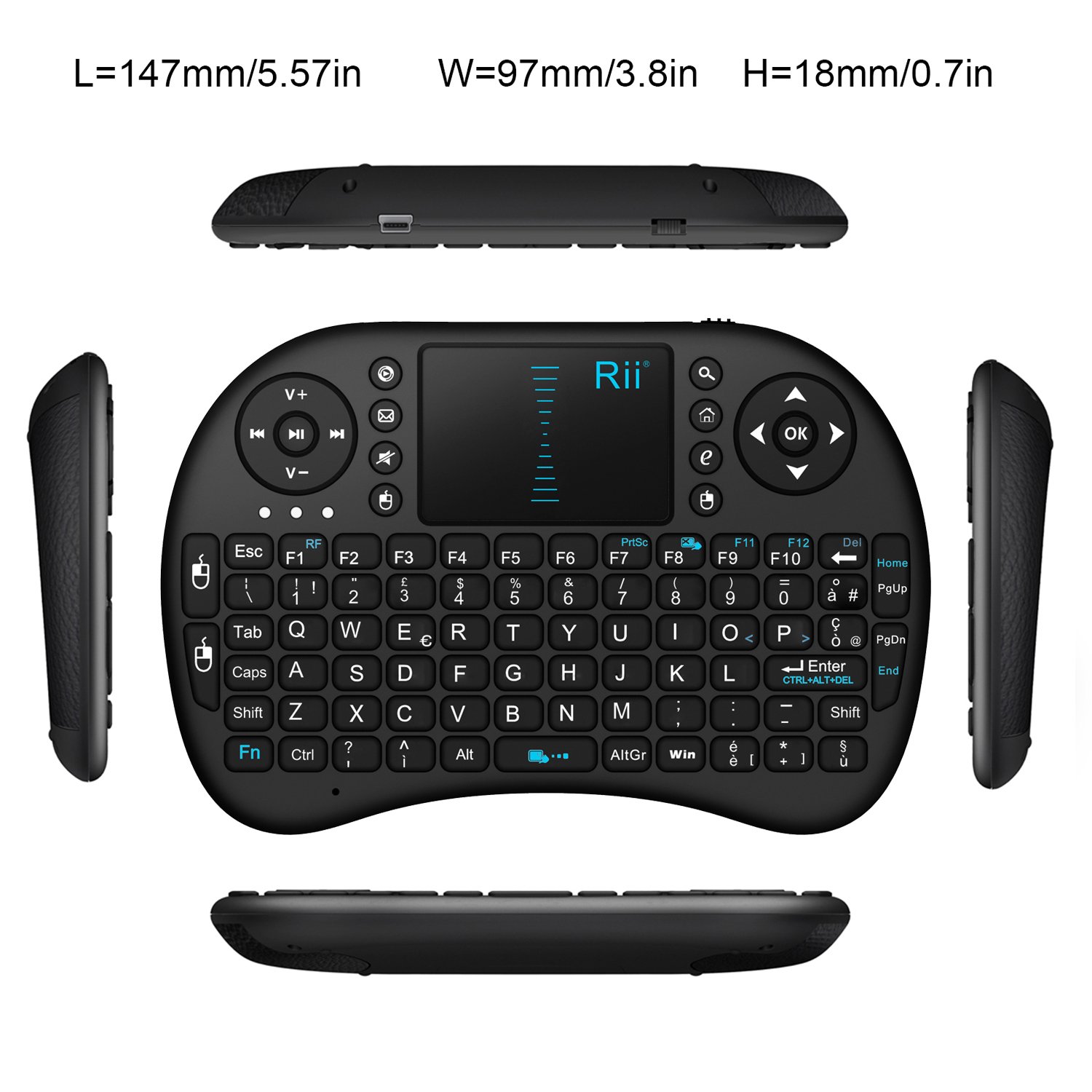
Imatge: De dalt a baix view of the Rii Mini i8 keyboard with its dimensions (length, width, height) indicated in millimeters and inches.
11. Garantia i Suport
Per obtenir informació sobre la garantia i assistència tècnica, consulteu el lloc web oficial del fabricant. weblloc web o poseu-vos en contacte amb el vostre distribuïdor. Conserveu el rebut de compra per a reclamacions de garantia.


