
1. Introducció
Aquest manual proporciona instruccions detallades per a la configuració, el funcionament i el manteniment del comandament a distància universal Vibe Axcess 5 en 1. Llegiu atentament aquest manual abans d'utilitzar el comandament a distància per garantir-ne el funcionament correcte i maximitzar l'experiència d'usuari. Aquest comandament a distància està dissenyat per controlar fins a cinc dispositius d'àudio/vídeo diferents.
2. Producte acabatview
El comandament a distància universal Vibe Axcess 5 en 1 està dissenyat per consolidar el control de diversos dispositius d'entreteniment domèstic en una sola unitat. Compta amb botons dedicats per a diverses funcions i tipus de dispositius.
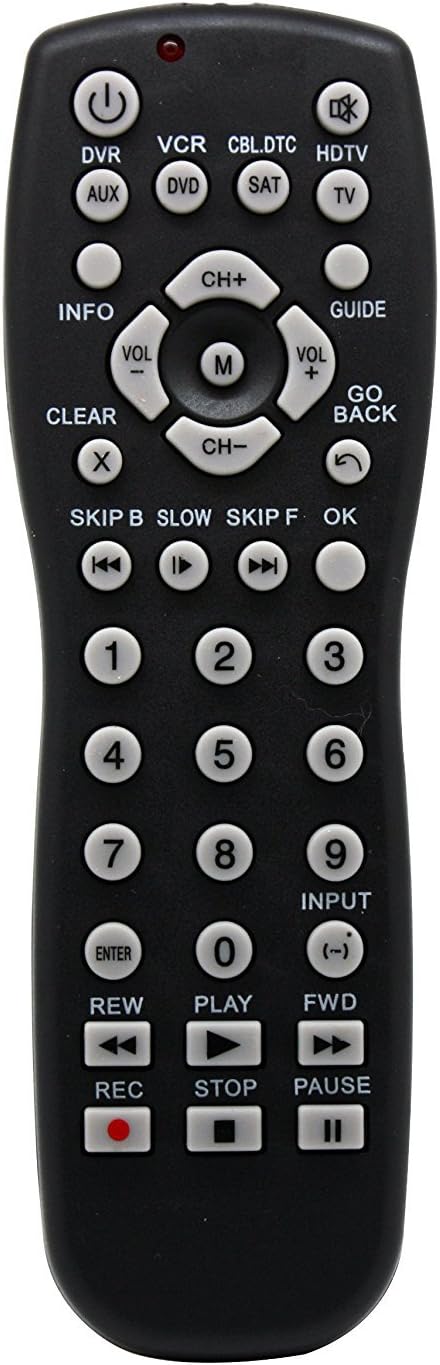
Figura 1: Davant view del comandament a distància universal Vibe Axcess 5 en 1. Aquesta imatge mostra la disposició del comandament a distància, inclosos els botons de selecció de dispositius (DVR, VCR, CBL.DTC, HDTV, AUX, DVD, SAT, TV), el teclat de navegació, les tecles numèriques i els botons de control multimèdia (REW, PLAY, FWD, REC, STOP, PAUSE).

Figura 2: Embalatge del comandament a distància universal Vibe Axcess 5 en 1. L'embalatge destaca la capacitat 5 en 1 del comandament a distància i la compatibilitat amb diversos tipus de dispositius com ara DVD/VCR, HDTV, DVD, AUX i CBL/SAT/CABLE.
3. Configuració
3.1 Instal·lació de la bateria
- Localitzeu la tapa del compartiment de la bateria a la part posterior del comandament a distància.
- Feu lliscar la coberta cap avall o premeu el pestell i aixequeu-la per obrir-la.
- Introduïu dues (2) piles AAA, assegurant-vos que els terminals positiu (+) i negatiu (-) coincideixin amb els diagrames de l'interior del compartiment.
- Torneu a col·locar la tapa del compartiment de la bateria, fent-la lliscar fins que faci clic de manera segura.
Nota: Feu servir sempre piles noves i substituïu-les totes dues alhora. No barregeu piles velles i noves ni piles de tipus diferents.
3.2 Programació del comandament a distància
Per controlar els dispositius, el comandament a distància universal s'ha de programar amb els codis correctes per a cada dispositiu. Normalment hi ha dos mètodes de programació:
3.2.1 Entrada directa de codi
Aquest mètode consisteix a introduir un codi específic d'una llista de codis (normalment proporcionada amb el comandament a distància o disponible en línia) per a la marca del dispositiu.
- Engegueu el dispositiu que voleu controlar (per exemple, televisor, reproductor de DVD).
- Premeu i manteniu premut el botó del dispositiu desitjat al comandament a distància (per exemple, TV, DVD) durant aproximadament 3 segons fins que el llum indicador (normalment vermell) s'il·lumini i es mantingui encès.
- Mentre l'indicador lluminós està encès, introduïu el codi de 3 o 4 dígits de la marca del dispositiu amb les tecles numèriques.
- Si el codi és vàlid, l'indicador lluminós s'apagarà. Si l'indicador parpelleja i roman encès, el codi no era vàlid; torneu a introduir el codi.
- Proveu el comandament a distància prement el botó PODER botó. Si el dispositiu s'apaga, el codi és correcte. Si no és així, proveu el següent codi que apareix a la vostra marca.
3.2.2 Cerca automàtica de codis
Si no podeu trobar un codi o l'entrada directa del codi falla, feu servir el mètode de cerca automàtica de codis.
- Engegueu el dispositiu que voleu controlar.
- Premeu i manteniu premut el botó del dispositiu desitjat (per exemple, TV) durant aproximadament 3 segons fins que el llum indicador s'il·lumini i es mantingui encès.
- Mentre manteniu premut el botó del dispositiu, premeu el PODER botó una vegada. El llum indicador començarà a parpellejar, indicant que està buscant un codi.
- Apunta el comandament a distància al dispositiu i espera que s'apagui. Això pot trigar uns minuts mentre el comandament a distància canvia els codis.
- Un cop apagat el dispositiu, premeu immediatament el botó ENTRAR per desar el codi. L'indicador lluminós s'apagarà.
- Proveu les funcions del comandament a distància. Si algunes funcions no funcionen, repetiu el procés de cerca automàtica per trobar un codi més compatible.
4. Instruccions de funcionament
Un cop programat, el funcionament del comandament a distància universal Vibe Axcess 5 en 1 és senzill.
- Seleccioneu el dispositiu: Premeu el botó del dispositiu corresponent (per exemple, TV, DVD, CBL.DTC) per al dispositiu que voleu controlar. L'indicador lluminós s'il·luminarà breument per confirmar la selecció.
- Encès/apagat: Premeu el botó PODER botó per encendre o apagar el dispositiu seleccionat.
- Control de volum: Utilitza el VOL+ i VOL- botons per ajustar el volum.
- Control del canal: Utilitza el CH+ i CH- botons per canviar de canal.
- Tecles numèriques: Feu servir les tecles numèriques (0-9) per introduir directament els números de canal o altres entrades numèriques.
- Navegació: Feu servir el botó direccional (amunt, avall, esquerra, dreta) i OK botó per a la navegació del menú.
- Controls de mitjans: Ús JUGAR, PAUSA, STOP, REW, FWD, i REC per controlar la reproducció multimèdia en dispositius compatibles.
5. Manteniment
5.1 Neteja
Per netejar el comandament a distància, eixugueu-lo suaument amb un drap suau i sec. No utilitzeu netejadors abrasius, dissolvents ni productes químics agressius, ja que poden danyar l'acabat o els components interns del comandament a distància.
5.2 Substitució de la bateria
Quan el rendiment del comandament a distància disminueix o l'indicador lluminós no s'il·lumina, és hora de substituir les piles. Seguiu els passos d'instal·lació de les piles de la secció 3.1. Desfeu-vos de les piles usades de manera responsable d'acord amb la normativa local.
6. Solució De Problemes
- El comandament a distància no funciona:
- Comproveu si les piles estan inserides correctament i no estan esgotades. Substituïu-les si cal.
- Assegureu-vos que heu seleccionat el botó del dispositiu correcte (per exemple, TV per al teu televisor).
- Verifiqueu que el comandament a distància estigui programat amb el codi correcte per al vostre dispositiu. Torneu-lo a programar si no esteu segurs.
- Assegureu-vos que no hi hagi obstacles entre el comandament a distància i el sensor d'infrarojos del dispositiu.
- Algunes funcions no funcionen:
- És possible que alguns codis de comandament a distància universal no siguin compatibles amb totes les funcions originals del comandament a distància. Prova un altre codi per a la marca del teu dispositiu seguint els passos de programació.
- Assegureu-vos que el dispositiu que intenteu controlar admeti la funció específica (per exemple, no tots els televisors tenen una funció específica del botó "INFO").
- L'indicador lluminós no s'il·lumina:
- Comproveu i substituïu les piles.
- Si el problema persisteix després de canviar la pila, és possible que el comandament a distància estigui defectuós.
7. Especificacions
- Model: OT795-KO
- Marca: Vibració
- Dimensions del producte: 10.7 x 4 x 0.8 polzades
- Pes de l'article: 4 unces
- Bateries: Necessites 2 piles AAA (no incloses)
- Nombre màxim de dispositius admesos: 5
- Tecnologia de connectivitat: infrarojos
- Característica especial: Universal
8. Garantia i Suport
Per obtenir informació sobre la cobertura de la garantia o l'assistència tècnica, consulteu la documentació inclosa amb la compra o poseu-vos en contacte amb el distribuïdor on vau adquirir el producte. Els termes específics de la garantia poden variar.