Introducció
This user manual provides comprehensive instructions for the setup, operation, and maintenance of your AT&T CL82201 DECT 6.0 Cordless Phone/Answering System. This expandable system supports up to twelve handsets and features a digital answering system, caller ID, and intercom capabilities for convenient communication.
Configuració
1. Contingut del paquet
Assegureu-vos que hi hagi tots els elements:
- AT&T CL82201 Base Unit with Digital Answering System
- Cordless Handsets (2 included)
- Handset Battery Packs
- Battery Compartment Covers
- Adaptador d'alimentació CA per a la unitat base
- Cordó de línia telefònica
- Handset Charger with AC Power Adapter (for second handset)
2. Instal·lació de la bateria
- Obriu la tapa del compartiment de la bateria a la part posterior de cada auricular.
- Connecteu el connector de la bateria de manera segura a la presa de l'interior del compartiment.
- Col·loqueu el paquet de bateries al compartiment.
- Substituïu la tapa del compartiment de la bateria.
- Place the handset in the base unit or charger to charge for at least 16 hours before first use.
3. Connexió de la unitat base
- Plug the small end of the AC power adapter into the power jack on the back of the base unit.
- Connecteu l'extrem gran de l'adaptador de corrent altern a una presa de corrent estàndard.
- Plug one end of the telephone line cord into the TEL LINE jack on the back of the base unit.
- Connecteu l'altre extrem del cable de la línia telefònica a una presa de paret.
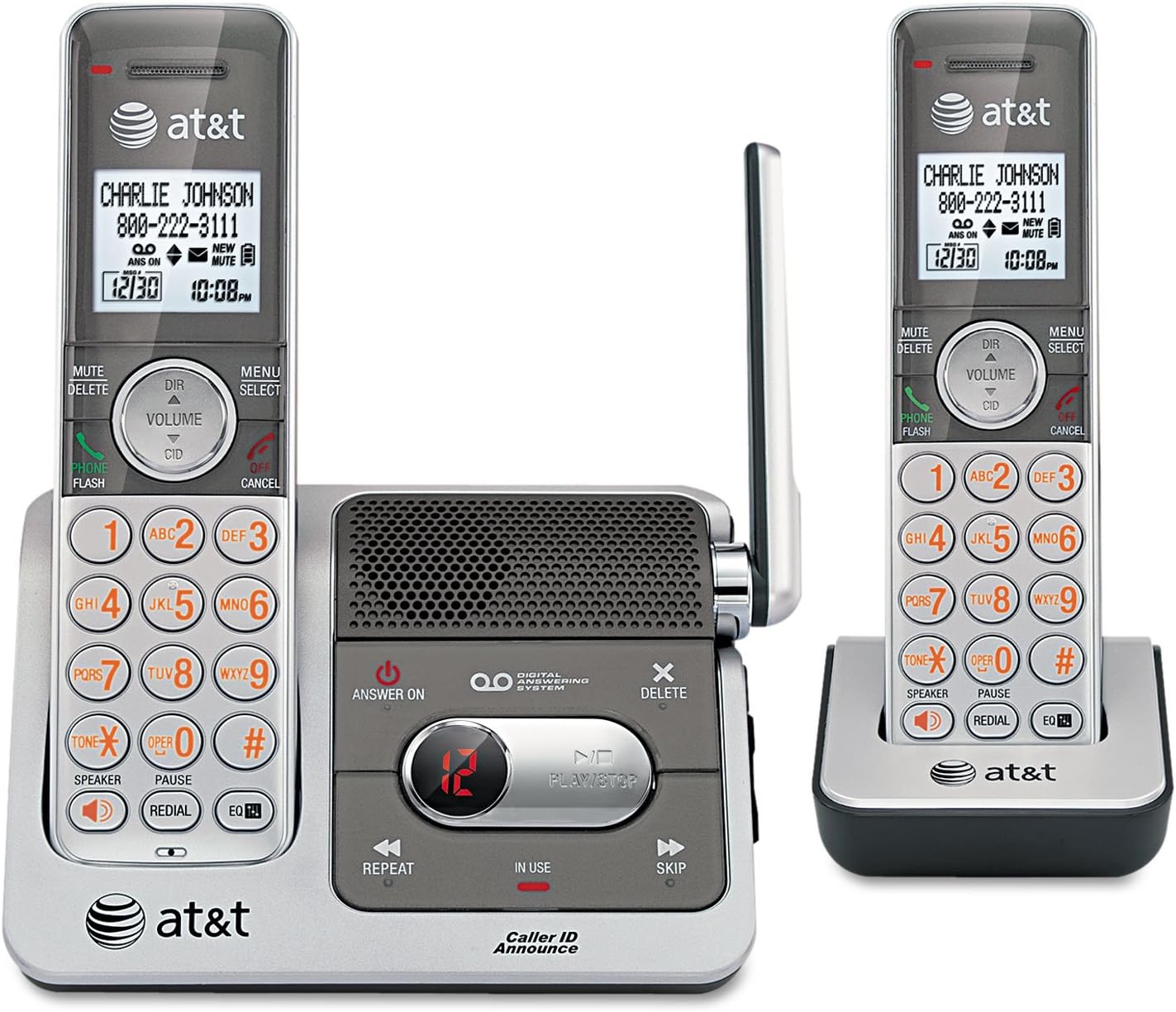
This image displays the AT&T CL82201 cordless phone system. On the left, a handset is docked in the main base unit, which features a digital answering system with controls for playback, repeat, and skip. The base also has an 'Answer On' button and a message counter. On the right, a second handset is shown docked in its charging cradle. Both handsets feature a backlit display showing caller ID information, date, and time, along with a full keypad, navigation buttons, and function keys for mute, delete, volume, speaker, and redial.
Instruccions de funcionament
1. Fer i rebre trucades
- Per fer una trucada: Premeu TELÈFON / FLASH or PONENTi, a continuació, marqueu el número.
- Per respondre una trucada: Premeu TELÈFON / FLASH or PONENT quan sona el telèfon.
- Per finalitzar una trucada: Premeu OFF/CANCEL·LAR o torneu a col·locar l'auricular a la base/carregador.
2. Digital Answering System
- Activar/Desactivar: Premeu RESPOSTA ACTIVADA botó de la unitat base.
- Reproducció de missatges: Premeu PLAY/STOP a la unitat base.
- Skip Message: Premeu SALTAR durant la reproducció.
- Repeat Message: Premeu REPETIR durant la reproducció.
- Suprimeix el missatge: Premeu ELIMINAR during playback or when the system is idle.
- Record Greeting: Refer to the handset menu for options to record a custom outgoing message.
3. Identificador de trucada
The handset display shows the caller's name and number (if available) after the first ring. The system also features Caller ID Announce, which audibly announces the caller's name.
- Review Registre d'identificació de trucades: Premeu DIR/VOLUM to scroll through the log.
- Tornar a trucar: Premeu TELÈFON / FLASH to dial a number from the Caller ID log.
4. Intercom (Multi-Handset)
Use the intercom feature to communicate between handsets.
- Premeu MENÚ/SELECT en un telèfon.
- Scroll to "Intercom" and press SELECCIONA.
- Select the desired handset to call.
5. Control de volum
Adjust the earpiece or speaker volume during a call by pressing DIR/VOLUM amunt o avall.
6. Funció de silenci
Durant una trucada, premeu MUTE/ELIMINAR to mute your microphone. Press it again to unmute.
7. Remarcació
Premeu RECOMANTA a view the last 10 dialed numbers. Press TELÈFON / FLASH per marcar el número seleccionat.
Manteniment
1. Neteja
Clean the phone and base unit with a soft, slightly damp drap. No utilitzeu esprais de neteja ni productes químics agressius.
2. Cura de la bateria
- Keep the handset charged when not in use to maintain optimal battery performance.
- Si no heu d'utilitzar el telèfon durant un període prolongat, traieu la bateria del receptor.
- Replace the battery pack when the handset indicates low battery or performance degrades significantly.
Resolució de problemes
| Problema | Solució |
|---|---|
| Sense to de marcatge. |
|
| Handset displays "Low Battery" or does not hold a charge. |
|
| Mala qualitat de so o estàtica. |
|
| El contestador automàtic no enregistra els missatges. |
|
Especificacions
- Model: CL82201
- Tipus de telèfon: Sense fils
- Tecnologia: DECT 6.0
- Handsets Included: 2 (Expandable up to 12)
- Sistema de contestador: Digital, Integrated
- Capacitat de gravació: Uns 17 minuts
- Identificació de la persona que truca: Yes (with Caller ID Announce)
- Capacitat de trucada de conferència: 3 vies
- Intercomunicador: Yes (Handset-to-handset)
- Visualització: Pantalla amb retroiluminació blanca
- Teclat: Il·luminat
- Fabricant: AT&T
- UPC: 151903430309
Garantia i Suport
Informació de la garantia
This AT&T product is covered by a standard manufacturer's limited warranty. Please refer to the warranty card included in your product packaging for specific terms, conditions, and duration. Keep your purchase receipt as proof of purchase.
Atenció al client
For technical assistance, troubleshooting, or warranty service, please visit the official AT&T support website or contact their customer service hotline. Contact information can typically be found on the AT&T weblloc web o a l'embalatge original del producte.


