1. Introducció
This manual provides instructions for the AGPTEK USB Male to XLR Female Microphone Cable, Model CM2. This cable is designed to connect an XLR-equipped microphone directly to a computer's USB port, enabling digital audio recording and processing. It offers a convenient plug-and-play solution for various audio applications.
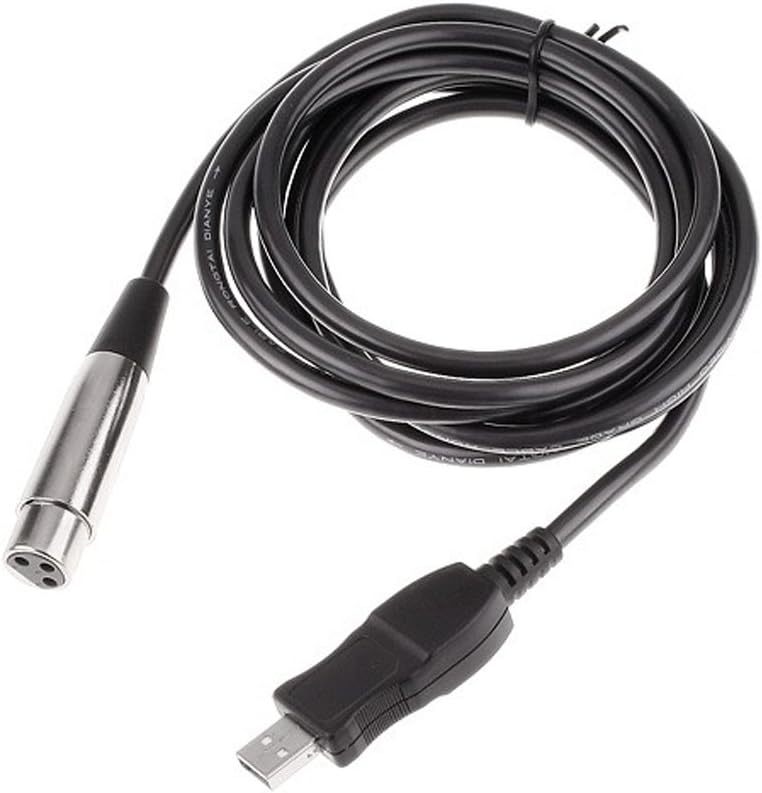
Image 1.1: AGPTEK USB Male to XLR Female Microphone Cable. This image displays the full length of the black cable, coiled, with the silver XLR female connector on one end and the black USB male connector on the other. The USB connector features a small red LED indicator.
2. Característiques del producte
- Direct Connectivity: Converts XLR microphone output to USB for direct computer connection.
- Plug-and-Play: No calen controladors addicionals per a la majoria de sistemes operatius.
- Integrated A/D Converter: Built-in analog-to-digital converter for clear audio signal.
- Indicador LED: Provides visual status of connection.
- Compatibilitat: Designed for use with PC (Windows) and macOS systems.
- Longitud del cable: Approximately 3 meters (10 feet) for flexible setup.
3. Contingut del paquet
- 1 x AGPTEK USB Male to XLR Female Microphone Cable (Model CM2)
4. Configuració
4.1 Requisits del sistema
- Operating System: Windows (XP/Vista/7/8/10/11) or macOS.
- Available USB 1.1/2.0/3.0 port.
4.2 Passos d'instal·lació
- Connecta el micròfon: Plug the XLR female end of the cable into the XLR output port of your microphone. Ensure a secure connection.
- Connexió a l'ordinador: Insert the USB male end of the cable into an available USB port on your computer.

Imatge 4.1: Primer pla view of the AGPTEK cable's USB and XLR connectors. The silver XLR female connector is shown with its three pins, and the black USB male connector is visible with its USB symbol and a small red LED indicator.
- Instal·lació del controlador: Your computer's operating system should automatically detect and install the necessary drivers. This is typically a plug-and-play process. The LED indicator on the USB connector will illuminate when the device is recognized and powered.
- Verifica el reconeixement del dispositiu:
- Windows: Vés a Tauler de control > So > Gravació tab. Look for a device named "USB Audio Device" or similar.
- macOS: Vés a Configuració del sistema > So > Entrada tab. Look for a device named "USB Audio Device" or similar.

Imatge 4.2: Detallada view of the USB male connector, highlighting the small red LED indicator. This LED illuminates when the cable is properly connected and receiving power from the USB port.
5. Instruccions de funcionament
5.1 Selecting the Input Device
Once the cable is connected and recognized by your computer, you need to select it as the primary audio input device in your operating system and any recording software you are using.
- Windows: En el Gravació tab of the Sound settings, right-click on the "USB Audio Device" and select "Set as Default Device." You can also adjust the input level (gain) from the "Levels" tab within the device properties.
- macOS: En el Entrada tab of the Sound settings, select "USB Audio Device." Adjust the input volume slider as needed.
5.2 Using with Audio Software
Open your preferred audio recording or processing software (e.g., Audacity, GarageBand, OBS Studio). Within the software's audio settings or preferences, select the "USB Audio Device" as your input source. You may need to adjust the input gain within the software for optimal recording levels.
6. Manteniment
- Emmagatzematge: Guardeu el cable en un lloc fresc i sec, allunyat de la llum solar directa i de temperatures extremes.
- Neteja: Feu servir un drap suau i sec per netejar el cable i els connectors. Eviteu els netejadors líquids.
- Manipulació: Do not bend the cable sharply or pull it by the cable itself when disconnecting. Always grasp the connector ends.
- Inspecció: Periodically check the cable and connectors for any signs of damage or wear.
7. Solució De Problemes
| Problema | Causa possible | Solució |
|---|---|---|
| No sound input from microphone. |
|
|
| Hissing or static noise in recording. |
|
|
| "Uses too much power" error (iPad/tablet). | Device power limitations. |
|
| L'indicador LED no s'encén. |
|
|
8. Especificacions
| Característica | Detall |
|---|---|
| Marca | AGPTEK |
| Número de model | CM2 |
| Tipus de connector | USB Type A Male to XLR Female |
| Tipus de cable | USB, XLR |
| Longitud del cable | 3 metres (aprox. 10 peus) |
| Dispositius compatibles | PC (Windows), macOS |
| Característica especial | Indicador LED |
| Velocitat de transferència de dades | 44.1 MHz (Audio Sampla tarifa) |
| Color | Negre |
| Pes de l'article | 4.8 unces (aprox. 0.3 lliures) |
| UPC | 847977046699, 713382727341, 847977039714, 519868721878 |
9. Garantia i Suport
For warranty information and technical support, please refer to the documentation included with your purchase or contact AGPTEK customer service directly. Contact details can typically be found on the manufacturer's official weblloc.


