1. Introducció
This user manual provides comprehensive instructions for the installation, operation, and maintenance of your D-Link DHP-W310AV Powerline Network Adapter. The DHP-W310AV extends your home network by utilizing your existing electrical wiring to transmit network data, offering both wired Ethernet and wireless 802.11n connectivity. Please read this manual carefully to ensure proper setup and optimal performance of your device.
2. Contingut del paquet
Comproveu que el vostre paquet contingui els elements següents:
- D-Link DHP-W310AV Powerline Network Adapter
- Cable Ethernet
- Guia d'instal·lació ràpida
If any of the above items are missing or damaged, please contact your local D-Link reseller for assistance.
3. Producte acabatview
The DHP-W310AV is designed for ease of use and compact integration into your home. Below are descriptions of its physical features and indicators.
3.1 Front Panel and LED Indicators

Figura 1: Davant view of the D-Link DHP-W310AV, showing the D-Link logo, model number, and four LED indicators on the left side. These indicators provide status information for power, Powerline connection, Ethernet activity, and Wi-Fi status.
- LED d'alimentació: Indica l'estat d'alimentació del dispositiu.
- LED de línia elèctrica: Indicates the status of the Powerline connection to other adapters.
- LED Ethernet: Indica activitat al port Ethernet.
- LED Wi-Fi: Indicates the status of the wireless network.
3.2 Rear Panel (Power Plug)
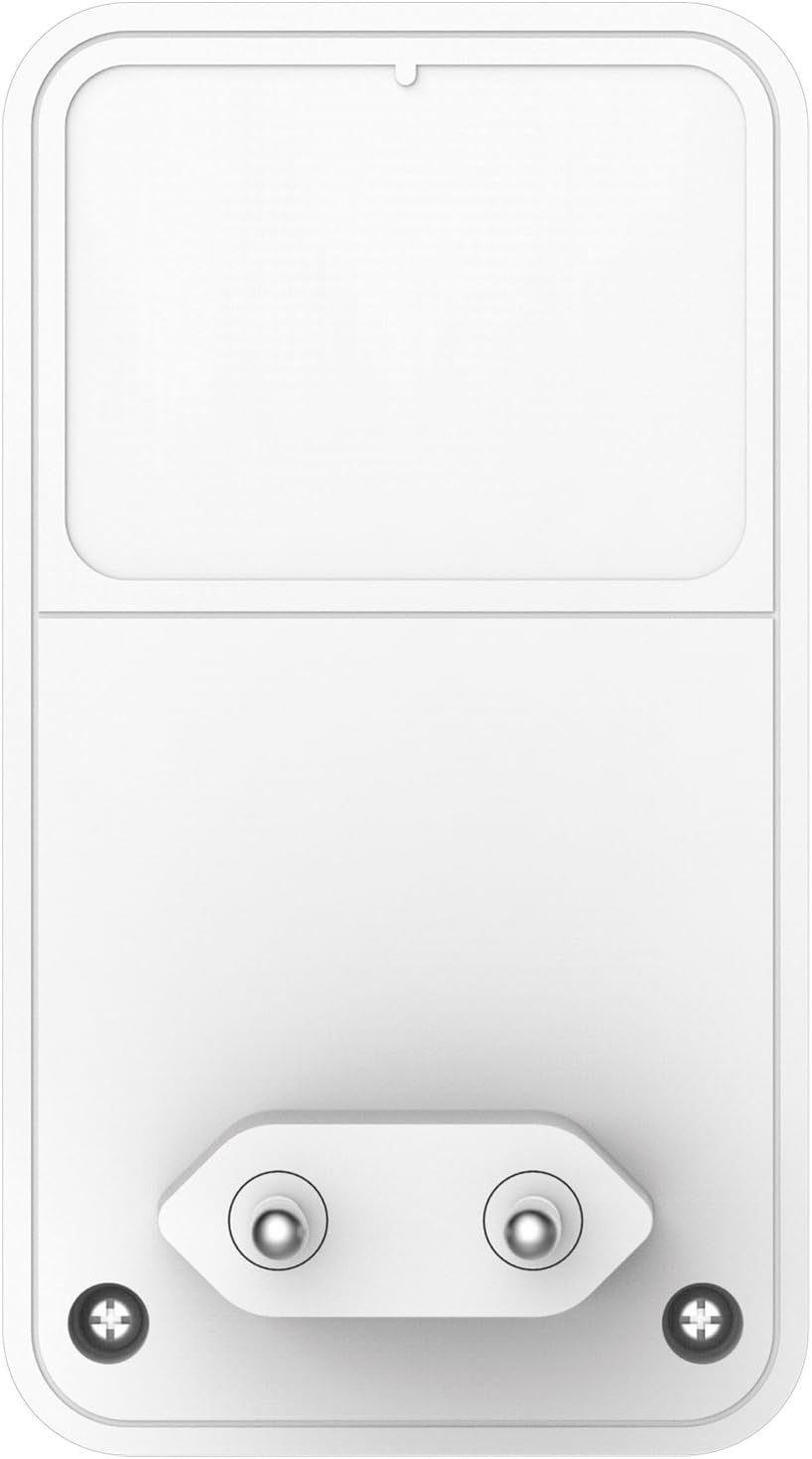
Figura 2: posterior view of the D-Link DHP-W310AV, displaying the integrated power plug designed for direct insertion into a wall outlet. This design ensures a compact form factor and direct power supply.
3.3 Side Panel (LAN Port and Reset Button)

Figura 3: lateral view of the D-Link DHP-W310AV, highlighting the LAN (Ethernet) port for wired connections and the recessed Reset button. The Reset button is used to restore the device to factory default settings.
- Port LAN: An RJ-45 Ethernet port for connecting wired devices such as computers, gaming consoles, or smart TVs.
- Botó de restabliment: Used to restore the device to its factory default settings. Press and hold for approximately 10 seconds while the device is powered on.
4. Configuració
Follow these steps to set up your D-Link DHP-W310AV Powerline Network Adapter. This device requires at least one other Powerline adapter (e.g., D-Link DHP-308AV, DHP-P308AV, or similar) connected to your router to function.
4.1 Col·locació inicial
- Plug in the Main Powerline Adapter: Connect your primary Powerline adapter (not included with DHP-W310AV) to an electrical outlet near your internet router. Use an Ethernet cable to connect this adapter to your router.
- Plug in the DHP-W310AV: Plug the DHP-W310AV into an electrical outlet in the room where you want to extend your network coverage. Ensure it is plugged directly into a wall outlet, not a power strip or surge protector, for optimal performance.
- Wait for Powerline LED: Wait for the Powerline LED on the DHP-W310AV to turn solid green, indicating a successful connection to your existing Powerline network. This may take a few moments.
4.2 Securing the Powerline Network (Pairing)
For security, it is recommended to pair your Powerline adapters to create a private, encrypted network.
- Press Security Button on Existing Adapter: On your existing Powerline adapter (connected to the router), press the Simple Connect or Security button. Refer to that adapter's manual for exact button location and timing.
- Press Security Button on DHP-W310AV: Within two minutes, press the Simple Connect or Security button on the DHP-W310AV. This button is typically located on the side or bottom of the device.
- Verifica l'emparellament: The Powerline LED on both adapters should turn solid green, indicating a successful and secure connection.
4.3 Configuració sense fil
The DHP-W310AV broadcasts a Wi-Fi network. The default Wi-Fi network name (SSID) and password (WPA/WPA2 key) are usually printed on a label on the bottom or back of the device.
- Connecta't a Wi-Fi: On your wireless device (laptop, smartphone, tablet), search for available Wi-Fi networks and select the SSID corresponding to your DHP-W310AV.
- Introduïu la contrasenya: Enter the Wi-Fi password (WPA/WPA2 key) when prompted.
- Access Internet: Once connected, your device should have internet access through the Powerline network.
For advanced Wi-Fi settings, such as changing the SSID or password, you may need to access the device's web-based configuration utility. Refer to the full D-Link DHP-W310AV manual for detailed instructions on accessing and configuring these settings.
5. Instruccions de funcionament
5.1 Connexió per cable
To connect a wired device to your Powerline network:
- Ensure the DHP-W310AV is powered on and the Powerline LED is solid green.
- Connect one end of an Ethernet cable to the LAN port on the DHP-W310AV.
- Connect the other end of the Ethernet cable to the Ethernet port on your wired device (e.g., computer, game console).
- The Ethernet LED on the DHP-W310AV should illuminate, indicating an active connection.
5.2 Connexió sense fils
To connect a wireless device to your Powerline network via Wi-Fi:
- Ensure the DHP-W310AV is powered on and the Wi-Fi LED is illuminated.
- On your wireless device, open the Wi-Fi settings and select the network name (SSID) of the DHP-W310AV.
- Enter the Wi-Fi password (WPA/WPA2 key) when prompted.
- Once connected, your device will have wireless internet access.
6. Manteniment
To ensure the longevity and optimal performance of your DHP-W310AV:
- Neteja: Netegeu suaument el dispositiu amb un drap suau i sec. No utilitzeu netejadors líquids ni en aerosol.
- Col·locació: Avoid placing the device in direct sunlight, near heat sources, or in areas with high humidity. Ensure adequate ventilation around the device.
- Actualitzacions de firmware: Comproveu periòdicament el suport de D-Link weblloc web per a actualitzacions de firmware. L'actualització del firmware pot millorar el rendiment, afegir noves funcions i corregir errors.
- Cicle d'alimentació: If you experience intermittent issues, try unplugging the device from the power outlet for 10 seconds and then plugging it back in.
7. Solució De Problemes
This section provides solutions to common issues you might encounter with your DHP-W310AV.
7.1 No Power LED
- Ensure the DHP-W310AV is securely plugged into a working electrical outlet.
- Try plugging another device into the same outlet to confirm the outlet is functional.
7.2 Powerline LED is Off or Blinking
- Ensure all Powerline adapters are plugged directly into wall outlets, not power strips or surge protectors.
- Verify that all Powerline adapters are on the same electrical circuit. Powerline technology works best within the same electrical phase.
- Ensure the main Powerline adapter is connected to your router and powered on.
- Intenta tornar a emparellar els adaptadors tal com es descriu a la Secció 4.2.
7.3 No Internet Access via Wired or Wireless Connection
- Check the Powerline LED status. If it's off or blinking, refer to the previous troubleshooting steps.
- Verifiqueu que el vostre encaminador principal tingui una connexió a Internet activa.
- For wired connections, ensure the Ethernet cable is securely connected to both the DHP-W310AV and your device.
- For wireless connections, ensure you are connected to the correct Wi-Fi network (SSID) and have entered the correct password.
- Try restarting your router, all Powerline adapters, and the connected devices.
7.4 Velocitat de xarxa lenta
- Powerline performance can be affected by electrical interference. Avoid plugging adapters into outlets shared with high-power appliances (e.g., washing machines, refrigerators).
- Assegureu-vos que els adaptadors estiguin connectats directament a les preses de corrent.
- The quality of your home's electrical wiring can impact performance.
- Ensure your main internet connection speed is adequate.
8. Especificacions
| Característica | Descripció |
|---|---|
| Número de model | DHP-W310AV |
| Tipus sense fil | 802.11n |
| Velocitat de transferència de dades | Up to 500 Mbps (Powerline), 300 Mbps (Wireless) |
| Protocol d'enllaç de dades | Ethernet, HomePlug AV |
| Interfície del maquinari | 1 x 10/100 Ethernet Port (RJ-45) |
| Dispositius compatibles | Desktop computers, Laptops, Gaming Consoles, Smart TVs, etc. |
| Dimensions (LxWxH) | 2.4 x 1.67 x 2.68 polzades (6.1 x 4.24 x 6.81 cm) |
| Pes de l'article | 4.4 unces (125.6 grams) |
| Entrada de potència | 100-240V AC, 50/60Hz |
9. Garantia i Suport
For detailed warranty information and technical support, please refer to the warranty card included with your product or visit the official D-Link support website. You can find drivers, firmware updates, and additional documentation there.
Suport de D-Link Weblloc: www.dlink.com/support


