1. Producte acabatview
The C2G 03997 Cat6 Snagless Unshielded Ethernet Network Patch Cable is designed for high-speed data transmission in Ethernet and Gigabit computer networks. It supports bandwidth-intensive applications such as voice, data, and video distribution. This cable meets all Cat6 TIA/EIA standards, effectively reducing impedance and structural return loss (SRL). Each pair of wires within the cable is bonded to maintain twist-spacing up to the termination point, minimizing Near-End Crosstalk (NEXT) levels. The cable features a molded, snagless boot to prevent damage during installation and provide strain relief.
Característiques principals:
- Connector RJ45: Standard connector for Ethernet networking.
- Snagless Boot: Protects the connector clip during installation and removal.
- Unshielded Twisted Pair (UTP): Suitable for environments with minimal electromagnetic interference.
- Cat6 Standard: Supports data transfer rates up to 1000 Mbps (1 Gigabit) and frequencies up to 250 MHz, compatible with 10GBase-T for shorter distances.
- Construcció duradora: Made from high-quality copper cable with a PVC jacket.

Figure 1: C2G Cat6 Ethernet Cable, Green, 30 Feet. This image shows the full length of the green Cat6 cable with RJ45 connectors on both ends.
2. Configuració i instal·lació
This Cat6 patch cable is designed for simple plug-and-play installation. No special tools or software are required.
- Identifica els ports: Locate the RJ45 Ethernet ports on the devices you wish to connect (e.g., modem, router, computer, network switch). These ports are typically rectangular with a small clip on one side.
- Connecta el primer dispositiu: Gently insert one end of the C2G Cat6 cable into the Ethernet port of your first device. Ensure the connector's clip clicks into place, indicating a secure connection.
- Connecta el segon dispositiu: Insert the other end of the C2G Cat6 cable into the Ethernet port of your second device. Again, ensure the clip clicks securely.
- Verifica la connexió: Most network devices have LED indicators next to the Ethernet port that will light up or blink when a successful connection is established and data is being transmitted.
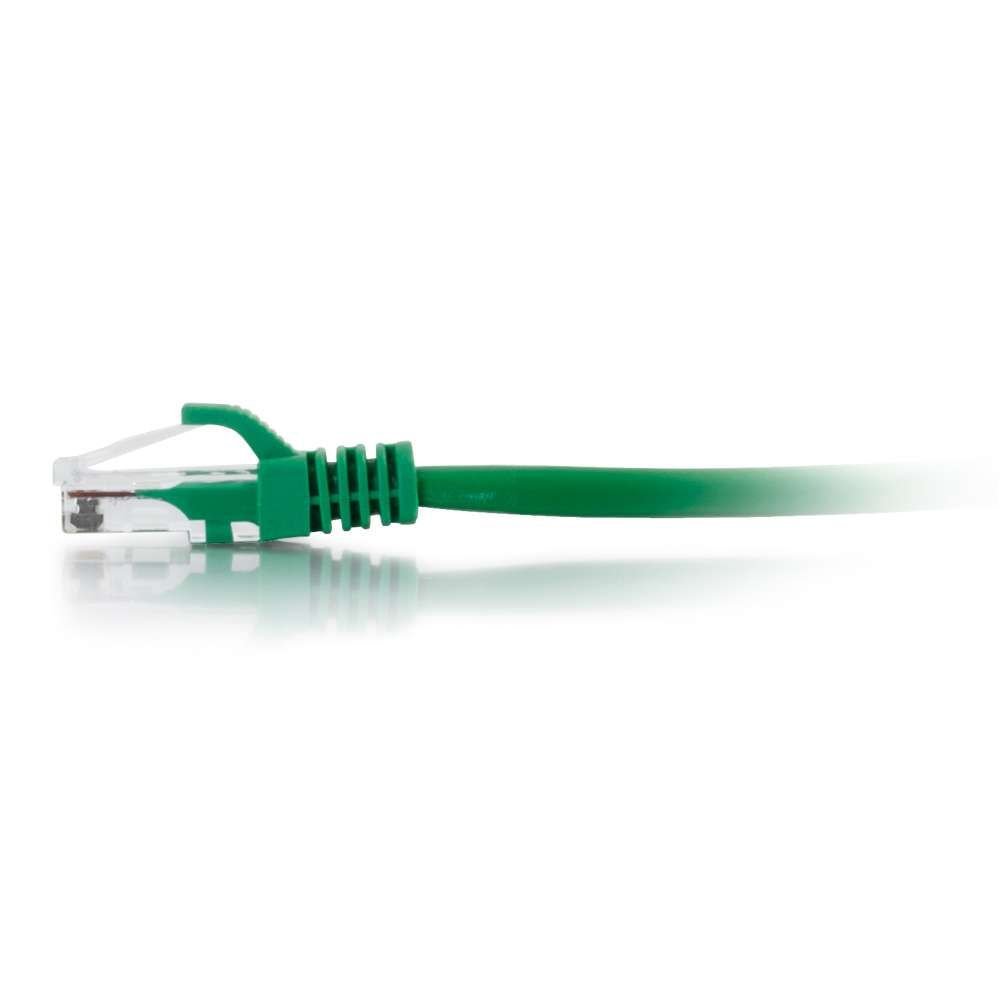
Figura 2: Primer pla view of the C2G Cat6 RJ45 connector with its snagless boot. This image highlights the connector design for secure and protected connections.
3. Instruccions de funcionament
Once connected, the C2G Cat6 cable facilitates data communication between the connected devices. It operates passively, meaning it does not require external power or configuration.
- Transmissió de dades: The cable transmits data signals between network devices. The speed of data transfer will depend on the capabilities of the connected devices and your network infrastructure.
- Compatibilitat de xarxa: This Cat6 cable is backward compatible with Cat5e and Cat5 standards, allowing it to function in older network setups, though at the speed of the lowest common denominator.
- Aplicació: Ideal for connecting computers, printers, network-attached storage (NAS), gaming consoles, smart TVs, and other network-enabled devices to a router, modem, or network switch.

Figura 3: Angle view of the C2G Cat6 RJ45 connector, showing the internal pins and the clear plastic housing. This perspective emphasizes the build quality of the connector.
4. Manteniment i cura
Proper care of your C2G Cat6 cable will ensure its longevity and optimal performance.
- Eviteu doblegar-vos: Do not excessively bend or kink the cable, as this can damage the internal wires and impair performance.
- Protegir els connectors: Avoid pulling the cable by the wire when disconnecting. Always grasp the connector housing. The snagless boot helps protect the locking tab.
- Neteja: Keep the RJ45 connectors free from dust and debris. Use compressed air if necessary.
- Emmagatzematge: When not in use, coil the cable loosely and store it in a dry, cool place away from direct sunlight or extreme temperatures.
- Ús ambiental: This cable is rated for both indoor and outdoor usage, but prolonged exposure to harsh outdoor elements may reduce its lifespan.
5. Solució De Problemes
Si teniu problemes de connectivitat de xarxa, tingueu en compte els passos següents per resoldre problemes:
- Sense connexió de xarxa:
- Assegureu-vos que els dos extrems del cable estiguin ben connectats als seus ports respectius. Escolteu el so de "clic".
- Check the LED indicators on your network devices. If they are off, try re-seating the cable or using a different port.
- Test the cable with another device or use a different Ethernet cable to rule out a faulty cable.
- Velocitat de xarxa lenta:
- While Cat6 supports higher speeds, ensure all connected devices (router, switch, computer network card) also support those speeds.
- Verify that the cable is not excessively bent or damaged, as this can degrade signal quality.
- Minimize cable length where possible, as longer cables can sometimes experience signal degradation, especially in noisy environments.
- Connexió intermitent:
- Comproveu si hi ha connexions soltes en ambdós extrems.
- Inspect the cable for visible damage (frays, cuts).
- Ensure the cable is not running near sources of strong electromagnetic interference (e.g., power lines, large motors) if it's an unshielded cable.
6. Especificacions
| Característica | Detall |
|---|---|
| Marca | C2G |
| Model | 03997 |
| Tipus de cable | Unshielded (UTP), Snagless, Booted, Ethernet Patch Cable |
| Categoria de cable Ethernet | Gat 6 |
| Tipus de connector | RJ45 |
| Connector Gènere | Mascle |
| Velocitat de transferència de dades | 1000 megabits per segon |
| Freqüència | 10 GHz (Note: Cat6 typically supports up to 250 MHz for full length, 10Gbps for shorter lengths) |
| Nombre de pins | 8 |
| Color | Verd |
| Longitud | 30 peus / 9.14 metres |
| Material exterior | Clorur de polivinil (PVC) |
| Dispositius compatibles | Modem, PC, Router |
| Ús interior/exterior | Interior, Exterior |
| Pes de l'article | 0.7 lliures |
| UPC | 062373690837, 757120039976, 336013481858 |
7. Garantia i Suport
For warranty information and technical support regarding your C2G 03997 Cat6 Snagless Unshielded Ethernet Network Patch Cable, please refer to the official C2G weblloc o poseu-vos en contacte amb el seu departament d'atenció al client.
C2G Official Weblloc: www.c2g.com
C2G is a brand of Legrand. For additional resources, you may visit the Legrand weblloc: www.legrand.us


