Producte acabatview
The Logitech K120 Ergonomic Keyboard is designed for comfortable and efficient typing. It features a sleek, low-profile design with full-size F-keys and a dedicated number pad, providing a quiet typing experience. Its spill-resistant design helps protect against accidental liquid spills, and the bold, bright characters on the keys are designed for durability and readability. Adjustable tilt legs allow users to customize the keyboard angle for personal ergonomic comfort.
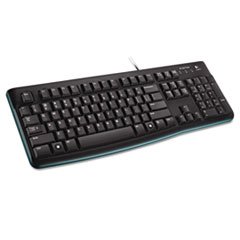
Image: The Logitech K120 Ergonomic Keyboard, showcasing its full layout with function keys and number pad.
Què hi ha a la caixa
- Logitech K120 USB Keyboard
Configuració
- Connecteu el teclat: Locate an available USB port on your computer. Insert the USB connector of the Logitech K120 keyboard firmly into the USB port.
- Plug and Play: The keyboard is plug-and-play compatible. Your operating system should automatically detect and install the necessary drivers. No additional software installation is typically required.
- Verificació de la funcionalitat: Once connected, test the keyboard by typing in a text editor or web browser to ensure all keys are functioning correctly.
Funcionament del teclat
The Logitech K120 keyboard operates like a standard full-size keyboard, providing all essential keys for daily computing tasks.
- Mecanografia: Feu servir les tecles alfanumèriques per introduir text.
- Tecles de funció (F1-F12): These keys perform various functions depending on the application or operating system. Some may have secondary functions accessible via the 'Fn' key (if present, though not typical for this model).
- Bloc numèric: The dedicated number pad on the right side allows for quick data entry and calculations. Ensure 'Num Lock' is active for numerical input.
- Potes inclinables ajustables: On the underside of the keyboard, you will find two foldable tilt legs. Flip these out to adjust the keyboard's angle for a more comfortable typing position.
Manteniment
- Neteja: To clean the keyboard, disconnect it from your computer. Use a soft, lint-free cloth lightly dampened with water or a mild cleaning solution. Avoid excessive moisture. For dust and debris between keys, use compressed air.
- Disseny resistent a vessaments: The K120 keyboard features a spill-resistant design, meaning it can withstand minor liquid spills. In case of a spill, immediately disconnect the keyboard from your computer, turn it upside down to drain the liquid, and allow it to dry completely before reconnecting. Do not immerse the keyboard in liquid.
- Emmagatzematge: Guardeu el teclat en un lloc fresc i sec, allunyat de la llum solar directa i de temperatures extremes quan no l'utilitzeu durant períodes prolongats.
Resolució de problemes
- El teclat no respon:
- Assegureu-vos que el cable USB estigui ben connectat a un port USB que funcioni de l'ordinador.
- Prova de connectar el teclat a un port USB diferent.
- Reinicieu l'ordinador.
- Si feu servir un concentrador USB, proveu de connectar el teclat directament a l'ordinador.
- Les tecles no funcionen o són enganxoses:
- Check for any debris or foreign objects lodged under the keys. Use compressed air to dislodge them.
- If a spill occurred, ensure the keyboard is completely dry before use.
- Incorrect Characters Appearing:
- Verifiqueu que la configuració d'idioma del teclat del vostre sistema operatiu sigui correcta.
- Ensure 'Num Lock' or 'Caps Lock' are not inadvertently activated if they are causing unexpected input.
Especificacions
| Característica | Detall |
|---|---|
| Marca | Logitech |
| Model | K120 |
| Tecnologia de connectivitat | USB-A, amb cable |
| Descripció del teclat | Ergonòmic |
| Color | Negre |
| Nombre de claus | 104 |
| Dispositius compatibles | Portàtil, PC |
| Pes de l'article | 1.54 lliures (0.7 kg) |
| Dimensions del paquet | 18.5 x 7.09 x 1.18 polzades (46.99 x 18.01 x 3.00 cm) |
Informació de la garantia
For detailed warranty information regarding your Logitech K120 Ergonomic Keyboard, please refer to the warranty card included with your product or visit the official Logitech weblloc. Els termes i condicions de la garantia poden variar segons la regió.
Atenció al client
If you require further assistance or have questions not covered in this manual, please visit the official Logitech support weblloc web per a preguntes freqüents, controladors i informació de contacte.
Suport Logitech Weblloc: https://support.logi.com/


