1. Introducció
This manual provides comprehensive instructions for the proper use, setup, operation, and maintenance of your Intermec 2M USB-A to USB Mini-B Cable, Model 321-611-102. Please read this manual thoroughly before using the product to ensure optimal performance and longevity.
2. Producte acabatview
The Intermec 2M USB-A to USB Mini-B Cable is designed for connecting devices with a USB Mini-B port to a host device with a standard USB-A port. This cable facilitates both data transfer and power supply, adhering to ROHS compliance standards.
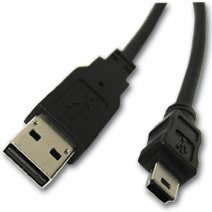
Image 1: The Intermec 2M USB-A to USB Mini-B Cable. The image displays the two distinct connectors: a rectangular USB-A connector on one end and a smaller, trapezoidal USB Mini-B connector on the other end, both black in color.
Característiques principals:
- Tipus de connector: USB-A Male to USB Mini-B Male
- Longitud del cable: 2 metres (aproximadament 6.56 peus)
- Funcionalitat: Supports data transfer and device charging
- Compliment: Compatibilitat amb ROHS
3. Configuració
To set up the Intermec USB-A to USB Mini-B Cable, follow these steps:
- Identificació de connectors: Locate the standard rectangular USB-A connector and the smaller, trapezoidal USB Mini-B connector on the cable.
- Connecta't al dispositiu amfitrió: Insert the USB-A connector into an available USB-A port on your computer, hub, or power adapter. Ensure the connector is oriented correctly to avoid damage.
- Connect to Peripheral Device: Insert the USB Mini-B connector into the corresponding USB Mini-B port on your peripheral device (e.g., camera, MP3 player, GPS device). Ensure the connector is oriented correctly.
- Verifica la connexió: Once both ends are connected, your host device should recognize the peripheral device. If connecting for charging, ensure the device indicates it is receiving power.
4. Instruccions de funcionament
This cable is designed for straightforward plug-and-play operation. No special drivers are typically required for basic functionality, though your peripheral device may require its own specific drivers.
Transferència de dades:
- Connect the cable as described in the Setup section.
- Once the peripheral device is recognized by the host, you can access its storage or functions as per the device's operating system or software.
- Always safely eject or disconnect the peripheral device from your host system before physically unplugging the cable to prevent data corruption.
Càrrega:
- Connect the USB-A end to a powered USB port (e.g., computer, wall adapter).
- Connect the USB Mini-B end to your device.
- Monitor your device's charging indicator to confirm it is receiving power.
5. Manteniment
Proper care will extend the life of your cable.
- Emmagatzematge: Guardeu el cable en un lloc fresc i sec, allunyat de la llum solar directa i de temperatures extremes. Eviteu enrotllar o doblegar el cable bruscament, ja que això pot danyar els cables interns.
- Neteja: Feu servir un drap suau i sec per netejar el cable i els connectors. No utilitzeu netejadors líquids ni dissolvents.
- Manipulació: Agafeu sempre la carcassa del connector quan connecteu o desconnecteu el cable. No estireu del cable en si, ja que això pot forçar les connexions i causar danys.
- Inspecció: Periodically inspect the cable for any signs of wear, fraying, or damage to the insulation or connectors. Discontinue use if damage is observed.
6. Solució De Problemes
If you encounter issues with your Intermec USB cable, consider the following:
- Dispositiu no reconegut:
- Assegureu-vos que els dos extrems del cable estiguin ben connectats.
- Try connecting to a different USB port on your host device.
- Test the cable with a different peripheral device, or test your peripheral device with a different known-good cable.
- Restart your host device and the peripheral device.
- Transferència lenta de dades:
- Ensure you are using a USB 2.0 compatible port on your host device for optimal speeds (this cable is USB 2.0 standard).
- Avoid connecting through unpowered or overloaded USB hubs.
- El dispositiu no es carrega:
- Verify the USB-A port or power adapter provides sufficient power. Some devices require more power than a standard computer USB port can supply.
- Check the charging indicator on your device.
- Danys físics: If the cable shows signs of physical damage (fraying, bent connectors), discontinue use immediately to prevent potential electrical hazards or damage to connected devices.
7. Especificacions
| Característica | Especificació |
|---|---|
| Número de model | 321-611-102 |
| Marca | Intermec |
| Tipus de cable | USB |
| Tipus de connector | USB-A to USB Mini-B |
| Connector Gènere | Mascle a Mascle |
| Longitud | 2 metres |
| Forma | Ronda |
| Compliment | ROHS |
| Dimensions del paquet | 3 x 2.5 x 1 polzades |
| Pes de l'article | 2.4 unces |
| Fabricant | Intermec Technologies Corporation |
| Data de primera disponibilitat | 9 de març de 2017 |
8. Garantia i Suport
For information regarding product warranty, technical support, or service, please refer to the official Intermec website or contact Intermec customer service directly. Warranty terms and conditions may vary by region and product. Please retain your proof of purchase for warranty claims.
Fabricant: Intermec Technologies Corporation
Weblloc: www.intermec.com (Nota: Això és un marcador de posició) URL. Refer to your product packaging or official documentation for the correct support weblloc.)


