1. Introducció i finalview
This manual provides comprehensive instructions for the setup, operation, maintenance, and troubleshooting of your InFocus IN3124 Projector. Designed for clarity and ease of use, this guide will help you maximize your projector's performance and longevity.
The InFocus IN3124 is a high-performance projector featuring XGA (1024 x 868) native resolution, 4800 lumens of brightness, and a 3000:1 contrast ratio, making it suitable for various presentation environments. Its portable design allows for flexible placement and usage.
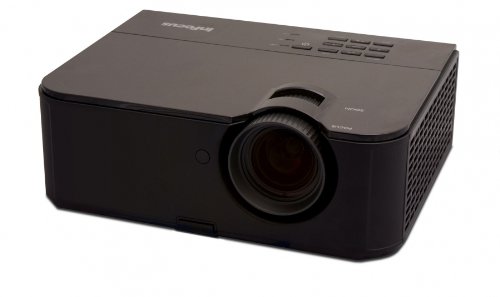
Figura 1: Frontal view of the InFocus IN3124 Projector, highlighting the main lens and the top-mounted control panel.
2. Configuració
2.1 Desembalatge
Carefully remove the projector and all accessories from the packaging. Verify that all components listed in the packing list are present. Retain the original packaging for future transport or storage.
2.2 Col·locació
Position the projector on a stable, level surface. Ensure adequate ventilation around the unit to prevent overheating. Maintain a clear path between the projector lens and the projection screen or surface. The optimal projection distance will vary based on the desired screen size.
2.3 Connexió de potència
- Connecteu el cable d'alimentació a l'entrada d'alimentació del projector.
- Connecteu l'altre extrem del cable d'alimentació a una presa de corrent amb connexió a terra.
2.4 Connexió de fonts d'entrada
The IN3124 projector supports various input sources. Connect your video source (e.g., computer, DVD player) to the appropriate input port on the projector. Common ports include VGA and HDMI (if available on your specific model).
- VGA: Use a VGA cable to connect to a computer's video output.
- HDMI: Use an HDMI cable for digital video and audio (check projector for HDMI port availability).
3. Instruccions de funcionament
3.1 Engegada/apagada
- Per encendre: Press the power button on the projector's control panel or the remote control. The power indicator light will illuminate.
- Per apagar: Press the power button twice. The projector will enter a cooling cycle before shutting down completely. Do not unplug the projector during the cooling cycle.
3.2 Ajust de l'enfocament i el zoom
Rotate the focus ring on the projector lens until the image appears sharp and clear. Use the zoom ring (if present) to adjust the image size to fit your screen.
3.3 Selecció de fonts d'entrada
Press the "Source" or "Input" button on the projector's control panel or remote control to cycle through available input sources (e.g., VGA, HDMI). Select the input corresponding to your connected device.
3.4 Menu Navigation and Keystone Correction
Use the menu buttons on the projector or remote to access the On-Screen Display (OSD). Navigate through the menu options to adjust settings such as brightness, contrast, color, and keystone correction. Keystone correction helps to square the image if the projector is not perfectly perpendicular to the screen.
4. Manteniment
4.1 Neteja de la lent
Netegeu suaument la lent del projector amb un drap suau i sense borrissol dissenyat específicament per a superfícies òptiques. No utilitzeu productes de neteja abrasius ni força excessiva, ja que això pot ratllar la lent.
4.2 Neteja dels filtres d'aire
Regularly check and clean the projector's air filters to ensure proper airflow and prevent overheating. Refer to the projector's specific filter access instructions. Use a soft brush or vacuum cleaner to remove dust accumulation.
4.3 Lamp Substitució
El projector lamp té una vida útil finita. Quan la lamp life indicator appears or the image becomes dim, the lamp may need replacement. Consult the full service manual or manufacturer's website for detailed lamp procediments de substitució i compatiblesamp models. Always allow the projector to cool down completely before attempting lamp substitució.
4.4 Emmagatzematge
Quan no l'utilitzeu durant períodes prolongats, guardeu el projector en un lloc fresc i sec, allunyat de la llum solar directa i de temperatures extremes. Feu servir l'embalatge original o una funda protectora per evitar la pols i els danys.
5. Solució De Problemes
This section addresses common issues you might encounter with your InFocus IN3124 Projector. For more complex problems, contact customer support.
- No es mostra cap imatge:
- Assegureu-vos que el projector estigui encès i que l'indicador d'engegada estigui fix.
- Verify that the input source cable (VGA, HDMI) is securely connected to both the projector and the source device.
- Seleccioneu la font d'entrada correcta amb el botó "Font".
- Check if the source device is outputting a signal.
- Dim or Faded Image:
- Adjust brightness and contrast settings in the OSD menu.
- Assegureu-vos que lamp is not nearing the end of its lifespan.
- Clean the projector lens and air filters.
- Check the projection mode (e.g., Eco mode might reduce brightness).
- La imatge està borrosa:
- Ajusteu l'anell de focus de la lent del projector.
- Assegureu-vos que la superfície de projecció sigui plana i que el projector estigui estable.
- Check the resolution settings of your source device to match the projector's native resolution.
- El control remot no funciona:
- Substituïu les piles del comandament a distància.
- Assegureu-vos que no hi hagi obstacles entre el comandament a distància i el receptor d'infrarojos del projector.
- Apunta el comandament a distància directament al projector.
6. Especificacions
The following table outlines the key technical specifications for the InFocus IN3124 Projector:
| Característica | Especificació |
|---|---|
| Número de model | IN3124 |
| Resolució de pantalla (nativa) | XGA (1024 x 868) |
| Brillantor | 4800 lúmens |
| Relació de contrast | 3000:1 |
| Tipus de visualització | LCD, LCoS |
| Pes de l'article | 8.16 lliures (3.7 kg) |
| Dimensions del producte (L x A x A) | 12.83 x 10.43 x 4.8 polzades (32.59 x 26.49 x 12.19 cm) |
| Característica especial | Portàtil |
7. Garantia i Suport
For detailed warranty information, please refer to the warranty card included with your product packaging or visit the official InFocus weblloc. La garantia normalment cobreix els defectes de fabricació durant un període especificat a partir de la data de compra.
If you encounter issues that cannot be resolved using the troubleshooting guide, or require technical assistance, please contact InFocus customer support. Contact details can usually be found on the manufacturer's weblloc web o a la documentació del producte.


