1. Introducció
This manual provides instructions for the APEX LD200RM remote control, designed for use with various APEX LCD and LED television models. This remote control offers full functionality for your compatible APEX television, ensuring convenient operation of all features.
Compatible APEX TV Models:
- LD3249
- LD3288, LD3288T, LD3288M
- LD4077, LE4077M
- LD4088
- LD4688
- LE3212, LE3212D
- LE4012
- LE4612
- LE3242
- LE3942
- LE40B12
- LE4243
- LE4643
- LE5043
2. Configuració
2.1 Instal·lació de la bateria
The APEX LD200RM remote control requires two (2) AA batteries for operation. Follow these steps to install the batteries:
- Localitzeu la tapa del compartiment de la bateria a la part posterior del comandament a distància.
- Premeu la pestanya i feu lliscar la coberta cap avall.
- Introduïu dues piles AA, assegurant-vos que els terminals positiu (+) i negatiu (-) s'alineïn correctament amb les marques de l'interior del compartiment.
- Feu lliscar la tapa del compartiment de la bateria fins que faci clic de manera segura.
Nota: Always replace both batteries at the same time. Do not mix old and new batteries, or different types of batteries.
2.2 Ús inicial
The APEX LD200RM remote control is an original replacement and typically does not require any programming or pairing. Once batteries are installed, point the remote control towards your compatible APEX television and begin operation.
3. Instruccions de funcionament
This section details the functions of the buttons on your APEX LD200RM remote control.
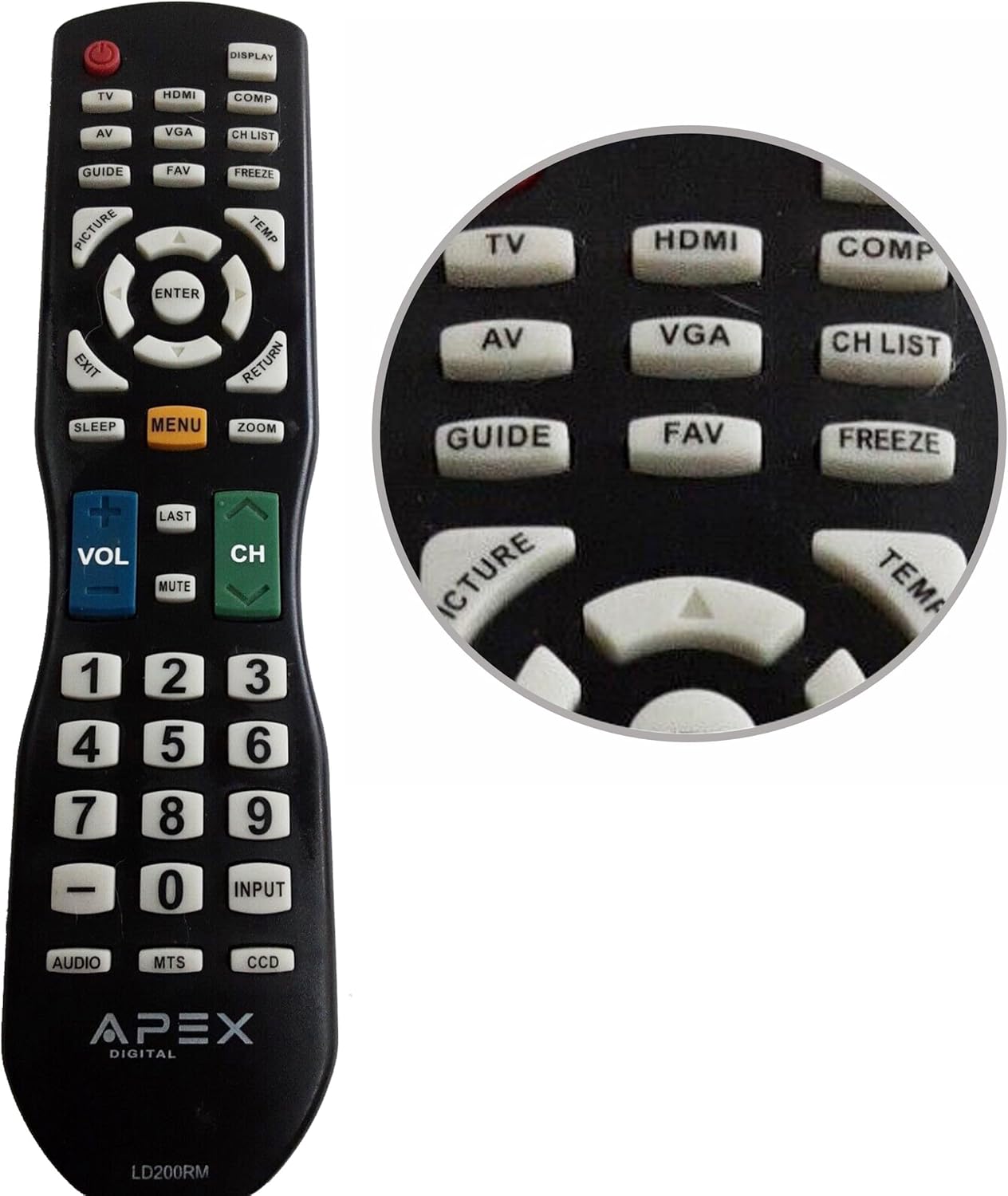
Figure 1: APEX LD200RM Remote Control Layout. This image displays the entire remote control, highlighting the arrangement of its various function buttons, including power, input selection, navigation, volume, channel, and numeric keypad.

Figure 2: Close-up of APEX LD200RM Remote Control Top Buttons. This image provides a detailed view of the upper section of the remote, focusing on buttons such as TV, HDMI, AV, VGA, COMP, CH LIST, DISPLAY, GUIDE, FAV, FREEZE, PICTURE, TEMP, MENU, ENTER, EXIT, RETURN, SLEEP, and ZOOM.
3.1 Power and Input Selection
- POWER (botó vermell): Encén o apaga el televisor.
- TV: Selects the TV tuner input.
- HDMI: Selects the HDMI input.
- DE: Selects the Audio/Video input.
- VGA: Selects the VGA input.
- COMP: Selects the Component video input.
- MOSTRA: Shows on-screen display information.
3.2 Control de canals i volum
- VOL (+/-): Augmenta o disminueix el nivell de volum.
- CH (Up/Down): Changes the television channel up or down.
- ÚLTIM: Torna a l'anterior viewcanal ed.
- MUT: Silencia o activa el so de la televisió.
- LLISTA DE CH: Mostra la llista de canals.
3.3 Menú i navegació
- MENÚ: Opens the television's main menu.
- ENTRAR: Confirms a selection within the menu.
- Arrow Buttons (Up/Down/Left/Right): Navega per les opcions del menú i ajusta la configuració.
- SORTIDA: Surt del menú actual o de la visualització en pantalla.
- TORNADA: Torna al menú o pantalla anterior.
3.4 Numeric Keypad and Special Functions
- 0-9 (Numeric Buttons): Introdueix directament els números de canal.
- ENTRADA: Passa ciclicament per les fonts d'entrada disponibles.
- GUIA: Displays the electronic program guide (if available).
- FAV: Accedeix als canals preferits.
- CONGELAR: Freezes the current image on the screen.
- IMATGE: Adjusts picture settings.
- TEMP: (Function may vary by model, often related to picture temperature or a specific mode).
- DORMIR: Estableix el temporitzador de son.
- ZOOM: Adjusts the screen zoom level.
- ÀUDIO: Selecciona modes o pistes d'àudio.
- MTS: Multi-channel Television Sound (stereo/SAP).
- CCD: Closed Captioning Display.
4. Manteniment
4.1 Substitució de la bateria
When the remote control's performance degrades or it stops responding, it is likely time to replace the batteries. Refer to Section 2.1 for detailed battery installation instructions. Always use fresh AA batteries.
4.2 Neteja
Per netejar el comandament a distància, utilitzeu un drap suau i sec. Per a la brutícia resistent, netegeu lleugerament.ampen the cloth with water or a mild, non-abrasive cleaner. Avoid using harsh chemicals or abrasive materials, as these can damage the remote's surface or internal components.
4.3 Emmagatzematge
Store the remote control in a cool, dry place away from direct sunlight and extreme temperatures. If the remote will not be used for an extended period, it is advisable to remove the batteries to prevent leakage and potential damage.
5. Solució De Problemes
- El comandament a distància no respon:
- Ensure the batteries are correctly installed with the correct polarity (+/-).
- Replace old batteries with new AA batteries.
- Check for any obstructions between the remote control and the television's infrared sensor.
- Ensure you are within the effective range of the television's IR receiver.
- Alguns botons no funcionen:
- This could indicate low battery power. Replace the batteries.
- Ensure the remote is clean and there is no debris lodged under the buttons.
- Verify that the button function is applicable to your specific TV model. Some functions may not be supported by all compatible TVs.
- Television is not turning on/off:
- Confirm the television is plugged into a working power outlet.
- Try using the power button directly on the television to rule out a TV issue.
6. Especificacions
| Característica | Detall |
|---|---|
| Número de model | LD200RM |
| Marca | Àpex |
| Dispositius compatibles | APEX LCD & LED Televisions |
| Font d'alimentació | 2 piles AA (no incloses) |
| Dimensions del producte | 10 x 6 x 2 polzades (aproximadament) |
| Pes de l'article | 3.2 unces (aproximadament) |
| Color | Negre |
| Característica especial | Disseny ergonòmic |
7. Informació de la garantia
This APEX LD200RM remote control typically comes with a 30-day warranty from the date of purchase. This warranty covers manufacturing defects. For specific details regarding warranty claims, returns, or replacements, please refer to your purchase documentation or contact the seller directly.
8. Suport
If you encounter issues not covered in this manual or require further assistance, please contact the retailer or the manufacturer's customer support. When contacting support, please have your product model number (LD200RM) and your television model number readily available.


