Introducció
This manual provides instructions for the Vivanco RR 220 remote control, designed for compatibility with Samsung Smart TVs. Please read this manual thoroughly before using the device to ensure proper operation and to understand its features.
Contingut del paquet
- Vivanco RR 220 Remote Control
- Aquest manual d'usuari
Nota: Les piles no estan incloses i s'han de comprar per separat.
Configuració
1. Instal·lació de la bateria
- Localitzeu el compartiment de la bateria a la part posterior del comandament a distància.
- Feu lliscar la tapa de la bateria cap avall o premeu el pestell i aixequeu-la per obrir-la.
- Introduïu dues (2) piles AAA, assegurant-vos que els terminals positiu (+) i negatiu (-) estiguin alineats amb les marques de l'interior del compartiment.
- Torneu a col·locar la tapa de la bateria, assegurant-vos que encaixi correctament al seu lloc amb un clic.
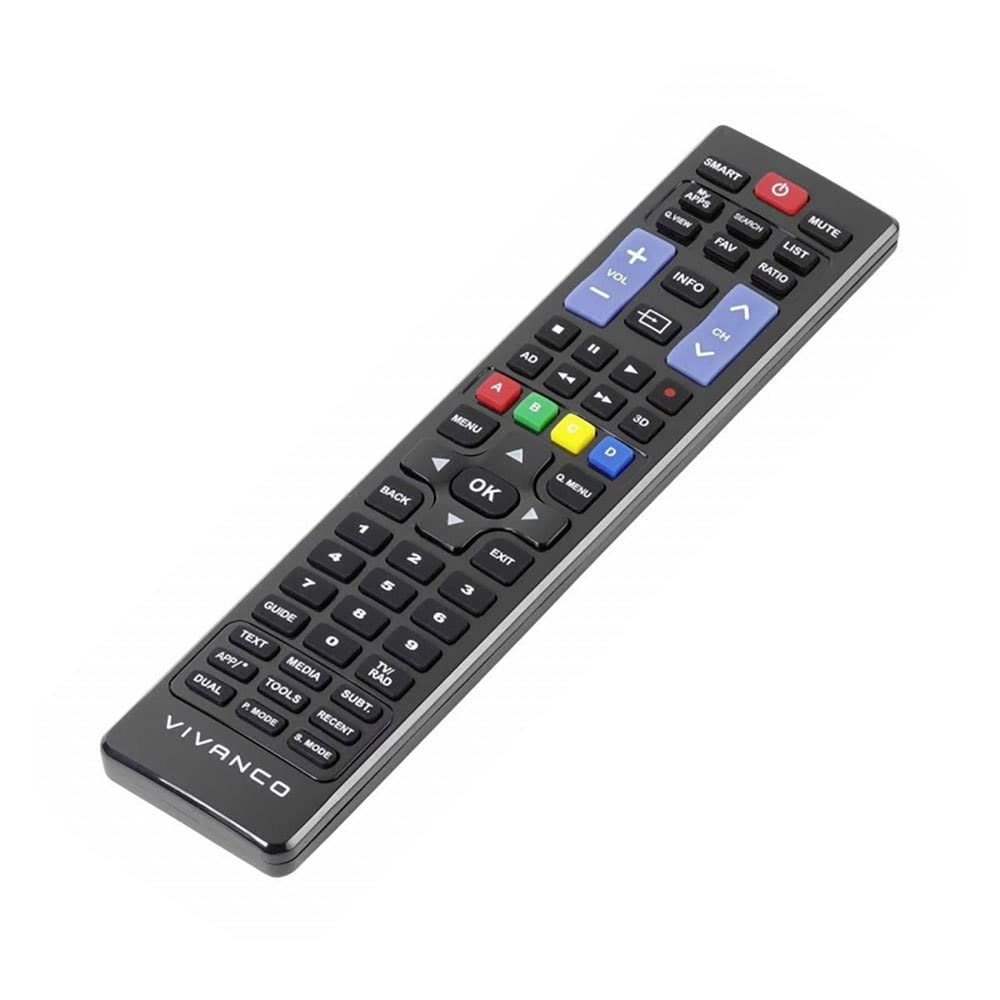
Imatge 1: Vivanco RR 220 remote control. This image displays the front of the remote control, highlighting its 57 buttons and ergonomic design. The battery compartment is located on the reverse side.
2. Ús inicial
The Vivanco RR 220 is pre-programmed for Samsung Smart TVs. No additional setup or pairing is typically required. Once batteries are installed, point the remote control towards your Samsung Smart TV and press the Power button to test functionality.
Instruccions de funcionament
The remote control features 57 buttons, providing comprehensive control over your Samsung Smart TV and compatible devices. Below are common button functions:
- Botó d'encesa: Encén o apaga el televisor.
- Botons numèrics (0-9): For direct channel selection or data input.
- Pujar/baixar el volum: Ajusta el volum d'àudio.
- Canal amunt/avall: Canvia els canals de televisió.
- Botó de silenci: Silencia l'àudio del televisor.
- Teclat de navegació (amunt, avall, esquerra, dreta, intro): S'utilitza per navegar pels menús i seleccionar opcions.
- Botó Enrere/Retorn: Torna a la pantalla o menú anterior.
- Smart Hub/Botó d'inici: Accesses the Smart Hub or main menu of your Samsung Smart TV.
- Botó font/entrada: Selecciona fonts d'entrada (HDMI, AV, etc.).
- Botons de color (vermell, verd, groc, blau): For specific functions within certain applications or menus, as indicated on-screen.
- Controls de reproducció (Reproduir, Pausa, Aturar, Avançar ràpidament, Rebobinar): Controls media playback on compatible devices or apps.
For specific functions related to your TV model, refer to your Samsung TV's user manual.
Manteniment
Neteja del comandament a distància
- Feu servir un drap suau i sec per netejar la superfície del comandament a distància.
- Per a la brutícia persistent, lleugerament dampal drap amb aigua o un netejador suau i no abrasiu.
- No utilitzeu productes químics agressius, dissolvents ni esponges de neteja abrasives, ja que poden danyar l'acabat del comandament a distància o els components interns.
- Ensure no liquid enters the remote control through button gaps or the battery compartment.
Canvi de bateria
Replace batteries when the remote's response becomes sluggish or it stops functioning. Always replace both batteries simultaneously with new AAA alkaline batteries. Do not mix old and new batteries or different types of batteries.
Resolució de problemes
| Problema | Causa possible | Solució |
|---|---|---|
| El comandament a distància no funciona. |
|
|
| Some buttons do not function. |
|
|
Especificacions
- Marca: Vivanco
- Nom del model: RR 220
- Número de model del producte: 38016
- Dispositius compatibles: Home cinema, DVD/Blu-ray player, Television (Samsung Smart TV compatible)
- Tecnologia de connectivitat: Wireless IR (Infrared)
- Nombre de botons: 57
- Tipus de bateria: 2 x AAA (es recomana alcalina)
- Bateries incloses: No
- Dimensions del producte: 18 x 4.8 x 2.3 cm
- Pes del producte: 80 g
- Interval màxim: 15 metres
- Característiques especials: IPTV, DVB-T, HDTV compatibility