1. Producte acabatview
The D-Link AC1200 Wi-Fi Router (DIR-850L) delivers next-generation wireless speed and coverage to all your Wi-Fi devices. With wireless dual-band speeds of 300 Mbps (2.4 GHz) and 867 Mbps (5 GHz), the DIR-850L avoids interference to deliver fast wireless speeds, improved coverage, and reliable connections. This router is ideal for streaming HD video, gaming, connecting multiple devices, and watching shows on your TV simultaneously. The DIR-850L is also backward compatible with existing wireless 802.11a/g/n devices for seamless connectivity. D-Link’s free mobile apps provide easy setup, remote monitoring, and access to content from anywhere on your smartphone or tablet.
Característiques principals:
- Tecnologia sense fil de nova generació: Wireless AC1200 for optimized performance and reliable coverage, delivering high-quality HD video streaming, gaming, and file transferències.
- Compatibilitat enrere: Compatible with wireless 802.11a/g/n devices.
- Connectivitat de diversos dispositius: Connect more devices with four Gigabit Ethernet ports.
- Compartició de mitjans: Stream and share files using the USB Share Port and free mobile app.
- Configuració fàcil: Assistent de navegador intel·ligent i aplicació mòbil Quick Router Setup per a una instal·lació simplificada.
- Seguretat avançada: Preset security with advanced WPA2 encryption.
2. Contingut del paquet
Ensure all items are present in your D-Link DIR-850L package:
- D-Link Wireless AC 1200 Dual-Band Gigabit Router (DIR-850L)
- Adaptador d'alimentació
- Cable Ethernet
- Guia d'instal·lació ràpida
Si falta algun element o hi ha algun dany, poseu-vos en contacte amb el vostre distribuïdor o amb el servei d'assistència de D-Link.
3. Maquinari acabatview
Familiarize yourself with the physical components and indicators of your DIR-850L router.

Figura 3.1: Frontal View. Shows the cylindrical design of the router with the D-Link logo and LED indicators for Power and Internet status.

Figura 3.2: lateral View. Illustrates the side of the router, highlighting the USB port for storage sharing and the Wi-Fi Protected Setup (WPS) button.
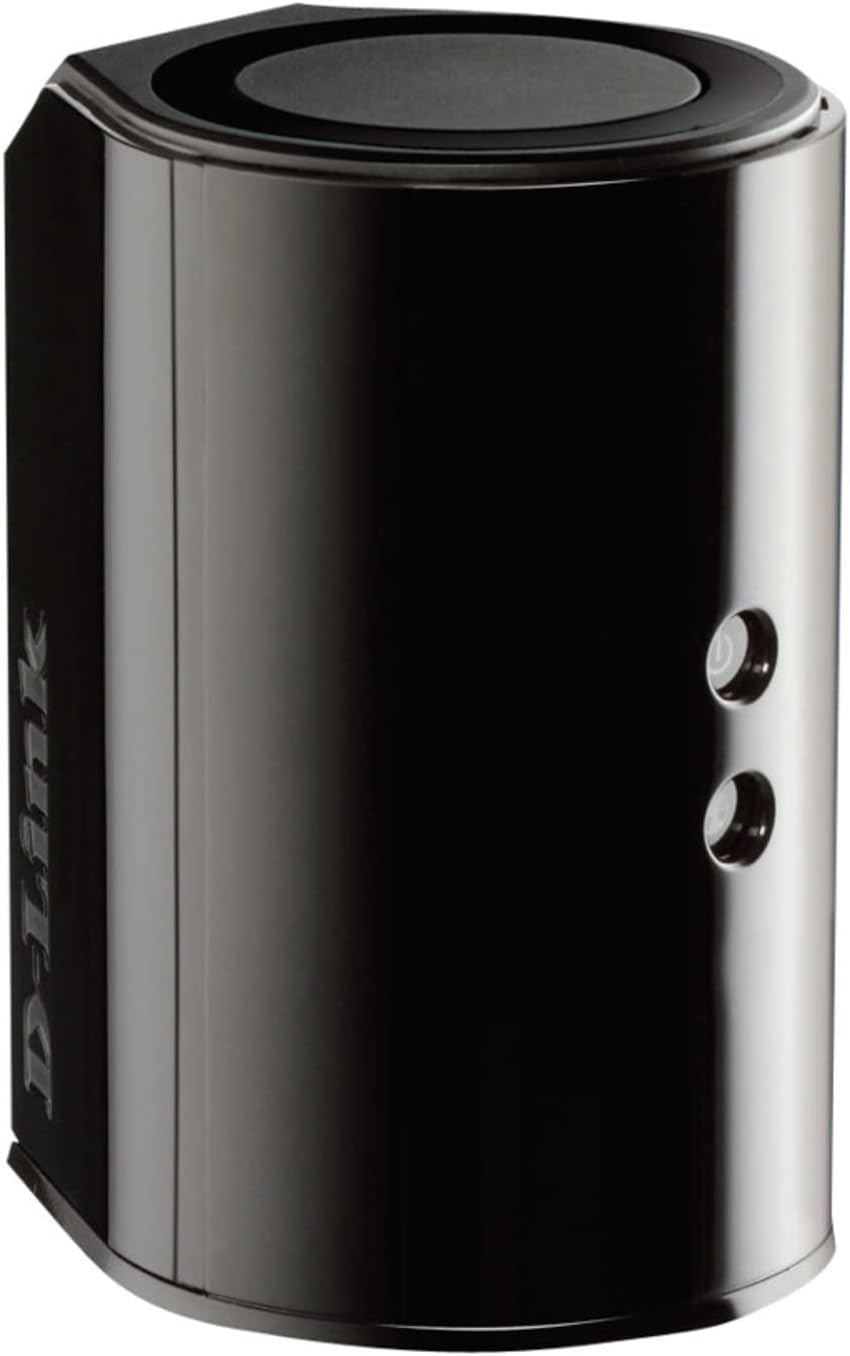
Figura 3.3: posterior View. Displays the back panel of the router, featuring the WAN (Internet) port, four LAN (Ethernet) ports, and the power input connector.
Indicadors LED:
- LED d'alimentació: Solid green indicates the router is powered on. Blinking green indicates a firmware upgrade or reset.
- LED d'Internet: Solid green indicates a successful connection to the internet. Blinking green indicates data activity. Amber indicates no internet connection.
Ports i botons:
- WAN (Internet) Port: Es connecta al mòdem per accedir a Internet.
- Ports LAN (1-4): Connecteu dispositius amb cable com ara ordinadors, consoles de jocs o emmagatzematge en xarxa.
- Port USB: Connect a USB storage device for network sharing.
- Connector d'alimentació: Es connecta a l'adaptador de corrent inclòs.
- Botó de restabliment: Manteniu premut durant 10 segons per restaurar la configuració predeterminada de fàbrica.
- Botó WPS: Initiates Wi-Fi Protected Setup for easy wireless connection of compatible devices.
4. Configuració
Follow these steps to set up your D-Link DIR-850L router:
- Posicioneu el router: Col·loca el router en un lloc cèntric de casa teva, allunyat d'obstacles i dispositius que puguin causar interferències (per exemple, telèfons sense fil, microones).
- Connectar-se al mòdem:
- Apagueu el mòdem.
- Connect one end of the provided Ethernet cable to the WAN (Internet) port on your DIR-850L router.
- Connecteu l'altre extrem del cable Ethernet al port Ethernet del mòdem.
- Encès:
- Power on your modem and wait for its indicator lights to stabilize (usually indicating an active internet connection).
- Connect the power adapter to the power connector on your DIR-850L router and plug it into a power outlet.
- Wait for the Power LED on the router to turn solid green. The Internet LED should also turn green, indicating a successful connection.
- Connectar un dispositiu:
- Connexió per cable: Connect an Ethernet cable from one of the LAN ports (1-4) on the router to your computer's Ethernet port.
- Connexió sense fil: On your Wi-Fi enabled device (laptop, smartphone, tablet), search for available Wi-Fi networks. Select the network name (SSID) found on the Wi-Fi Configuration Card (usually a sticker on the bottom of the router) and enter the Wi-Fi password.
- Executa l'assistent de configuració:
- Obre a web browser (e.g., Chrome, Firefox) on the connected device.
- Tipus
http://dlinkrouter.localor192.168.0.1a la barra d’adreces i premeu Retorn. - Follow the on-screen instructions of the D-Link Setup Wizard to configure your internet connection and personalize your Wi-Fi network name (SSID) and password.
Setup Video (General D-Link Router Overview):
Video 4.1: D-Link Wireless AC 1200 Mbps Home Cloud App-Enabled Dual-Band Gigabit Router Overview. Aquest vídeo ofereix una visió generalview of D-Link routers, including the DIR-850L, and highlights their features and target users. While not a step-by-step setup guide, it offers insights into the router's capabilities.
5. Instruccions de funcionament
Once your D-Link DIR-850L router is set up, you can manage and optimize your network.
Dispositius de connexió:
- Sense fil: Use the Wi-Fi network name (SSID) and password you configured during setup to connect your wireless devices. The router supports both 2.4 GHz and 5 GHz bands.
- Amb cable: Connect devices directly to the LAN ports using Ethernet cables for a stable, high-speed connection.
Accés a la configuració del router:
Per accedir a la configuració avançada, obriu un web navegador i navegueu a http://dlinkrouter.local or 192.168.0.1. Log in with the administrator password you set during the initial setup. From here, you can:
- Canvia la configuració del Wi-Fi (SSID, contrasenya, tipus de seguretat).
- Configure guest Wi-Fi networks.
- Configura els controls parentals.
- Gestioneu els dispositius connectats.
- Actualitza el firmware.
Using the USB Share Port:
Plug a USB storage device (e.g., flash drive, external hard drive) into the USB port on the router. You can then access and share files on this storage device across your network using the D-Link SharePort Mobile app or through network shares on your computer.
6. Manteniment
Un manteniment regular ajuda a garantir un rendiment òptim i una llarga vida útil del vostre encaminador.
- Reiniciant: Reinicieu el router periòdicament (desconnecteu-lo de l'alimentació durant 10 segons i torneu-lo a connectar) per esborrar-ne la memòria i actualitzar les connexions de xarxa. Això pot resoldre problemes menors de rendiment.
- Actualitzacions de firmware: Comproveu el suport de D-Link website for firmware updates. Firmware updates can improve performance, add new features, and fix security vulnerabilities. Follow the instructions provided by D-Link carefully when performing updates.
- Neteja: Keep the router clean and free from dust. Use a soft, dry cloth to wipe the exterior. Do not use liquid cleaners or aerosols. Ensure ventilation openings are not blocked.
- Seguretat: Regularly change your Wi-Fi password and router administrator password to enhance network security.
7. Solució De Problemes
If you encounter issues with your D-Link DIR-850L router, refer to the following common problems and solutions:
Sense connexió a Internet:
- Comproveu els cables: Assegureu-vos que tots els cables Ethernet estiguin connectats correctament al router i al mòdem.
- Estat del mòdem: Verifiqueu que el mòdem funciona correctament i que té una connexió a Internet activa.
- Seqüència de reinici: Apagueu el mòdem i després l'encaminador. Espereu 30 segons i, a continuació, engegueu primer el mòdem. Un cop el mòdem estigui completament en línia, engegueu l'encaminador.
- Contacte del proveïdor d'Internet: If the issue persists, contact your Internet Service Provider (ISP) to confirm service status.
Velocitat Wi-Fi lenta:
- Col·locació del router: Moveu el router a una ubicació més cèntrica, allunyada d'obstacles i fonts d'interferències.
- Interferència de canal: Inicieu sessió al router web interfície i proveu de canviar el canal Wi-Fi per a les bandes de 2.4 GHz i 5 GHz per un de menys congestionat.
- Dispositius connectats: Disconnect unused devices from your network.
- Firmware: Assegureu-vos que el firmware del vostre encaminador estigui actualitzat.
No es pot connectar a Wi-Fi:
- Contrasenya correcta: Double-check that you are entering the correct Wi-Fi password (case-sensitive).
- Transmissió SSID: Ensure the router is broadcasting its Wi-Fi network name (SSID).
- WPS: If your device supports WPS, try using the WPS button on the router to connect.
- Restableix l'encaminador: As a last resort, perform a factory reset (see Hardware Overview) and reconfigure the router.
8. Especificacions
| Característica | Descripció |
|---|---|
| Nom del model | DIR-850L |
| Tipus sense fil | 802.11ac (backward compatible with 802.11a/b/g/n) |
| Classe de banda de freqüència | Doble banda (2.4 GHz i 5 GHz) |
| Velocitat sense fil | Fins a 300 Mbps (2.4 GHz), Fins a 867 Mbps (5 GHz) |
| Ports Ethernet | 4 x Gigabit LAN, 1 x Gigabit WAN |
| Port USB | 1 x USB 2.0 (for SharePort) |
| Tipus d'antena | Interna |
| Compatibilitat de sistemes operatius | Windows® 8, 7, Vista®, XP SP2, or Mac OS® X (v10.4 or higher) |
| Dimensions (LxWxH) | 4.45 x 3.43 x 5.72 polzades |
| Pes de l'article | 9.9 unces (0.62 lliures) |
| Color | Negre |
9. Garantia i Suport
Els productes D-Link estan avalats per una garantia limitada. Per conèixer els termes i condicions específics de la garantia, consulteu la informació de la garantia inclosa amb el producte o visiteu el lloc web oficial de D-Link. weblloc.
For technical support, product registration, and access to the latest drivers, firmware, and user manuals, please visit the D-Link support portal:
Suport de D-Link Weblloc: www.dlink.com/support
You may also find helpful resources and community forums on the D-Link weblloc.


