Introducció
This manual provides comprehensive instructions for the installation, operation, maintenance, and troubleshooting of your XFX TK-DM59-NCD4 Radeon HD 6450 Graphics Card. This card is designed to enhance your computing experience by providing dedicated graphics processing and multi-monitor capabilities.
The XFX TK-DM59-NCD4 graphics card features the AMD Radeon HD 6450 GPU, offering 1GB of 64-bit DDR3 memory and PCI Express connectivity. It supports AMD APP Acceleration technology, DirectX 11, and AMD Eyefinity technology for versatile display configurations.
Producte acabatview
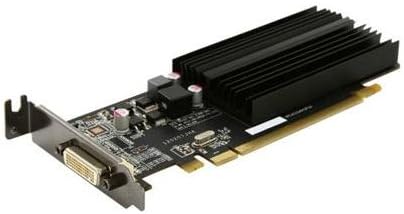
Figure 1: XFX TK-DM59-NCD4 Radeon HD 6450 Graphics Card. This image displays the low-profile graphics card with its passive heatsink and DVI output port, designed for efficient heat dissipation and multi-monitor support.
The XFX TK-DM59-NCD4 is a low-profile ready graphics card, making it suitable for various system form factors. Its design focuses on providing reliable graphics performance and enabling easy multi-monitor setups.
Configuració
1. Instal·lació física
- Apagar: Assegureu-vos que l'ordinador estigui completament apagat i desendollat de la presa de corrent.
- Cas obert: Traieu el panell lateral de la caixa de l'ordinador per accedir a la placa base.
- Localitza la ranura PCIe: Identifica una ranura PCI Express x16 disponible a la placa base.
- Treure la coberta de la ranura: Carefully remove the metal slot cover from the back of your computer case corresponding to the chosen PCIe slot.
- Inseriu la targeta gràfica: Align the graphics card with the PCIe slot and press down firmly until it is securely seated. Ensure the retention clip (if present) locks into place.
- Targeta segura: Use a screw or the case's retention mechanism to secure the graphics card bracket to the computer case.
- Tanca el cas: Substitueix el panell lateral de la caixa de l'ordinador.
- Connecta la pantalla: Connect your monitor(s) to the appropriate output port(s) on the graphics card (e.g., DVI, HDMI, VGA).
2. Instal·lació del controlador
After physical installation, you must install the graphics drivers for optimal performance and functionality.
- Encès: Plug in your computer and power it on. Your operating system may automatically install a basic display driver.
- Descarrega els controladors: Visiteu l'AMD oficial weblloc (www.amd.com/support) or the XFX support page to download the latest drivers for the Radeon HD 6450. Select your operating system (e.g., Windows 10, Windows 7).
- Executa l'instal·lador: Locate the downloaded driver package and run the installer.
- Seguiu les indicacions: Follow the on-screen instructions to complete the driver installation. This may include accepting license agreements and choosing installation options.
- Reinicieu l'ordinador: Restart your computer when prompted to finalize the driver installation.
En funcionament
Funcionalitat bàsica
Once drivers are installed, your XFX TK-DM59-NCD4 graphics card will handle all graphical output for your system. You can adjust display settings, resolution, and refresh rates through your operating system's display settings or the AMD Radeon Software (formerly Catalyst Control Center).
Multi-Monitor Setup (AMD Eyefinity)
The AMD Eyefinity technology allows you to connect multiple displays to your graphics card for an expanded desktop experience. The TK-DM59-NCD4 supports multi-monitor configurations.
- Connecta les pantalles: Connect your additional monitors to the available display outputs on the graphics card.
- Access Display Settings: Right-click on your desktop and select "Display settings" (Windows) or "AMD Radeon Software."
- Configure Displays: Within the display settings, you can detect, arrange, and extend your desktop across multiple monitors. For advanced configurations, including creating a single large surface, use the AMD Radeon Software.
Manteniment
Neteja
Una neteja regular ajuda a mantenir un rendiment òptim i allarga la vida útil de la targeta gràfica.
- Apagar: Always power off and unplug your computer before cleaning.
- Eliminació de pols: Use compressed air to gently blow dust from the heatsink fins and other components of the graphics card. Hold the can upright to prevent propellant discharge.
- Evita el contacte: Do not touch the circuit board or components directly with your hands.
Actualitzacions de controladors
Periodically check for updated drivers on the official AMD or XFX website. Driver updates often include performance improvements, bug fixes, and compatibility enhancements.
Resolució de problemes
| Problema | Causa possible | Solució |
|---|---|---|
| No es mostra cap imatge al monitor. | Graphics card not seated correctly, monitor cable loose, incorrect input selected on monitor, faulty monitor/cable. | Ensure card is fully seated in PCIe slot. Check monitor cable connections. Select correct input on monitor. Test with a different monitor or cable if possible. |
| Low performance or graphical glitches. | Outdated or incorrect drivers, overheating, insufficient system resources. | Install the latest drivers from AMD/XFX. Ensure proper case ventilation. Close unnecessary background applications. |
| Computer fails to boot after installation. | Graphics card not fully seated, power supply issues, BIOS/UEFI settings. | Re-seat the graphics card. Ensure your power supply meets system requirements. Reset BIOS/UEFI to default settings if necessary. |
If you encounter issues not listed here, refer to the XFX support weblloc o poseu-vos en contacte amb el seu servei d'atenció al client.
Especificacions
- GPU Model: AMD Radeon HD 6450
- GPU Line: AMD Radeon HD 6400
- Tipus de bus: PCIe x16 Gen 2.0
- Tipus de sistema: Escriptori
- Memory Amount: 1024MB (1GB)
- Tipus de memòria: SDRAM DDR3
- Fabricant del processador gràfic: AMD
- Dimensions del paquet: 10.25 x 6.75 x 2.25 polzades
- Pes de l'article: 4 lliures
Garantia
The XFX TK-DM59-NCD4 graphics card comes with a Garantia limitada de 1 anysAquesta garantia cobreix els defectes de materials i de fabricació en condicions d'ús normal. Si us plau, conserveu el comprovant de compra per a reclamacions de garantia.
For detailed warranty terms and conditions, please refer to the official XFX weblloc o poseu-vos en contacte amb el seu servei d'atenció al client.
Suport
For further assistance, technical support, or driver downloads, please visit the official XFX support resources:
- XFX Official Weblloc: www.xfxforce.com
- Suport d'AMD: www.amd.com/support (for general AMD driver and software support)
When contacting support, please have your product model (TK-DM59-NCD4) and serial number ready.


