1. Introducció
The Coxo C-root VI is a versatile 2-in-1 dental instrument designed for precise endodontic measurements. It combines the functionalities of an Apex Locator and a Pulp Tester, providing dental professionals with an efficient tool for root canal procedures and pulp vitality assessment. This manual provides essential information for the proper setup, operation, maintenance, and troubleshooting of the device.
2. Producte acabatview
The C-root VI features a compact design with a clear color LCD display for easy reading of measurements. Its intuitive interface allows for seamless switching between Apex Locator and Pulp Tester modes.

Figura 2.1: Frontal view of the Coxo C-root VI displaying the Pulp Tester mode.
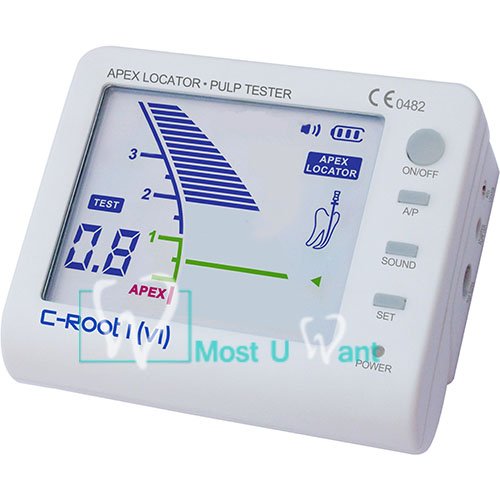
Figura 2.2: Frontal view of the Coxo C-root VI displaying the Apex Locator mode.
3. Característiques clau
- Funcionalitat 2 en 1: Combines Apex Locator and Pulp Tester in a single device.
- Visualització de dígits: Provides clear digital display of distance measurements.
- Pantalla LCD en color: Enhanced visibility and readability of measurement data.
- Accurate Current-Stabilized Technology: Ensures reliable and precise measurements.
- Rechargeable Li-Battery: Offers convenience and portability for clinical use.
4. Components i accessoris
The Coxo C-root VI package typically includes the main unit and various accessories necessary for its operation.
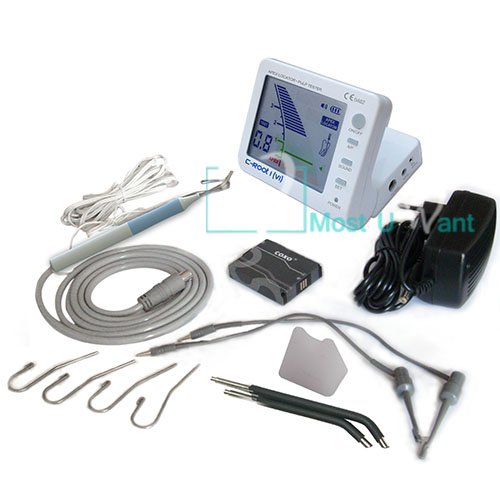
Figure 4.1: Complete kit contents of the Coxo C-root VI.
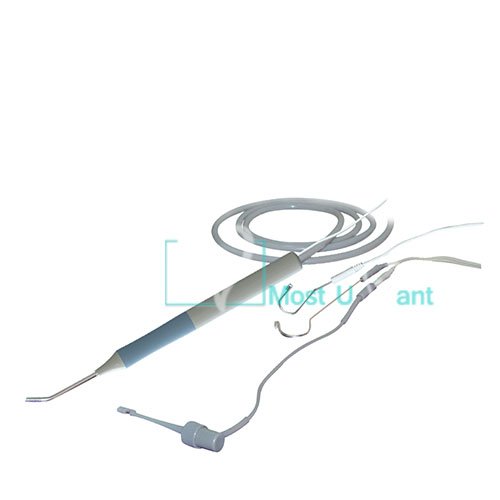
Figura 4.2: Detallada view d'accessoris inclosos.
Contingut del paquet estàndard:
- Coxo C-root VI Main Unit
- Measuring Cable
- File Clip (x2)
- Lip Hook (x4)
- Pulp Tester Probe
- Adaptador/Carregador
- Manual d'usuari (aquest document)
5. Configuració
5.1 Càrrega inicial
- Connect the provided adapter to the 'CHARGE' port on the side of the C-root VI unit.
- Connecteu l'adaptador a una presa de corrent adequada.
- The 'CHARGE' indicator light will illuminate, indicating that the device is charging. Allow the device to fully charge before first use (typically 2-3 hours).
5.2 Connexió d'accessoris
- For Apex Locator Function: Connect the measuring cable to the 'APEX LOCATOR' port. Attach a file clip to one end of the measuring cable and a lip hook to the other end.
- For Pulp Tester Function: Connect the pulp tester probe to the 'PULP TESTER' port.
6. Instruccions de funcionament
6.1 Funcionament general
- Botó ON/OFF: Press to power the device on or off.
- A/P Button: Press to switch between Apex Locator mode and Pulp Tester mode.
- SOUND Button: Toggles the audible alert on or off.
- Botó SET: Used for calibration or setting specific parameters within each mode (refer to specific mode instructions).
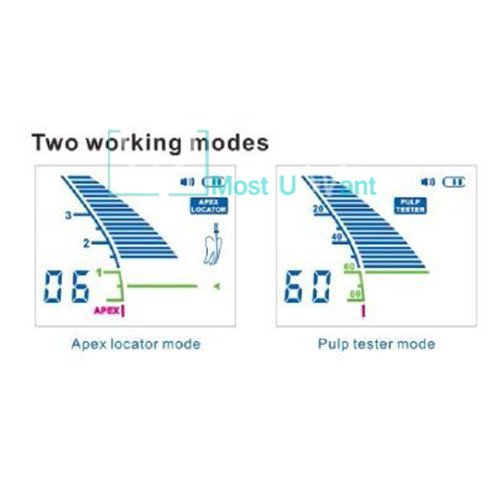
Figure 6.1: Comparison of Apex Locator and Pulp Tester display modes.
6.2 Apex Locator Mode
This mode is used to accurately determine the working length of the root canal.
- Ensure the device is powered on and in Apex Locator mode (indicated on the display).
- Adjunta el file clip to the endodontic file and the lip hook to the patient's lip.
- Carefully insert the endodontic file into the root canal.
- Observe the color LCD display. The numerical value and graphical representation will indicate the file's position relative to the apex.
- The 'APEX' indicator and an audible alert (if enabled) will signal when the file reaches the apical foramen.
6.3 Pulp Tester Mode
This mode assesses the vitality of the dental pulp by delivering a controlled electrical stimulus.
- Ensure the device is powered on and in Pulp Tester mode (indicated on the display).
- Apply a conductive medium (e.g., toothpaste) to the tip of the pulp tester probe.
- Place the probe tip on the tooth surface to be tested, avoiding contact with gingival tissue or metallic restorations.
- Gradually increase the stimulus intensity using the 'SET' button or designated controls until a patient response is observed or the maximum level is reached.
- Note the numerical reading on the display at which the patient responds. This reading indicates the pulp's vitality level.
7. Manteniment i cura
Proper maintenance ensures the longevity and accuracy of your Coxo C-root VI device.
- Neteja: After each use, wipe the main unit with a soft cloth dampened with a mild disinfectant. Do not immerse the unit in liquid.
- Accessory Sterilization: El file clips, lip hooks, and pulp tester probe should be sterilized according to standard dental practice guidelines (e.g., autoclaving for reusable components). Refer to the specific instructions for each accessory.
- Emmagatzematge: Store the device in a clean, dry environment, away from direct sunlight and extreme temperatures.
- Cura de la bateria: Recharge the battery regularly, even if the device is not in frequent use, to maintain battery health. Avoid fully discharging the battery for extended periods.
8. Solució De Problemes
This section addresses common issues you might encounter with the Coxo C-root VI.
| Problema | Causa possible | Solució |
|---|---|---|
| El dispositiu no s'encén. | Bateria baixa; botó d'engegada no premut correctament. | Charge the device fully. Press and hold the ON/OFF button firmly. |
| Inaccurate Apex Locator readings. | Poor contact; Dry canal; Damaged cable/clip. | Ensure good contact between file clip/lip hook and patient. Ensure canal is moist. Check cables and clips for damage. |
| Pulp Tester not eliciting response. | No conductive medium; Probe not making contact; Pulp non-vital. | Apply conductive medium to probe tip. Ensure firm contact with tooth. Consider pulp vitality status. |
| La pantalla està tènue o parpelleja. | Bateria baixa. | Recarrega el dispositiu. |
9. Especificacions tècniques
| Número de model | B00C9ED06Q |
| Fabricant | COXO |
| País d'origen | Índia |
| Pes de l'article | 839 g |
| Dimensions del paquet | 20.07 x 16.26 x 8.38 cm |
| Font d'alimentació | Rechargeable Li-Battery |
| Mostra | LCD color |
10. Garantia i Suport
For detailed warranty information and technical support, please refer to the warranty card included with your product or contact the manufacturer, COXO, directly. Keep your purchase receipt as proof of purchase for any warranty claims.
Manufacturer Contact Information: Please refer to the packaging or the official COXO weblloc web per obtenir les dades de contacte més actualitzades.


