
1. Introducció
La caixa de seguretat d'acer SPYPOINT S-SB-T està dissenyada per proporcionar una protecció robusta per a les vostres càmeres de caça SPYPOINT. Aquesta carcassa blindada protegeix la vostra càmera de danys ambientals, interferències de la fauna salvatge i possibles robatoris. La seva construcció d'acer resistent garanteix la durabilitat en diverses condicions exteriors.
Aquest manual proporciona informació essencial per a la configuració, el funcionament i el manteniment adequats de la caixa de seguretat S-SB-T.
Característiques principals:
- Construcció d'acer negre per a una major durabilitat.
- Panell frontal extraïble per a un accés còmode a la càmera.
- Forats integrats per a opcions de seguretat amb cadenat i cable.
- Dissenyat per a totes les càmeres SPYPOINT de 38 LED.
2. Contingut del paquet
El paquet de caixa de seguretat d'acer SPYPOINT S-SB-T normalment inclou:
- 1 x Caixa de seguretat d'acer SPYPOINT S-SB-T
- (Nota: La càmera de joc, el cadenat i el cable de bloqueig es venen per separat.)
3. Configuració
3.1 Instal·lació de la càmera
- Obriu la caixa de seguretat: El panell frontal de la caixa de seguretat S-SB-T és extraïble. Feu lliscar o desenganxeu suaument el panell frontal per obrir la caixa.
- Inseriu la càmera: Col·loca amb cura la teva càmera de jocs SPYPOINT de 38 LED compatible dins la caixa de seguretat. Assegura't que encaixi bé i que l'objectiu, els sensors i el flaix estiguin alineats amb les obertures corresponents del panell frontal.
- Tanca la caixa de seguretat: Torneu a col·locar el panell frontal, assegurant-vos que estigui ben fixat.

Figura 1: Caixa de seguretat d'acer SPYPOINT S-SB-T amb una càmera de caça instal·lada. Aquesta imatge mostra la càmera ben allotjada dins de la caixa d'acer, amb la lent i els sensors visibles a través de les obertures frontals.
3.2 Assegurar la caixa
L'S-SB-T ofereix múltiples opcions per assegurar la càmera i la caixa en si:
- Cadenat: A la part frontal de la caixa hi ha un forat dedicat per instal·lar un cadenat estàndard (no inclòs). Això assegura la càmera dins de la caixa i impedeix l'accés no autoritzat a la càmera.
- Cable de bloqueig: La caixa de seguretat té forats a banda i banda, cosa que permet utilitzar un cable de cadenat (no inclòs). Això permet fixar tota la caixa a un arbre, un pal o un altre objecte fix, evitant que es pugui treure.
- Ancoratge: El panell posterior de la caixa de seguretat té forats que es poden utilitzar per ancorar la caixa directament a un arbre o a la paret mitjançant cargols o perns (no inclosos) per a una instal·lació més permanent.
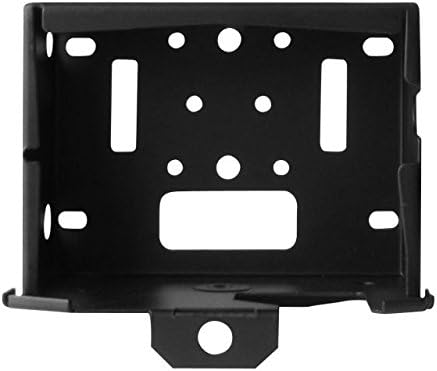
Figura 2: Frontal view de la caixa de seguretat S-SB-T. Aquesta imatge mostra clarament el forat central per a un cadenat i les obertures laterals dissenyades per a un cable de bloqueig, il·lustrant els diversos punts de seguretat.
4. Funcionament
La caixa de seguretat S-SB-T està dissenyada per facilitar l'accés a la càmera i mantenir la seguretat. Per accedir a la càmera per canviar la bateria, recuperar la targeta SD o ajustar la configuració:
- Desbloquejar: Si feu servir un cadenat o un cable de bloqueig, desbloquegeu-lo i traieu-lo de la caixa de seguretat.
- Treure el panell frontal: Traieu amb cura el panell frontal de la caixa de seguretat. Això proporciona accés complet a la càmera sense haver de treure tota la caixa de la seva ubicació muntada.
- Realitzar tasques de la càmera: Un cop retirat el panell frontal, podeu recuperar fàcilment imatges, canviar les piles o ajustar la configuració de la càmera.
- Torna a assegurar: Després de completar les tasques, torneu a col·locar el panell frontal i activeu els bloquejos de seguretat per garantir que la càmera romangui protegida.
5. Manteniment
- Neteja: Netegeu periòdicament l'exterior de la caixa de seguretat amb anuncis.amp drap per eliminar la brutícia, la pols o les restes. Eviteu productes de neteja abrasius que puguin danyar l'acabat.
- Inspecció: Inspeccioneu regularment la caixa de seguretat per detectar qualsevol signe de desgast, danys o corrosió, especialment si està exposada a condicions meteorològiques adverses. Assegureu-vos que tots els mecanismes de bloqueig funcionin correctament.
- Prevenció de l'òxid: Tot i que està fet d'acer, l'exposició prolongada a la humitat pot provocar oxidació. Penseu en aplicar un esprai inhibidor d'òxid a l'exterior si la caixa es troba en un ambient particularment humit, assegurant-vos de no ruixar a les obertures de la càmera.
6. Solució De Problemes
6.1 Dificultat per obrir/tancar el panell frontal
- Comproveu si hi ha obstruccions: Assegureu-vos que no hi hagi restes ni objectes estranys que impedeixin que el panell llisqui o es tanqui correctament.
- Verifica la col·locació de la càmera: Confirma que la càmera de joc estigui correctament col·locada dins la caixa i que no obstrueixi el moviment del panell.
- Inspeccionar per danys: Comproveu si el panell o el marc de la caixa estan doblegats o danyats, cosa que podria impedir un funcionament suau.
6.2 Els panys de seguretat no s'activen
- Cadenat: Assegureu-vos que el grilló del cadenat estigui correctament alineat amb el forat del panell frontal. Feu servir un cadenat amb un diàmetre de grilló adequat.
- Cable de bloqueig: Verifiqueu que el cable de bloqueig estigui enroscat pels dos forats laterals i que no estigui obstruït.
6.3 Formació d'òxid
- Neteja i tractament: Si apareix una petita oxidació, netegeu la zona afectada i apliqueu una imprimació o pintura inhibidora de l'òxid.
- Reubicar: Si és possible, considereu la possibilitat de traslladar la caixa de seguretat a un entorn més sec o proporcionar-li protecció addicional contra la pluja directa i la humitat.
7. Especificacions
| Característica | Detall |
|---|---|
| Número de model | S-SB-T |
| Marca | SPYPOINT |
| Material | Acer resistent |
| Color | Negre |
| Compatibilitat | Totes les càmeres SPYPOINT de 38 LED |
| Característiques de seguretat | Forat per a cadenat, Forats per a cable, Forats d'ancoratge posteriors |
| Accés | Panell frontal extraïble |
| Pes aproximat del paquet | 2 lliures |
8. Informació de la garantia
Els productes SPYPOINT es fabriquen amb estàndards d'alta qualitat. Per obtenir informació detallada sobre la cobertura de la garantia de la vostra caixa de seguretat d'acer S-SB-T, consulteu la pàgina oficial de SPYPOINT. weblloc web o contacteu directament amb el seu servei d'atenció al client. Els termes i condicions de la garantia poden variar segons la regió i el producte.
9. Suport
Si necessiteu més ajuda, teniu preguntes sobre la vostra caixa de seguretat d'acer SPYPOINT S-SB-T o necessiteu assistència tècnica, visiteu el lloc web oficial de SPYPOINT. weblloc:
SPYPOINT oficial Weblloc: Botiga SPYPOINT
També podeu trobar recursos útils, preguntes freqüents i informació de contacte a les seves pàgines d'assistència.