1. Introducció
The Mastech MS8232B is a compact, auto-ranging digital multimeter designed for measuring AC/DC voltage, AC/DC current, resistance, frequency, capacitance, and duty cycle. It features a 3 3/4 digit LCD display with 3999 counts, overload protection, a flashlight function, low voltage display, and automatic power-off for energy conservation. This manual provides essential information for safe and effective operation of the device.
2. Informació de seguretat
To ensure safe operation and avoid damage to the meter, observe the following safety precautions:
- Always ensure the test leads are in good condition and properly connected before making any measurements.
- No aplicar voltage o corrent que supera els límits màxims especificats per a cada rang.
- Aneu amb extrema precaució quan treballeu amb voltagsuperiors a 60 V CC o 30 V CA RMS, ja que representen un perill de descàrrega elèctrica.
- Abans de canviar les funcions, desconnecteu els cables de prova del circuit a prova.
- No feu funcionar el mesurador si sembla danyat o si la carcassa està oberta.
- Substituïu la bateria immediatament quan aparegui l'indicador de bateria baixa per garantir lectures precises.
- Complir els codis de seguretat locals i nacionals.
3. Producte acabatview
The Mastech MS8232B is a compact and versatile digital multimeter. Key features include a 4000-count display, non-contact voltage detection, and an integrated flashlight.

Figure 3.1: Mastech MS8232B Mini Digital Multimeter with test leads.
3.1 Components
- Pantalla LCD: Mostra lectures de mesura, unitats i indicadors de funció.
- Interruptor rotatiu: Used to select the desired measurement function.
- Botó FUNC: Toggles between different measurement modes within a single rotary switch position (e.g., AC/DC, Resistance/Continuity/Diode).
- Botó de la llanterna: Activa la llanterna integrada.
- Botó Hz%: Toggles between frequency and duty cycle measurements.
- Preses d'entrada: For connecting test leads.
- Vol. Sense contactetage (NCV) Sensor: Detecta AC voltagi sense contacte directe.

Figure 3.2: Close-up of the rotary switch and function buttons, including FUNC, Flashlight, and Hz%.

Figure 3.3: The multimeter's LCD display showing a measurement.
4. Configuració
4.1 Instal·lació de la bateria
The MS8232B is powered by batteries. To install or replace batteries:
- Assegureu-vos que el multímetre estigui APAGAT.
- Localitzeu la tapa del compartiment de la bateria a la part posterior de la unitat.
- Use a screwdriver to remove the screw(s) securing the cover.
- Carefully remove the old batteries (if any) and insert new ones, observing the correct polarity (+ and -).
- Torneu a col·locar la tapa del compartiment de la bateria i fixeu-la amb el(s) cargol(s).
4.2 Connexió dels cables de prova
Connect the red test lead to the 'VΩHz%CAP' input jack and the black test lead to the 'COM' input jack for most voltage, resistance, frequency, and capacitance measurements. For current measurements, refer to the specific current measurement section.
5. Instruccions de funcionament
Always ensure the correct function is selected and test leads are properly connected before making any measurement.
5.1 DC Voltage (DCV) Measurement
- Set the rotary switch to the 'VΩHz%' position.
- Press the 'FUNC' button until 'DC' is indicated on the display.
- Connecteu el cable de prova vermell al costat positiu del circuit i el cable de prova negre al costat negatiu.
- Llegeix el voltage valor a la pantalla LCD.
5.2 AC Voltage (ACV) Measurement
- Set the rotary switch to the 'VΩHz%' position.
- Press the 'FUNC' button until 'AC' is indicated on the display.
- Connecteu els cables de prova a través del voltatge de CAtage font.
- Llegeix el voltage valor a la pantalla LCD.
5.3 DC Current (DCA) Measurement
- Set the rotary switch to the 'μA' or 'mA' position, depending on the expected current range.
- Press the 'FUNC' button until 'DC' is indicated on the display.
- Disconnect power to the circuit. Break the circuit and connect the multimeter in series. The red lead connects to the higher potential side, and the black lead to the lower potential side.
- Apliqueu alimentació al circuit i llegiu el valor del corrent.
5.4 AC Current (ACA) Measurement
- Set the rotary switch to the 'μA' or 'mA' position, depending on the expected current range.
- Press the 'FUNC' button until 'AC' is indicated on the display.
- Disconnect power to the circuit. Break the circuit and connect the multimeter in series.
- Apliqueu alimentació al circuit i llegiu el valor del corrent.
5.5 Mesura de la Resistència
- Set the rotary switch to the 'Ω' position.
- Assegureu-vos que el circuit que s'està provant estigui desenergitzat.
- Connecteu els cables de prova a través del component per mesurar-ne la resistència.
- Llegiu el valor de la resistència a la pantalla LCD.
5.6 Frequency (Hz) and Duty Cycle (%) Measurement
- Set the rotary switch to the 'VΩHz%' position.
- Press the 'Hz%' button to cycle between Frequency and Duty Cycle modes.
- Connecteu els cables de prova a la font de senyal.
- Read the frequency or duty cycle value on the LCD display.
5.7 Mesura de la capacitat
- Set the rotary switch to the 'CAP' position.
- Assegureu-vos que el condensador estigui completament descarregat abans de connectar els cables de prova.
- Connecteu els cables de prova als terminals del condensador.
- Llegiu el valor de la capacitat a la pantalla LCD.
5.8 Funció de llanterna
The multimeter includes a built-in flashlight for illuminating dark work areas.
- Press the flashlight button (labeled with a light bulb icon) to turn the flashlight ON.
- Press the button again to turn the flashlight OFF.

Figure 5.1: The integrated flashlight on the Mastech MS8232B.
5.9 Vol. sense contactetage (NCV) Detecció
La funció NCV permet la detecció del volum de CAtage sense contacte directe amb els conductors.
- Set the rotary switch to the 'NCV' position (often integrated with other functions or a dedicated position).
- Bring the top front part of the multimeter (where the NCV sensor is located) close to the conductor.
- El mesurador indicarà la presència de voltatge de CAtage mitjançant un bip audible i/o un indicador visual.
5.10 Apagat automàtic
The multimeter features an automatic power-off function to conserve battery life. If no operation is performed for approximately 15 minutes, the meter will automatically shut down. To reactivate, turn the rotary switch to OFF and then back to the desired function, or press any button.
6. Manteniment
6.1 Neteja
Netegeu el cas amb l'anunciamp drap i detergent suau. No utilitzeu abrasius ni dissolvents. Mantingueu els terminals d'entrada lliures de brutícia i humitat.
6.2 Substitució de la bateria
Refer to Section 4.1 for battery replacement instructions. Always use the specified battery type.
6.3 Emmagatzematge
If the meter is not to be used for an extended period, remove the batteries to prevent leakage and damage to the unit. Store the meter in a cool, dry place away from direct sunlight.
7. Solució De Problemes
| Problema | Causa possible | Solució |
|---|---|---|
| El comptador no s'encén | Bateries gastades o mal instal·lades | Comproveu la polaritat de la bateria o substituïu les bateries. |
| Es mostra "OL" (sobrecàrrega) | Input value exceeds selected range or meter's maximum capacity | Select a higher range (if available) or ensure the input is within the meter's specifications. |
| Lectures inexactes | Low battery, incorrect function selected, or poor test lead connection | Replace batteries, verify function selection, ensure leads are securely connected. |
| No NCV detection | Sense AC voltage present, or sensor not close enough to source | Verify AC voltage presence with direct contact method if safe, move sensor closer. |
8. Especificacions
The Mastech MS8232B offers the following technical specifications:
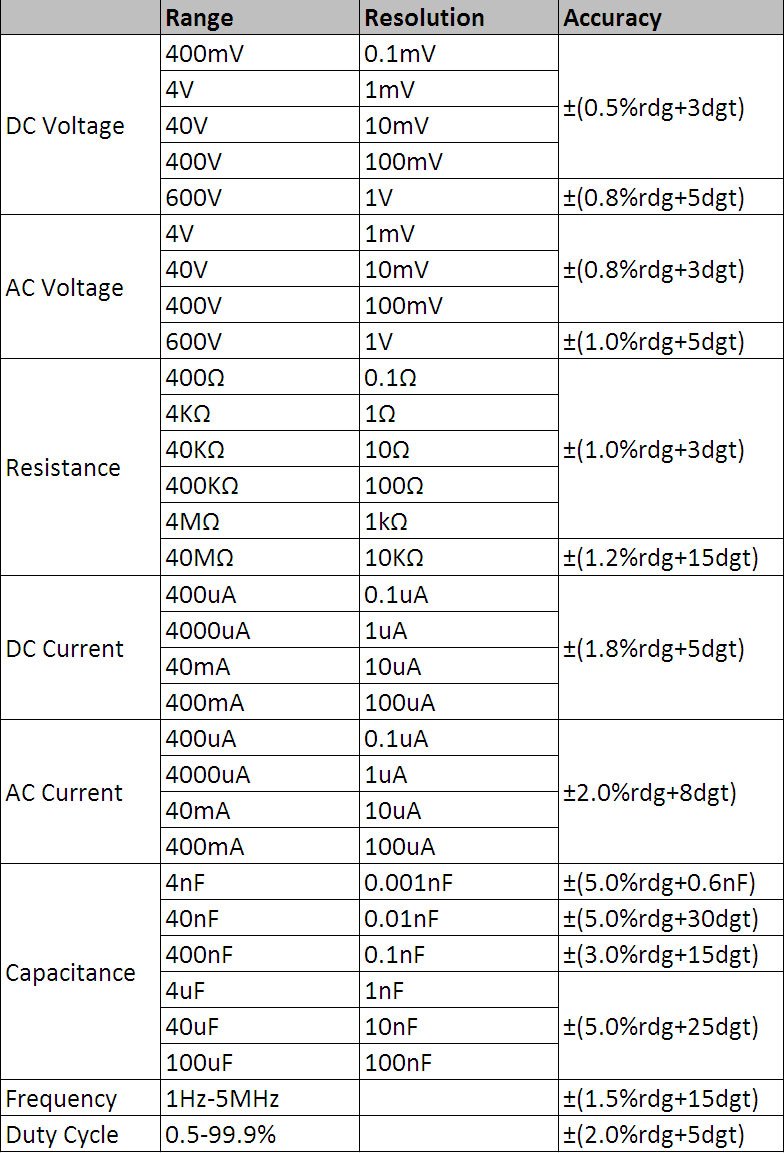
Figure 8.1: Detailed technical specifications table.
Especificacions generals:
- Visualització: 3 3/4 digits LCD, 3999 Counts
- Protecció de sobrecàrrega: Full range protection
- Volum baixtage Visualització: Sí
- Apagat automàtic: Sí
- Funció de llanterna: Sí
- Font d'alimentació: Funciona amb bateria
- Normes de seguretat: UL 61010-1, IEC 61010-1
Intervals de mesura i precisió:
- DC Voltage (DCV): 400mV / 4V / 40V / 400V / 600V (±0.5% + 3 digits)
- Vol. ACtage (ACV): 4V / 40V / 400V / 600V (±0.8% + 3 digits)
- DC Current (DCA): 400μA / 4000μA / 40mA / 400mA (±1.8% + 5 digits)
- AC Current (ACA): 400μA / 4000μA / 40mA / 400mA (±2.0% + 8 digits)
- Resistència: 400Ω / 4KΩ / 40KΩ / 400KΩ / 4MΩ / 40MΩ (±1.0% + 3 digits)
- Freqüència: 1Hz - 5MHz (±1.5% + 15 digits)
- Capacitat: 4nF / 40nF / 400nF / 4μF / 40μF / 100μF (±5.0% + 6 digits)
- Cicle de treball: 0.5% - 99.9% (±2.0% + 5 digits)
9. Garantia i Suport
Specific warranty information for the Mastech MS8232B Mini Digital Multimeter is not provided in the product data. For warranty claims or technical support, please contact your retailer or the manufacturer directly. Retain your proof of purchase for any warranty-related inquiries.