1. Introducció
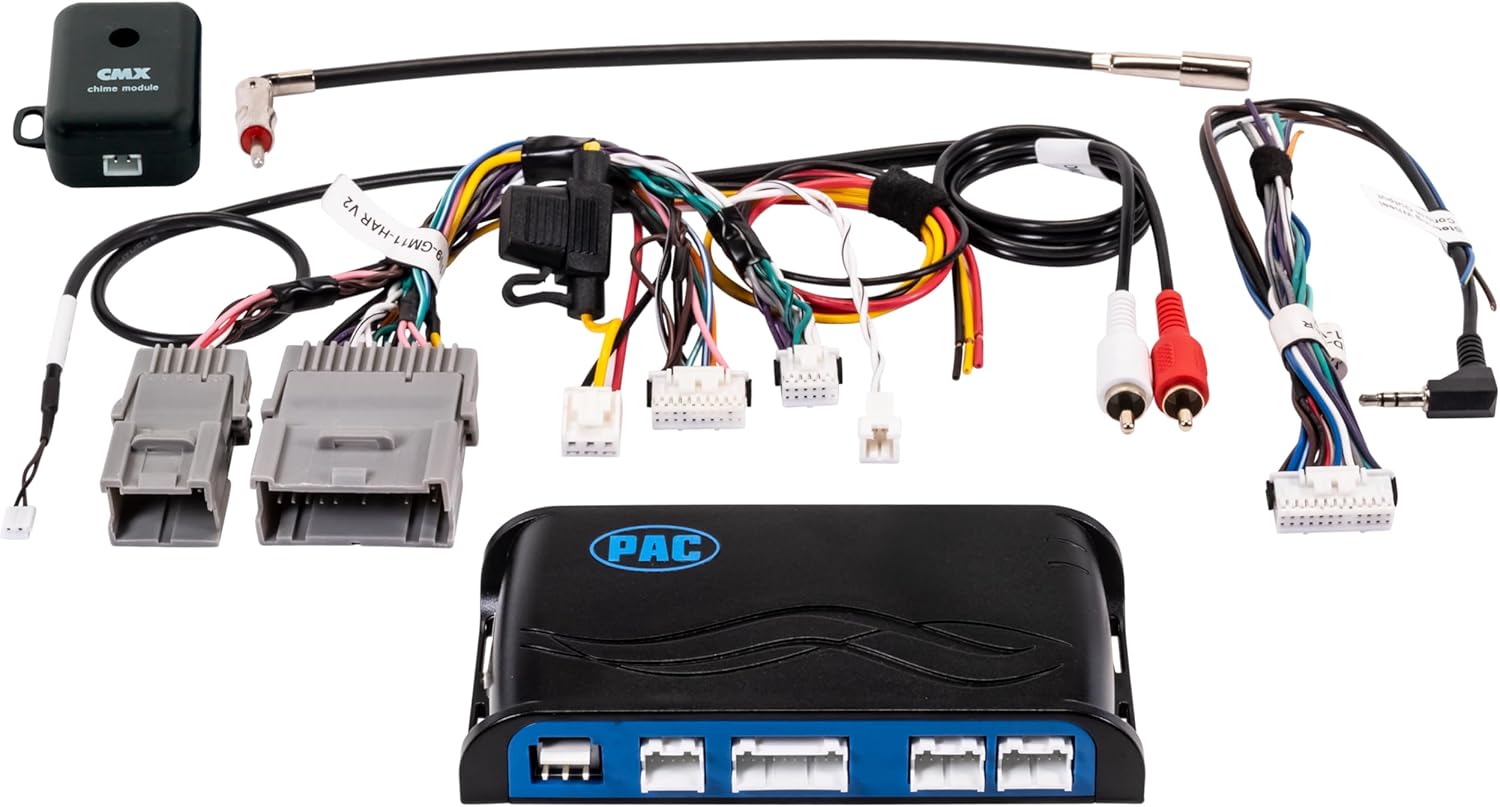
The PAC RP5-GM11 Radio Replacement Interface is designed to facilitate the installation of an aftermarket radio in select General Motors (GM) Class II vehicles. This interface retains essential factory features such as OnStar, steering wheel controls, and provides navigation outputs, ensuring seamless integration with your vehicle's existing systems. It is compatible with non-amplified audio systems and also supports factory BOSE audio systems.
This manual provides detailed instructions for the proper installation, setup, and operation of your RP5-GM11 interface.
2. Contingut del paquet
Verifiqueu que hi hagi tots els elements abans de començar la instal·lació:
- PAC RP5-GM11 Interface Module
- Arnesos de cablejat específics per a vehicles
- Mòdul de timbres
- Manual d'instruccions (aquest document)
3. Compatibilitat del vehicle
The RP5-GM11 interface is compatible with a wide range of General Motors Class II vehicles. Please refer to the following tables to confirm your vehicle's compatibility. This interface is designed for vehicles with non-amplified audio systems and also supports factory BOSE audio systems.
Nota: The RP5-GM11 does not retain climate control steering wheel controls. It supports dual zone audio functions.

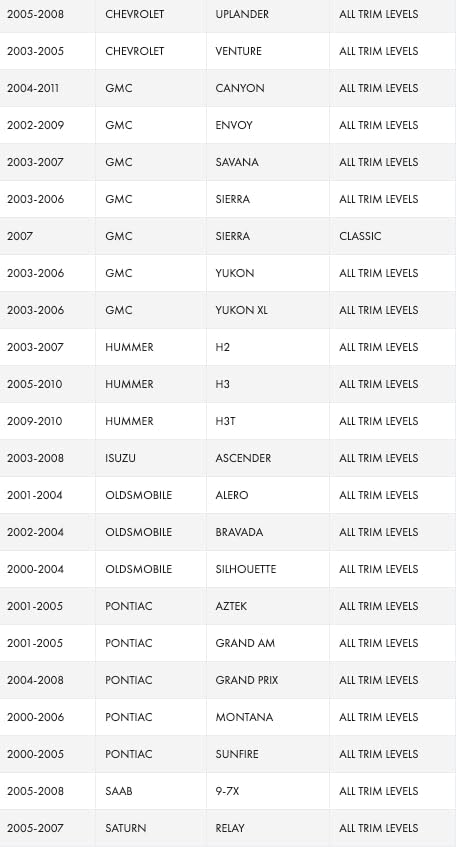
For a complete and up-to-date compatibility list, please consult the official PAC website or the detailed application guide provided with your product.
4. Configuració i instal·lació
Proper installation is crucial for the correct functioning of the RP5-GM11 interface. It is recommended that installation be performed by a qualified professional.
4.1. Passos previs a la instal·lació
- Desconnecta la bateria: Abans de començar qualsevol treball elèctric, desconnecteu el terminal negatiu de la bateria del vehicle per evitar curtcircuits.
- Treure la ràdio de fàbrica: Carefully remove the factory radio from the dashboard.
- Identificar el cablejat: Familiarize yourself with the vehicle's factory wiring and the wiring of your new aftermarket radio.
4.2. Configuració del commutador DIP
The RP5-GM11 module features DIP switches that must be configured according to your aftermarket radio's brand. Set the corresponding DIP switches to the ON position. All other DIP switches should remain in the OFF position.

Configuració del commutador DIP:
- Alpine: DIP 1 ON
- JVC: DIP 2 ON
- Kenwood / Lightning Audio: DIP 1 & 2 ON
- Stinger: DIP 3 ON
- Clarion / Nakamichi: DIP 3 ON
- Pioner: DIP 1, 2, & 3 ON
- Sony: DIP 4 ON
- Fusió: DIP 1 & 4 ON
- All Other Brands: DIP 1, 2, & 3 ON
If your radio brand is not listed, use the "All Other Brands" setting.
4.3. Connexions de cablejat
Connect the RP5-GM11 wiring harness to your aftermarket radio's harness according to the color codes and functions. Ensure all connections are secure, either by soldering and heat-shrinking or using high-quality crimp connectors.
- Match speaker wires (Front Left, Front Right, Rear Left, Rear Right).
- Connect power (constant 12V, accessory 12V, ground).
- Connect navigation outputs (Reverse, Parking Brake, Vehicle Speed Sense) to your aftermarket radio if it supports these features.
- Connect the 3.5mm steering wheel control output from the RP5-GM11 to the steering wheel control input of your aftermarket radio.
- Connect the OnStar retention harness.
- Connect the chime module. Adjust chime volume as needed.
Refer to the detailed wiring diagram included with your RP5-GM11 package for specific wire colors and functions.
5. Funcionament
Once installed, the RP5-GM11 interface allows your aftermarket radio to function while retaining key factory features.
5.1. Comandaments al volant (SWC)
The interface retains the functionality of your factory steering wheel audio controls. These controls will operate your aftermarket radio. If your aftermarket radio has a programmable SWC input, you may need to program the buttons after installation. Refer to your aftermarket radio's manual for programming instructions.
Nota: Climate control steering wheel functions are not retained by this interface.
5.2. OnStar Retention
The RP5-GM11 retains your vehicle's OnStar system. When OnStar is active, the audio will mute, and the OnStar audio will play through the vehicle's speakers.
5.3. Navigation Outputs
The interface provides dedicated outputs for Reverse, Parking Brake, and Vehicle Speed Sense. These outputs are essential for the proper functioning of aftermarket navigation systems, allowing features like accurate GPS tracking and camera activation.
5.4. Factory Bluetooth Retention
For 2009 and newer model vehicles, the RP5-GM11 retains factory Bluetooth functionality.
5.5. Rear Seat Audio Controls and BOSE Systems
The interface retains rear seat audio controls and is compatible with factory BOSE audio systems, ensuring continued functionality of these features.
6. Manteniment
The PAC RP5-GM11 interface is designed for maintenance-free operation. No user-serviceable parts are inside the module. Ensure all wiring connections remain secure and free from corrosion. If the module requires cleaning, use a dry, soft cloth. Do not use liquid cleaners or solvents.
7. Solució De Problemes
If you experience issues with your RP5-GM11 interface, consult the following troubleshooting guide:
| Problema | Causa possible | Solució |
|---|---|---|
| No audio from aftermarket radio. |
|
|
| Els comandaments del volant no funcionen. |
|
|
| OnStar audio not heard or distorted. |
|
|
| No navigation outputs (Reverse, Parking Brake, VSS). |
|
|
| Speaker hiss or noise. |
|
|
If problems persist after consulting this guide, contact PAC technical support for further assistance.
8. Especificacions
| Característica | Detall |
|---|---|
| Número de model | RP5GM11 |
| Marca | PAC |
| Fabricant | AAMP d'Amèrica |
| Pes de l'article | 0.96 unces |
| Dimensions del producte | 9 x 9 x 2 polzades |
| Característiques especials | Lightweight design, OnStar retention, Steering Wheel Control retention, Navigation outputs. |
| Compatibilitat | Select GM Class II Vehicles (2000-2013, see compatibility list). Compatible with non-amplified and factory BOSE audio systems. |
| Bluetooth Retention | Retains factory Bluetooth for 2009+ model vehicles. |
| Àudio del seient posterior | Retains rear seat audio controls. |
| Climate Control SWC | Does not retain climate control steering wheel controls. |
9. Informació de la garantia
PAC products are designed and manufactured to the highest quality standards. For specific warranty terms and conditions, please refer to the warranty card included with your product or visit the official PAC weblloc web. Conserveu el comprovant de compra per a reclamacions de garantia.
10. Suport tècnic
If you require further assistance with installation, setup, or troubleshooting, please contact PAC technical support. Contact information can typically be found on the PAC weblloc web o a l'embalatge del producte.


