1. Introducció
Thank you for choosing the Chieftec Libra Series LG-01B Mid-Tower ATX PC Case. This manual provides essential information for the proper installation, operation, and maintenance of your new computer chassis. Please read this manual thoroughly before beginning installation to ensure optimal performance and safety.
2. Informació de seguretat
Observeu sempre les precaucions de seguretat següents:
- Ensure the power supply is disconnected from the mains before opening the case or installing components.
- Handle components with care to avoid damage from electrostatic discharge (ESD). Consider using an anti-static wrist strap.
- Mantingueu les peces petites i les eines lluny dels nens.
- Do not operate the case in environments with excessive dust, moisture, or extreme temperatures.
- Refer to the manuals of your individual components (motherboard, power supply, etc.) for specific installation instructions.
3. Contingut del paquet
Verifiqueu que tots els elements siguin presents al paquet:
- Chieftec Libra Series LG-01B PC Case
- Accessory kit (screws, motherboard standoffs, thumb screws)
Note: Power supply unit (PSU) is not included and must be purchased separately.
4. Característiques clau
- Modern and ergonomic design
- Support for mATX and ATX motherboards
- Front panel connectivity: 1x USB 3.0, 2x USB 2.0, Mic-in, Audio-out (HD Audio)
- Tool-less installation for 5.25" optical drives and 3.5" hard drives
- Drive Bays: 2x 5.25" external, 1x 3.5" external, 2x 3.5" internal, 1x 2.5" internal
- Fan preparations: 1x 80/90/120mm (front), 2x 80mm (rear), 2x 120mm (left side panel)
- Alçada màxima del refrigerador de la CPU: 140 mm
- Maximum VGA card length: 380mm
5. Configuració i instal·lació
5.1. Obertura de la caixa
To access the interior, remove the side panel. Typically, this involves unscrewing two thumb screws at the rear of the case and sliding the panel backward.
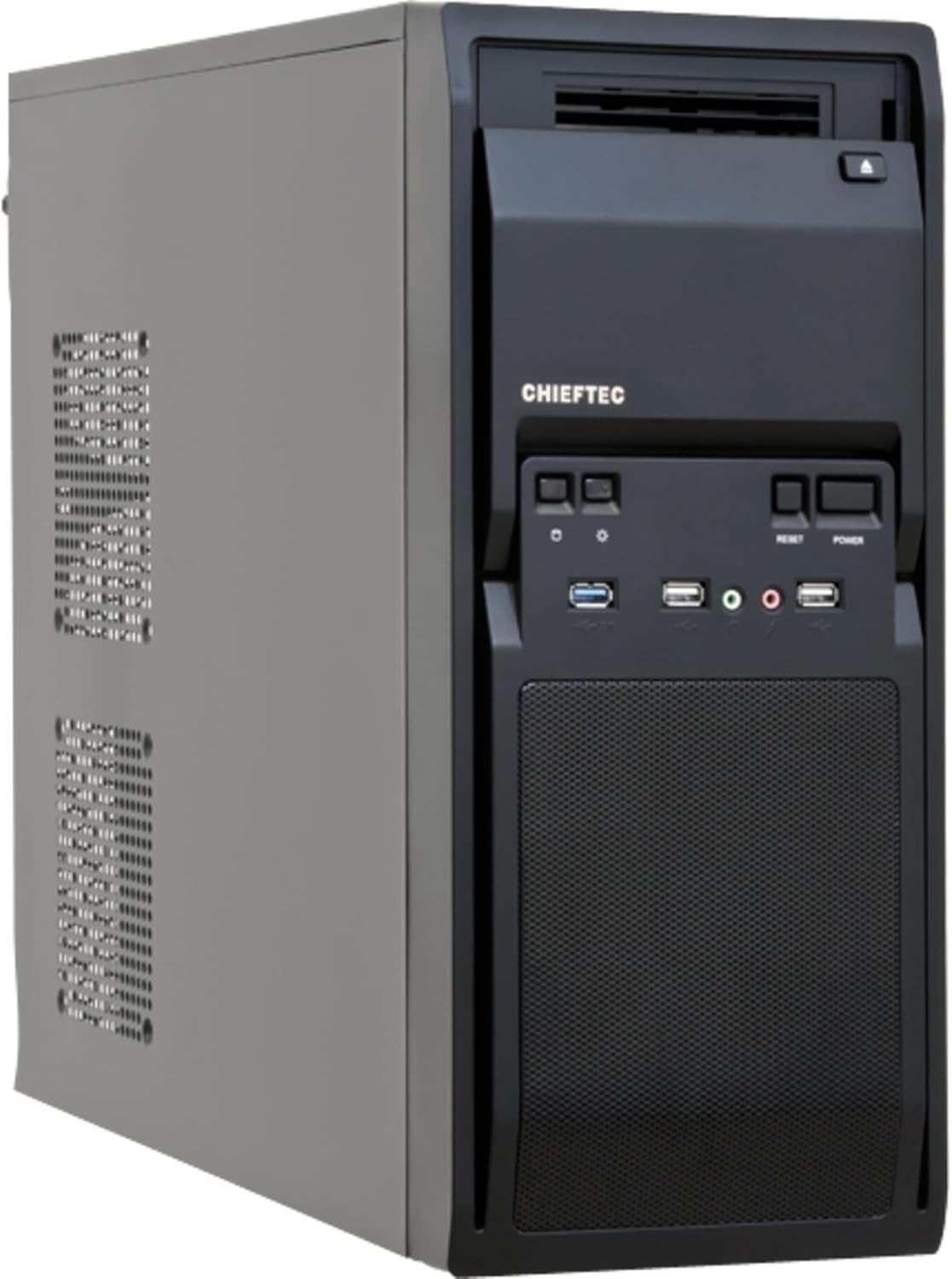
Figura 1: Frontal esquerre view of the Chieftec LG-01B PC case, showing the main chassis and front panel design. The side panel is secured by screws at the rear.
5.2. Instal·lació de la placa base
- Install the necessary motherboard standoffs into the motherboard tray according to your motherboard's form factor (ATX or mATX).
- Place the I/O shield into the opening at the rear of the case.
- Carefully align your motherboard with the standoffs and I/O shield, then secure it with screws.

Figura 2: Interior view of the Chieftec LG-01B PC case, showing the motherboard tray, drive bays with tool-less clips, and cable management cutouts. The rear I/O shield opening is visible.
5.3. Instal·lació de la font d'alimentació (PSU)
Install your ATX power supply into the designated bay at the top rear of the case and secure it with screws from the exterior.

Figura 3: posterior view of the Chieftec LG-01B PC case, highlighting the power supply mounting area at the top, expansion slots, and fan mounting points.
5.4. Drive Installation (ODD/HDD/SSD)
- 5.25" Optical Drives: Remove the front panel bay cover, slide the optical drive into the bay, and secure it using the tool-less clips.
- 3.5" Hard Drives: Slide the 3.5" HDD into an internal bay and secure it with the tool-less clips.
- SSD de 2.5 polzades: Install 2.5" SSDs into the dedicated internal 2.5" bay, typically requiring screws.

Figura 4: Frontal view of the Chieftec LG-01B PC case with the front panel cover for the I/O ports opened, revealing the 5.25" and 3.5" external drive bays. The USB and audio ports are also visible.
5.5. Connexions del panell frontal
Connect the front panel cables (USB 3.0, USB 2.0, HD Audio, Power, Reset, HDD LED, Power LED) to the corresponding headers on your motherboard. Refer to your motherboard manual for header locations.
5.6. Expansion Cards (GPU, etc.)
Remove the necessary expansion slot covers at the rear of the case. Insert your expansion card into the PCIe slot on the motherboard and secure it with a screw.
5.7. Gestió de cables
Utilize the cable routing cutouts and tie-down points behind the motherboard tray to manage cables for improved airflow and aesthetics.
6. Instruccions de funcionament
Once all components are installed and connected, close the side panel. Connect your monitor, keyboard, mouse, and power cable to the system. Press the power button on the front panel to start your computer.
6.1. Front Panel Ports
- Port USB 3.0: Per a la transferència de dades d'alta velocitat amb dispositius compatibles.
- Ports USB 2.0: Per connectar dispositius USB estàndard.
- Mic-in Jack: Per connectar un micròfon.
- Audio-out Jack: Per connectar auriculars o altaveus.
- Botó d'encesa: Per encendre/apagar el sistema.
- Botó de restabliment: Per reiniciar el sistema.
7. Manteniment
Un manteniment regular ajuda a garantir la longevitat i el rendiment òptim dels components del teu PC.
- Neteja de pols: Periodically clean dust from inside the case, especially from fan filters and heatsinks, using compressed air or a soft brush. Ensure the system is powered off and unplugged before cleaning.
- Gestió de cables: Ensure cables are neatly routed to prevent obstruction of airflow.
- Ventilació: Ensure the case has adequate clearance around its ventilation openings for proper airflow.
8. Solució De Problemes
Si teniu problemes, tingueu en compte els passos habituals següents per resoldre'ls:
- El sistema no s'encén:
- Check if the power cable is securely connected to the PSU and the wall outlet.
- Assegureu-vos que l'interruptor de la font d'alimentació estigui a la posició "ON".
- Verify that the front panel power button cable is correctly connected to the motherboard header.
- Sense sortida de pantalla:
- Ensure the monitor cable is securely connected to the graphics card or motherboard (if using integrated graphics).
- Torneu a col·locar els mòduls de la targeta gràfica i de la RAM.
- Ports USB que no funcionen:
- Check if the front panel USB cables are correctly connected to the motherboard headers.
- Ensure necessary drivers are installed for your motherboard.
For more complex issues, consult your component manuals or seek professional assistance.
9. Especificacions
| Model | LG-01B |
| Factor de forma | Torre mitja |
| Compatibilitat amb la placa base | ATX, mATX |
| Dimensions (LxWxH) | 484mm x 180mm x 404mm (with feet +3mm) / 19.06 x 7.09 x 15.91 inches |
| Pes | 4.5 kg / 9.9 lbs (without PSU) |
| Badies d'unitat externes | 2x 5.25", 1x 3.5" |
| Badies d'unitats internes | 2x 3.5", 1x 2.5" |
| Ports del panell frontal | 1x USB 3.0, 2x USB 2.0, Mic-in, Audio-out (HD Audio) |
| Fan Preparations | Front: 1x 80/90/120mm; Rear: 2x 80mm; Left Side: 2x 120mm |
| Alçada màxima del refrigerador de la CPU | 140 mm |
| Longitud màxima de la targeta VGA | 380 mm |
| Gruix del material | 0.6 mm |
10. Garantia i assistència
The Chieftec Libra Series LG-01B PC case comes with a 24-month warranty from the date of purchase. This warranty covers manufacturing defects. It does not cover damage caused by improper installation, misuse, accidents, modifications, or unauthorized repairs.
For technical support or warranty claims, please contact your retailer or visit the official Chieftec weblloc per obtenir informació de contacte.


