Introducció
This manual provides essential instructions for setting up and operating your VTech CS6709 Accessory Cordless Handset. This handset is designed to expand your existing VTech CS6719, CS6729, CS6829, or CS6859 Series Phone System. It features DECT 6.0 digital technology for clear communication, a speakerphone, caller ID, and call waiting capabilities.
Please read this manual thoroughly before using your new accessory handset to ensure proper installation and functionality.
Instruccions importants de seguretat
- Always follow basic safety precautions when using telephone equipment to reduce the risk of fire, electric shock, and injury.
- Llegeix i entén totes les instruccions.
- Do not use this product near water, such as a bathtub, washbowl, kitchen sink, or laundry tub, in a wet basement, or near a swimming pool.
- Avoid using the telephone during a thunderstorm. There may be a remote risk of electric shock from lightning.
- No utilitzeu el telèfon per informar d'una fuita de gas a les proximitats de la fuita.
- Use only the power cord and batteries indicated in this manual. Do not dispose of batteries in a fire. They may explode. Check with local codes for special disposal instructions.
Contingut del paquet
Your VTech CS6709 Accessory Cordless Handset package includes the following items:
- 1 x CS6709 Cordless Handset
- 1 x Handset Charger with Power Adapter
- 1 x Rechargeable Ni-MH Battery Pack
- 1 x Quick Start Guide (not included in this HTML manual)
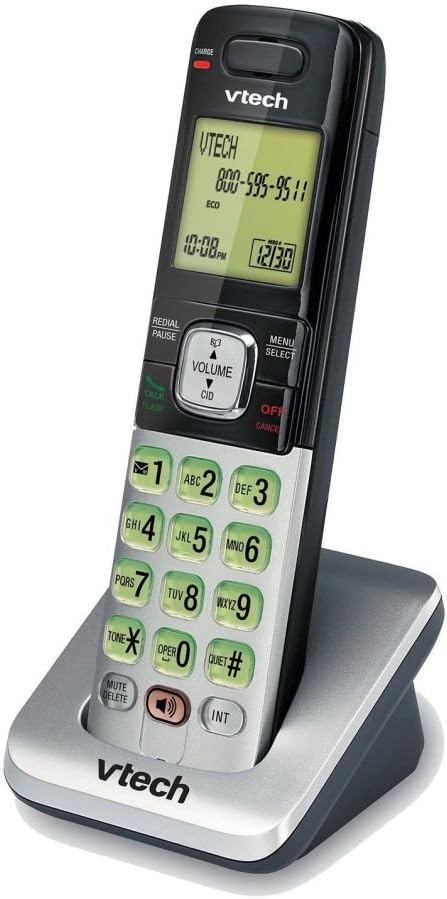
Image: VTech CS6709 Cordless Handset in its charging cradle. The handset is black and silver with a green backlit screen and keypad. The charging base is silver and black.
Configuració
1. Instal·lació de la bateria
- Obriu la tapa del compartiment de la bateria a la part posterior del telèfon.
- Connect the battery pack connector securely into the jack inside the compartment.
- Place the battery pack with the label UP and close the battery compartment cover.

Image: Close-up of the VTech CS6709 handset's rear, showing the battery compartment and how to insert the battery.
2. Connexió del carregador
- Plug the small end of the charger's power adapter into the power jack on the back of the handset charger.
- Connecteu l'extrem gran de l'adaptador de corrent a una presa de corrent estàndard.
3. Registre del telèfon
Your accessory handset must be registered to your VTech CS6719, CS6729, CS6829, or CS6859 Series Phone System base unit before use. Follow these steps:
- Place the accessory handset in the main base unit's charger (not the accessory charger).
- The handset will display "Registering..." or similar.
- If successful, the handset will display "Handset X Registered" (where X is the handset number).
- If registration fails, the handset will display "Registration Failed". Remove the handset from the base, wait a few seconds, and try again.
Nota: Refer to your main phone system's manual for specific instructions on placing the base unit into registration mode, if required.
4. Càrrec inicial
Once registered, place the handset in its charger for at least 11 hours to fully charge the battery before initial use. A fully charged battery ensures optimal performance and talk time.
Operating the Handset
Fer i respondre trucades
- To make a call: Press XERRADA / FLASHi, a continuació, marqueu el número.
- To answer a call: Press any dialing key (0-9, #, *) or XERRADA / FLASH.
- Per finalitzar una trucada: premeu OFF/CANCEL·LAR o col·loqueu el telèfon al carregador.
Ús de l’altaveu
To activate the speakerphone during a call, press the PONENT Premeu-lo de nou per tornar a l'auricular del microtelèfon.
Video: A brief product summary video demonstrating the VTech cordless phone features, including the speakerphone function.
Identificació de trucades i trucada en espera
- The handset's display will show the caller's name and number if you subscribe to Caller ID service.
- If you subscribe to Call Waiting service, you will hear a tone when another call comes in. Press FLASH per canviar entre trucades.
Phonebook/Directory
The handset can store up to 50 name and number entries in its directory. Use the MENÚ/SELECT button to access the directory and follow the on-screen prompts to add, edit, or delete entries.
Control de volum
Durant una trucada, premeu VOLUM to adjust the listening volume. Use the navigation keys to select the desired volume level.
Find Handset
If you misplace your accessory handset, press the TROBAR TELEFON button on the main base unit. The accessory handset will ring, allowing you to locate it.
Manteniment
- Neteja: Netegeu el telèfon i el carregador amb un drap suau iamp drap. No utilitzeu esprais de neteja ni productes químics agressius.
- Cura de la bateria: To prolong battery life, avoid overcharging by removing the handset from the charger once fully charged if not in active use for extended periods. If the handset will not be used for a long time, remove the battery.
- Emmagatzematge: Store the product in a cool, dry place away from extreme temperatures and direct sunlight.
Resolució de problemes
| Problema | Solució |
|---|---|
| Sense to de marcatge. | Ensure the main base unit is properly connected to the telephone line and power. Verify the accessory handset is registered to the base. |
| No es poden fer ni rebre trucades. | Check if the handset battery is charged. Ensure the handset is within range of the main base unit. Confirm the telephone line is active. |
| Handset displays "Registration Failed". | Remove the handset from the charger, wait a few seconds, and place it back in the main base unit's charger to re-attempt registration. |
| Mala qualitat d'àudio o estàtica. | Move closer to the main base unit. Ensure no other electronic devices are causing interference. Check the telephone line connection. |
| La bateria no es carrega. | Ensure the charger is properly connected to power. Verify the battery is correctly installed in the handset. The battery may need replacement if it's old. |
Especificacions
- Model: CS6709
- Tecnologia: DECT 6.0 Digital
- Dimensions: 4.4 x 6.9 x 2.3 polzades
- Pes de l'article: 10.2 unces (0.64 lliures)
- Bateria: 1 bateria recarregable específica del producte (inclosa)
- Color: Plata/Negre
- Material: Plàstic
- Sistemes compatibles: VTech CS6719, CS6729, CS6829, or CS6859 Series Phone System
- Característiques: Caller ID/Call Waiting, Speakerphone, 50-name/number directory, Backlit keypad and display, Trilingual prompts (English, Spanish, French).
Garantia i Suport
For warranty information, technical support, or to purchase replacement parts, please refer to the documentation included with your main VTech phone system or visit the official VTech weblloc web. Conserveu el rebut de compra com a comprovant de compra.


