1. Introducció
This manual provides comprehensive instructions for the installation, configuration, operation, and maintenance of your D-Link DGS-1210-08P Smart Switch. The DGS-1210 series represents the third generation of D-Link Web Smart Switches, designed to integrate advanced security and management functions for optimal application performance and modularity. Its innovative fanless design ensures silent operation and extended durability, making the DGS-1210 an efficient and cost-effective solution for small and medium-sized businesses (SMBs).
2. Producte acabatview
2.1 Característiques clau
- Features 8 Power over Ethernet (PoE) ports.
- These PoE ports provide up to 15.4 W per port.
- Offers the flexibility to connect 802.3af compatible devices, such as network cameras and IP phones.
- Includes 2 Gigabit SFP ports for fiber optic connections.
- Web-managed interface for advanced configuration.
2.2 Contingut del paquet
- D-Link DGS-1210-08P Smart Switch Unit
- Adaptador d'alimentació
- Kit de muntatge en bastidor (si escau)
2.3 Producte Views
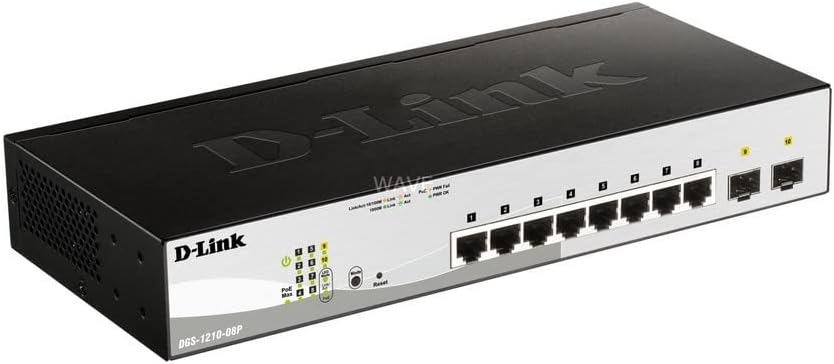
Figura 1: Angle view of the D-Link DGS-1210-08P Smart Switch, showcasinel seu disseny compacte i la disposició dels ports.

Figura 2: Frontal view of the D-Link DGS-1210-08P Smart Switch, highlighting the 8 Gigabit Ethernet ports and 2 SFP ports, along with LED indicators.

Figura 3: posterior view of the D-Link DGS-1210-08P Smart Switch, showing the power input and grounding screw.

Figure 4: D-Link DGS-1210-08P Smart Switch with key dimensions indicated: 28 cm length, 12.6 cm width, and 4.4 cm height.
3. Configuració
3.1 Instal·lació física
- Col·locació: Position the switch on a flat, stable surface or mount it in a standard 19-inch equipment rack using the provided rackmount kit. Ensure adequate ventilation around the unit.
- Medi ambient: Avoid placing the switch in direct sunlight, near heat sources, or in areas with high humidity or dust.
3.2 Connexió d'alimentació
- Connecteu l'adaptador d'alimentació al port d'entrada d'alimentació del panell posterior del commutador.
- Connecteu l'altre extrem de l'adaptador d'alimentació a una presa de corrent adequada.
- Verifiqueu que el LED d'alimentació del panell frontal s'il·lumina, indicant que l'interruptor rep alimentació.
3.3 Connexió de xarxa
- Connect your network devices (computers, servers, network cameras, IP phones) to the RJ45 Ethernet ports (1-8) on the front panel using standard Ethernet cables.
- For fiber optic connections, insert SFP transceivers into the SFP ports (9-10) and connect fiber optic cables.
- For PoE-powered devices, connect them to any of the 8 PoE-enabled ports. The switch will automatically detect and provide power to compatible devices.
3.4 Configuració inicial
The DGS-1210-08P is a managed switch, allowing for advanced configuration via a web-based graphical user interface (GUI). Refer to the detailed D-Link documentation for specific instructions on accessing and configuring the web interface, including default IP addresses and login credentials.
4. Instruccions de funcionament
4.1 Funcionalitat d'alimentació a través d'Ethernet (PoE)
The switch's 8 PoE ports automatically detect and supply power to IEEE 802.3af compliant devices. This eliminates the need for separate power cables for devices like IP cameras or VoIP phones, simplifying deployment and reducing cable clutter.
4.2 Transferència de dades
The Gigabit Ethernet ports support high-speed data transfer up to 1000 Mbps, while the SFP ports provide flexible uplink options. The switch operates automatically to forward data packets between connected devices.
5. Manteniment
5.1 Neteja
Netegeu regularment l'exterior de l'interruptor amb un drap suau i sec. No utilitzeu netejadors líquids ni en aerosol. Assegureu-vos que les obertures de ventilació estiguin lliures de pols i obstruccions.
5.2 actualitzacions de microprogramari
Comproveu periòdicament el suport de D-Link website for firmware updates. Keeping the switch's firmware up-to-date ensures optimal performance, security, and access to new features.
6. Solució De Problemes
6.1 Problemes d'energia
- If the Power LED is off, ensure the power adapter is securely connected to both the switch and a working power outlet.
- Proveu la presa de corrent amb un altre dispositiu per confirmar que funciona.
6.2 Problemes de connectivitat
- Check that Ethernet cables are securely connected to both the switch and the network device.
- Verify that the Link/Act LED for the connected port is illuminated or blinking, indicating a valid connection and activity.
- Assegureu-vos que el dispositiu connectat estigui encès i configurat correctament.
6.3 Problemes de PoE
- Confirm that the connected device is IEEE 802.3af compliant.
- Check the PoE status LEDs on the switch for any error indications.
- Ensure the total power budget (65W) is not exceeded by all connected PoE devices.
7. Especificacions
| Dimensions del producte | 28L x 12.6W x 4.4H cm |
| Pes de l'article | 1.23 quilos |
| Voltage | 240 Volts |
| Housing Material Type | Plàstic |
| Maximum Power (PoE Budget) | 65 watts |
| Tipus d'interfície | SFP, RJ45 |
| Velocitat de transferència de dades | 2000 megabits per segon |
| Corrent nominal | 2 Ampere |
| Fabricant | D-Link Mediterraneo S.r.l. |
| Marca | D-Link |
| Sèrie | DGS-1210-08P |
| Color | Negre |
| Número de model de l'article | DGS-1210-08P |
| Nombre de ports Ethernet | 8 |
| Wat totaltage | 97 watts |
| Tipus d'alimentació | Type F Connector (EU) |
| Components inclosos | Unitat de canvi |
8. Garantia i Suport
8.1 Informació de la garantia
This product originates from and is shipped within the European Economic Area (EEA). It is an original product from manufacturer-authorized distributors. For specific warranty terms and conditions, please refer to the warranty card included with your product or visit the official D-Link weblloc.
8.2 Suport tècnic
Per obtenir més ajuda, assistència tècnica o per descarregar els controladors i el firmware més recents, visiteu el lloc web oficial d'assistència de D-Link. weblloc: www.dlink.com/support.


