Producte acabatview
The Sagemcom Sixty Cordless Telephone and Answer Machine combines modern technology with a classic design. Its unique aesthetic, smooth finish, and touchscreen functionality make it a distinctive addition to any environment. Designed for user comfort, the Sixty offers a range of features including hands-free mode, extended battery life, and an intuitive interface for easy communication.
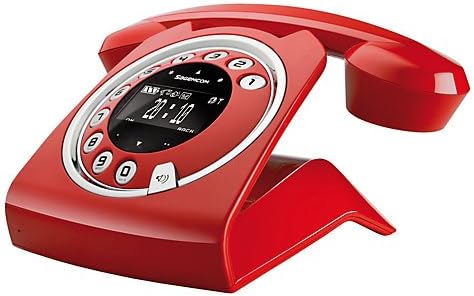
Image: The Sagemcom Sixty Cordless Telephone and Answer Machine in red, showcasing its unique retro-modern design with a circular dial and digital display.

Imatge: Lateral view of the Sagemcom Sixty Cordless Telephone, highlighting its sleek profile and the cradle design.
Guia de configuració
1. Desembalatge
Carefully remove all components from the packaging. Ensure you have the base unit, handset, power adapter, and telephone line cord.
2. Connexió de la unitat base
- Connect the power adapter to the 'DC IN' port on the back of the base unit and plug the other end into a wall outlet.
- Connect one end of the telephone line cord to the 'LINE' port on the base unit and the other end to your telephone wall jack.
3. Instal·lació i càrrega de la bateria
- Obriu el compartiment de la bateria del telèfon.
- Inseriu les piles recarregables subministrades, respectant la polaritat correcta (+ i -).
- Tanqueu el compartiment de la bateria.
- Place the handset on the base unit. The display will indicate charging. Allow the handset to charge for at least 16 hours before first use to ensure optimal battery performance.
Instruccions de funcionament
Fer i rebre trucades
- Per fer una trucada: Aixequeu el telèfon o premeu Truca button. Dial the number using the touchscreen keypad.
- Per rebre una trucada: Aixequeu el telèfon o premeu Truca botó quan sona el telèfon.
- Per finalitzar una trucada: Torneu a col·locar l'auricular a la unitat base o premeu la tecla Finalitzar la trucada botó.
Ús de la pantalla tàctil
The Sixty features a responsive touchscreen for navigation and input. Tap icons or numbers to select functions or dial. Swipe to scroll through lists or menus.
Mode mans lliures
Durant una trucada, premeu el botó Altaveu button to activate hands-free mode. Press it again to return to handset mode.
Gestió de l'agenda telefònica
- Afegir un contacte: Navigate to the Phonebook menu, select 'Add New Contact', enter the name and number using the touchscreen, and save. The phonebook can store up to 150 names.
- Cercant un contacte: Access the Phonebook and use the search function or scroll through the list.
- Editing/Deleting a Contact: Select the desired contact from the Phonebook and choose the 'Edit' or 'Delete' option.
Funcions del contestador automàtic
The integrated answering machine has a recording capacity of 10 minutes.
- Activació/Desactivació: Access the Answering Machine menu to turn it on or off.
- Reproducció de missatges: Select 'Play Messages' from the Answering Machine menu.
- Recording Outgoing Message: Follow the prompts in the Answering Machine menu to record a personalized outgoing message.
Manteniment
Neteja del telèfon
To clean the phone, wipe it with a soft, damp cloth. Do not use abrasive cleaners or solvents, as these can damage the surface. Ensure the phone is disconnected from power before cleaning.
Cura de la bateria
- Always use the supplied rechargeable batteries.
- Si no heu d'utilitzar el telèfon durant un període prolongat, traieu-ne les piles per evitar fuites.
- Eliminar les piles velles de manera responsable d'acord amb la normativa local.
Resolució de problemes
| Problema | Possible solució |
|---|---|
| Sense to de marcatge | Comproveu si el cable de la línia telefònica està connectat correctament tant a la unitat base com a la presa de paret. Assegureu-vos que l'adaptador de corrent estigui endollat. |
| El telèfon no es carrega | Ensure the handset is correctly placed on the base unit. Clean the charging contacts on both the handset and base unit with a dry cloth. Verify the power adapter is working. |
| Mala qualitat del so | Acosteu-vos a la unitat base. Comproveu si hi ha interferències d'altres dispositius electrònics. Assegureu-vos que el cable de la línia telefònica no estigui danyat. |
| La pantalla està en blanc | Check if the handset battery is charged. If not, place it on the base unit to charge. Ensure the power adapter is connected to the base unit. |
| No puc fer ni rebre trucades | Verify that the telephone line is active. Check all cable connections. Restart the base unit by unplugging and replugging the power adapter. |
Especificacions tècniques
| Característica | Especificació |
|---|---|
| Marca | Sagemcom |
| Model | Seixanta |
| Color | Vermell |
| Tipus de telèfon | Sense fils |
| Temps de conversa telefònica | Fins a 10 hores |
| Temps d'espera | Fins a 120 hores |
| Recording Capacity (Answering Machine) | 10 minuts |
| Capacitat de l'agenda | 150 Noms |
| ASIN | B00DX64LPI |
| Primera data disponible | 15 d'abril de 2014 |
Garantia i Suport
For warranty information and customer support, please refer to the documentation included with your purchase or visit the official Sagemcom weblloc web. Conserveu el comprovant de compra per a qualsevol reclamació de garantia.


