Introducció
This user manual provides detailed instructions for the setup, operation, maintenance, and troubleshooting of your Cisco CP-7921G-A-K9 Unified Wireless IP Phone. Designed for seamless integration into Cisco Unified Communications environments, this device offers robust wireless connectivity and advanced telephony features. Please read this manual thoroughly to ensure proper use and to maximize the functionality of your phone.
Configuració
Contingut del paquet
Abans de començar, comproveu que tots els elements estiguin presents al paquet:
- Cisco CP-7921G-A-K9 Unified Wireless IP Phone
- Charging Cradle (Desktop Charger)
- Adaptador de corrent alterna
- Paquet de bateries recarregables
Instal·lació de la bateria
Per instal·lar la bateria:
- Locate the battery compartment on the back of the phone.
- Align the battery pack with the compartment, ensuring the gold contacts on the battery match the contacts in the phone.
- Empenyeu suaument la bateria al seu lloc fins que faci clic de manera segura.
- Replace the battery compartment cover if applicable.
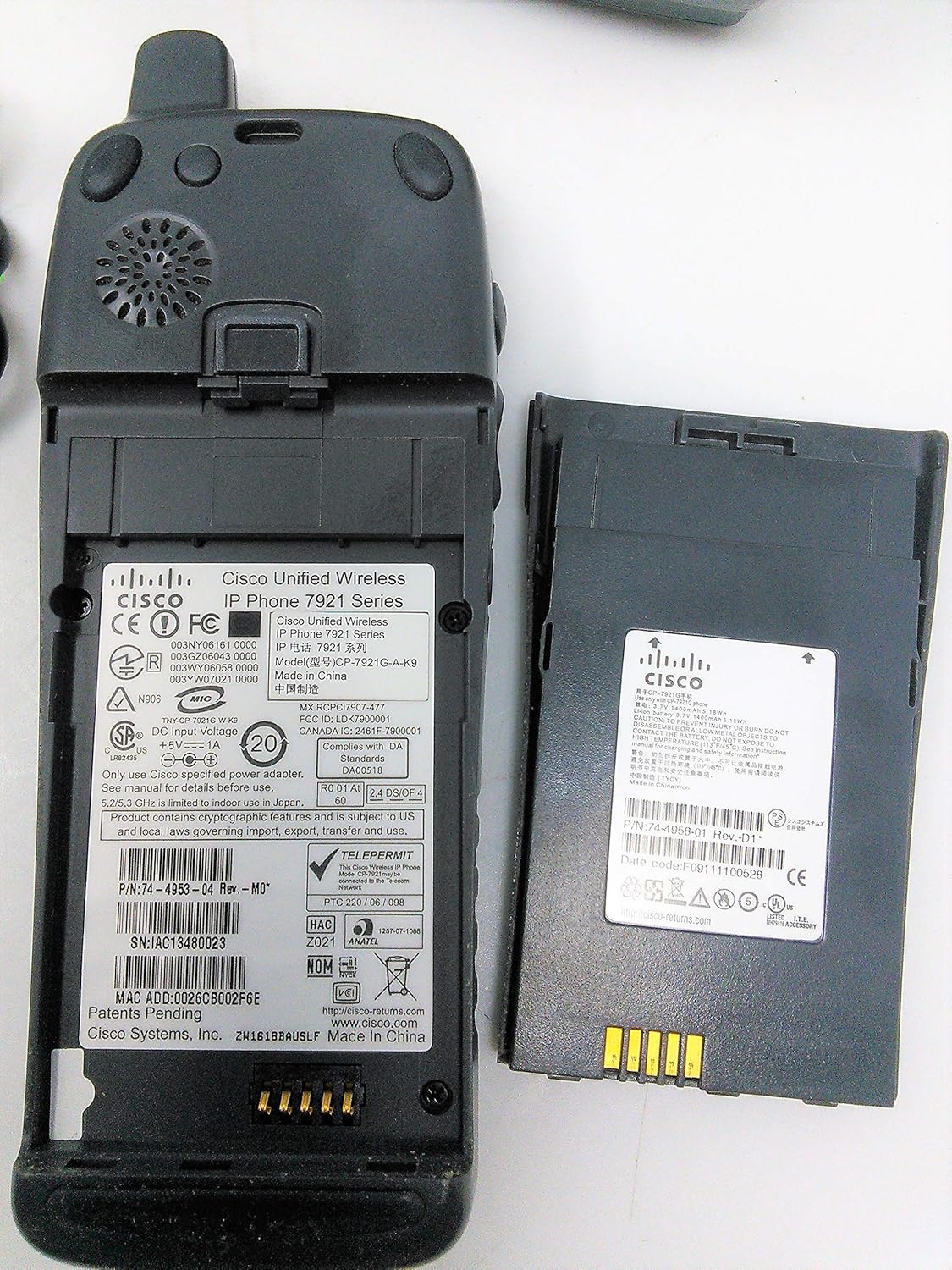
Imatge: Part posterior view of the Cisco CP-7921G-A-K9 phone, illustrating the battery compartment and various regulatory labels. The battery pack is shown separately, highlighting its contact points.
Carregant el telèfon
For initial use, fully charge the phone's battery. Place the phone in the charging cradle and connect the AC power adapter to the cradle and a power outlet.
- Connect the AC power adapter cable to the power input port on the back of the charging cradle.
- Connecteu l'adaptador de corrent altern a una presa de corrent estàndard.
- Place the Cisco CP-7921G-A-K9 phone into the charging slot of the cradle. Ensure it is seated correctly and the charging indicator (if present) illuminates.

Image: The Cisco CP-7921G-A-K9 wireless IP phone docked in its charging cradle, with the accompanying AC power adapter visible. This setup demonstrates the typical charging configuration.

Image: Components of the Cisco CP-7921G-A-K9 system, including the wireless IP phone, its charging cradle, and the power adapter, displayed individually to show all parts.

Image: The underside of the Cisco CP-7921G-A-K9 desktop charger, displaying its model number (CP-DSKCH-7921G), serial number, and various compliance and manufacturing details.
Engegada inicial i connexió de xarxa
Once charged, press and hold the Power button to turn on the phone. The phone will attempt to connect to a configured wireless network. If prompted, enter your network credentials (SSID and password) to establish a connection to your VoIP services.
Instruccions de funcionament
Funcions de trucada bàsiques
- Fer una trucada: Dial the desired number using the keypad and press the Truca botó.
- Respondre una trucada: Quan soni el telèfon, premeu la tecla Respon button or lift the phone from the cradle.
- Finalització d'una trucada: Premeu el botó Finalitzar la trucada button or place the phone back in the cradle.
Funcions avançades
- Manteniu: Durant una trucada activa, premeu Aguanta button to place the call on hold. Press again to resume.
- Transferència: To transfer a call, press the Transferència , marqueu el número nou i, a continuació, premeu el botó Transferència de nou.
- Conferència: To initiate a conference call, press the Conferència button during an active call, dial the third party, and then press Conferència de nou per unir-se a tots els partits.
- Silenciar: Premeu el botó Silenciar botó per silenciar el micròfon durant una trucada. Premeu-lo de nou per activar el so.
Accés a la bústia de veu
To access your voicemail, press the Missatges button and follow the voice prompts. You may need to enter your voicemail PIN.
Contacts/Directory
The phone supports a local directory and can integrate with corporate directories. Use the navigation buttons to access and search your contacts.
Manteniment
Neteja
To clean your phone and charging cradle, use a soft, lint-free cloth. For stubborn marks, slightly dampRenta el drap amb aigua. Evita utilitzar productes químics agressius, netejadors abrasius o ruixar líquids directament sobre el dispositiu.
Cura de la bateria
Per allargar la durada de la bateria:
- Eviteu exposar el telèfon a temperatures extremes.
- Carregueu completament la bateria abans del primer ús.
- If the phone will not be used for an extended period, store it with a partial charge (around 50%) and in a cool, dry place.
Actualitzacions de programari
Periodically, Cisco may release software updates to improve performance and add features. These updates are typically managed by your IT administrator. Consult your IT department for information on available updates and installation procedures.
Resolució de problemes
This section addresses common issues you might encounter with your Cisco CP-7921G-A-K9 IP Phone.
| Problema | Causa possible | Solució |
|---|---|---|
| El telèfon no s'encén. | Low or depleted battery; incorrect battery installation; power adapter issue. | Ensure battery is correctly installed and fully charged. Verify power adapter is securely connected to cradle and outlet. |
| Cannot connect to wireless network. | Incorrect Wi-Fi password; out of range; network issues. | Verify Wi-Fi password. Move closer to the wireless access point. Contact your IT administrator to check network status. |
| Sense to de marcatge. | No network connection; VoIP service issue. | Check network connection status on the phone. Contact your IT administrator or VoIP service provider. |
| Poor call quality (static, drops). | Senyal Wi-Fi feble; congestió de la xarxa. | Move to an area with better Wi-Fi signal strength. Report persistent issues to your IT administrator. |
| Phone not charging in cradle. | Improper seating in cradle; dirty contacts; faulty power adapter. | Ensure phone is correctly seated. Clean contacts on phone and cradle with a dry cloth. Test with another power adapter if available. |
Especificacions
Key technical specifications for the Cisco CP-7921G-A-K9 Unified Wireless IP Phone:
| Característica | Valor |
|---|---|
| Número de model | CP-7921G-A-K9 |
| Marca | Cisco |
| Dimensions del producte (L x A x A) | 11 x 8 x 5 polzades |
| Pes de l'article | 4 unces |
| Color | negre |
| Tipus de telèfon | Sense fils |
| Font d'alimentació | Elèctric amb cable |
| Tipus de contestador | Digital |
| Dispositius compatibles | Cisco Unified Communications family of products, VoIP services, wireless networks |
| Capacitat de trucades de conferència | avançat |
| Operació multilínia | Operació multilínia |
| Identificació de trucades | Sí |
| Fabricant | Cisco Systems, Inc. |
| Data de primera disponibilitat | 21 d'octubre de 2015 |
Garantia i Suport
This Cisco product is covered by a standard manufacturer's warranty. For specific warranty terms and conditions, please refer to the documentation provided with your purchase or visit the official Cisco weblloc.
For technical support, additional documentation, or service inquiries, please visit the Botiga Cisco a Amazon or the main Cisco support website. Your IT administrator is also a primary resource for support within your organization's network environment.


